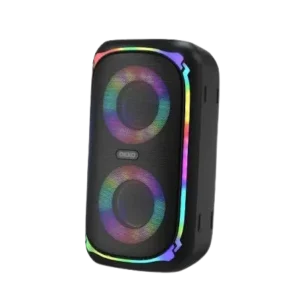
| Document Detail | Information |
| Document Type | User Guide |
| Brand Name | OKKO Sound |
| Product Name | Sonic Bass Speaker |
| PDF File Size | 0.62 MB |
| Number of Pages | 1 |
| Languages Covered | English |
OKKO Sound Sonic Bass Speaker
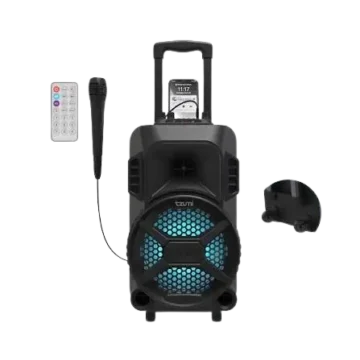
The OKKO Sound Sonic Bass Speaker is a portable Bluetooth 5.1 speaker designed for music playback, gatherings, outdoor use, and karaoke. It combines dual 5W speakers with colorful LED lighting, five media modes, a digital display, a pull-up handle with wheels, and an included wired microphone.
The speaker can play audio through Bluetooth, FM radio, USB, MicroSD, or a 3.5 mm AUX connection. Its rechargeable 5000 mAh battery provides up to 10 hours of playback on a full charge, while two Sonic Bass speakers can also be linked through the built-in TWS pairing function.
Main Features
The Sonic Bass User Guide lists the following product features:
- Dual 5W speakers with colorful LED lighting.
- Five media modes.
- Easy-to-read digital display.
- Up to 10 hours of playback on a full battery.
- Bluetooth 5.1 compatibility.
- Pull-up carrying handle.
- Built-in wheels for easier transport.
- Included wired microphone for karaoke use.
What’s Included
The package includes:
- Sonic Bass Speaker
- USB-C charging cable
- Wired microphone
- User Guide
Parts, Buttons, and Ports
The Product Overview & Functions diagram on page 1 identifies 13 controls, connections, and display elements.
| No. | Part or Control | Function |
| 1 | Power Button | Turns the speaker on and off |
| 2 | Mode Button | Changes between supported playback modes |
| 3 | Light Button | Controls the RGB lighting |
| 4 | Volume Control Knob | Adjusts speaker volume |
| 5 | Previous Track | Selects the previous track or saved FM station where applicable |
| 6 | Play/Pause | Controls playback and is also used for Bluetooth and FM functions |
| 7 | Next Track | Selects the next track or saved FM station where applicable |
| 8 | Digital Display | Shows speaker operating information |
| 9 | USB-C Charging Port | Used to recharge the speaker |
| 10 | AUX Port | Accepts a 3.5 mm AUX audio connection |
| 11 | USB Port | Accepts a USB storage device |
| 12 | Wired Microphone Port | Connection for the included wired microphone |
| 13 | MicroSD Port | Accepts a MicroSD card |
Technical Specifications
| Specification | Value |
| Input | 5V / 1A |
| Power | 10W |
| Bluetooth Version | 5.1 |
| Battery Capacity | 5000 mAh |
| Charging Time | Up to 6 hours |
| Playback Time | Up to 10 hours |
| Dimensions | 10 × 9.1 × 18.6 in. |
The feature section describes the sound system as two 5W speakers, while the specification section lists total power as 10W.
Charging the Sonic Bass Speaker
The Sonic Bass contains an internal rechargeable battery. The guide recommends fully charging the speaker before use.
How to Charge the Speaker
- The USB-C end of the supplied charging cable should be connected to the speaker’s charging port.
- The other end should be connected to a USB power source.
- During charging, the speaker’s LED indicator glows red.
- When the battery is fully charged, the LED indicator turns off.
Charging takes approximately 5–6 hours.
Low-Battery Warning
When the battery becomes low, the speaker produces a low-power alarm.
If the battery level becomes critically low, the speaker automatically shuts down.
How to Pair the Sonic Bass With Bluetooth
The Sonic Bass automatically enters Bluetooth pairing mode after it is switched on.
Bluetooth Pairing Instructions
- Bluetooth should be enabled on the phone, tablet, or other source device.
- The Power button should be pressed and held to turn the Sonic Bass on.
- The speaker automatically enters Bluetooth pairing mode.
- For initial pairing, the speaker and Bluetooth device should remain within approximately 3 feet of one another.
- The Bluetooth device list should be opened.
- “OKKO Sonic Bass” should be selected.
- Any prompts shown on the source device should be followed.
- After successful pairing, the speaker announces “Bluetooth Connected.”
Reconnecting a Previously Paired Device
After a successful first pairing, the speaker and source device remember each other. Normal re-pairing should therefore not be required each time they are used together.
Disconnecting a Bluetooth Device
To disconnect the currently paired device, the Play/Pause button should be pressed and held for approximately 3 seconds.
The speaker can then connect to another Bluetooth device by following the normal pairing procedure.
How to Play Music From a USB Drive
The Sonic Bass can play MP3 music stored on a USB storage device.
- MP3 files should be loaded onto a compatible USB drive.
- The USB drive should be inserted into the speaker’s USB port.
- The Sonic Bass automatically detects the drive and enters USB mode.
- Music stored on the USB drive begins playing automatically.
How to Play Music From a MicroSD Card
The MicroSD port can also be used for stored MP3 playback.
- MP3 music should be stored on a MicroSD card.
- The card should be inserted into the speaker’s MicroSD port.
- The Sonic Bass automatically enters MicroSD mode.
- Playback begins from the music stored on the card.
The speaker automatically detects either a USB drive or MicroSD card when it is inserted.
How to Use AUX Mode
The AUX connection allows the Sonic Bass to play audio from a device with a compatible AUX output.
AUX Connection Instructions
- One end of a 3.5 mm AUX cable should be inserted into the AUX port on the Sonic Bass.
- The opposite end should be connected to the AUX output on the phone, computer, or other source device.
- The speaker automatically detects the connection and enters AUX mode.
- The Play/Pause button can be used to play or pause the music.
How to Listen to FM Radio
The Sonic Bass includes an internal FM radio function and does not require an external antenna.
The documented FM frequency range is 87.5 MHz to 108.0 MHz.
Scan for FM Stations
- The Mode button should be pressed until the speaker enters FM mode.
- The Play/Pause button should be pressed and held.
- The Sonic Bass scans for available FM stations.
- Available stations are stored automatically.
Change Between Saved Stations
The Next and Previous buttons can be pressed to move through the saved FM stations.
Controlling the RGB Lights
The Sonic Bass includes colorful RGB speaker lighting.
Turn the Lights On
The Light button should be pressed to switch the RGB lights on.
Change the Lighting Mode
Pressing the Light button again cycles through the available lighting modes.
Turn the Lights Off
The Light button can be pressed and held at any time to switch the lighting off.
How to Connect Two Sonic Bass Speakers With TWS
Two Sonic Bass speakers can be paired with one another using the built-in TWS function.
TWS Pairing Instructions
- Two Sonic Bass speakers should be positioned near one another.
- The Power button should be pressed on both speakers.
- A voice prompt announces “TWS Pairing.”
- The speakers should be allowed to complete their connection.
- Once pairing is successful, a voice prompt announces “TWS Connected.”
Using the Wired Microphone
A wired microphone is included with the Sonic Bass.
The speaker’s product diagram identifies a dedicated Wired Microphone Port for the microphone connection. This allows the speaker to be used for karaoke and other supported microphone applications.
Playback and Media Modes
The Sonic Bass supports five primary media modes:
| Mode | Source |
| Bluetooth | Wireless Bluetooth device |
| FM Radio | Built-in FM receiver |
| USB | USB storage device containing MP3 files |
| MicroSD | MicroSD card containing MP3 files |
| AUX | Device connected through a 3.5 mm AUX cable |
The Mode button is used to move between applicable operating modes, while inserting certain media sources causes the speaker to detect them automatically.
Indicator and Voice Prompt Guide
| Indicator or Prompt | Meaning |
| Red charging LED | Internal battery is charging |
| Charging LED turns off | Battery has reached a full charge |
| Low-power alarm | Battery charge is low |
| Automatic shutdown | Battery has reached a critically low level |
| “Bluetooth Connected” | Bluetooth pairing completed successfully |
| “TWS Pairing” | Two Sonic Bass speakers are attempting to connect |
| “TWS Connected” | TWS connection between the two speakers is complete |
Important Safety Instructions
The Sonic Bass should be operated only for its intended purpose.
The guide provides the following safeguards:
- The speaker should be kept away from heat sources and direct sunlight.
- It should be protected from humidity, water, and other liquids.
- Extremely high or low temperatures should be avoided because they may damage the battery.
- The speaker should not be operated if it becomes wet or moist.
- The unit should not be used after being dropped or otherwise damaged.
- Electrical repairs should only be carried out by a qualified electrician.
- Improper repair work may create serious risks.
- The speaker should be kept out of the reach of children.
- The product is not a toy.
- Music should not be played at high volume for long periods.
Battery Disposal
The Sonic Bass contains a lithium-polymer battery.
The guide states that lithium-polymer batteries are environmentally safe when fully discharged. The speaker should not be discarded with ordinary household waste.
Instead, it should be taken to an appropriate:
- Hazardous-waste collection site.
- Recycling facility.
- Electronics retailer that accepts products for recycling.
Applicable local or state disposal requirements should be followed.
FCC Information
The manual states that the Sonic Bass complies with Part 15 of the FCC Rules and applicable Industry Canada license-exempt RSS standards.
Operation is subject to two conditions:
- The device may not cause harmful interference.
- The device must accept received interference, including interference that could cause undesired operation.
Unauthorized changes or modifications may void the user’s authority to operate the equipment.
The manual also identifies the product as a Class B digital device. If harmful radio or television interference occurs, the recommended corrective measures include:
- Reorienting or relocating the receiving antenna.
- Increasing the distance between the speaker and receiver.
- Connecting the affected equipment to outlets on different circuits.
- Consulting a dealer or experienced radio/TV technician.
Customer Support
The Sonic Bass User Guide provides Tzumi customer support for product questions and usage issues.
| Support Method | Contact Information |
| support@tzumi.com | |
| Phone | 1-855-GO-TZUMI |
Product and Distribution Information
The document identifies the product as the Sonic Bass Speaker and states that it is distributed by OKKO Inc.
The manual carries a © 2024 OKKO Inc. copyright notice and states that the product is made in China.
Frequently Asked Questions
How is the OKKO Sonic Bass paired with a phone?
The Sonic Bass should be switched on so that it enters Bluetooth pairing mode. Bluetooth should then be enabled on the phone, and “OKKO Sonic Bass” should be selected from the available devices. Successful connection is confirmed by the “Bluetooth Connected” voice prompt.
How long does the Sonic Bass battery last?
The manual lists up to 10 hours of playback on a full charge.
How long does the Sonic Bass take to charge?
Charging takes approximately 5–6 hours, while the specification section lists charging time as up to six hours.
What does the red light mean on the Sonic Bass?
A red LED while connected to power means the internal battery is charging. The light switches off when charging is complete.
Can the Sonic Bass play music from a USB drive or MicroSD card?
Yes. The speaker supports USB drives and MicroSD cards containing MP3 music files. When either source is detected, the speaker automatically enters the appropriate playback mode.
What FM frequencies does the Sonic Bass support?
The built-in FM radio operates from 87.5 MHz to 108.0 MHz.
Can two Sonic Bass speakers be connected together?
Yes. Two Sonic Bass speakers can be linked through the TWS function. The speakers announce “TWS Pairing” while connecting and “TWS Connected” after the connection succeeds.
How are the Sonic Bass RGB lights turned off?
The Light button should be pressed and held to switch the RGB lighting off. A normal press turns the lights on, and subsequent presses cycle through the available lighting modes.