| Document Detail | Information |
| Document Type | User Guide |
| Brand Name | Tzumi |
| Product Name | SoundPlay V3 Wireless Earbuds |
| PDF File Size | 704.6 KB |
| Number of Pages | 1 |
| Languages Covered | English |
Tzumi SoundPlay V3 Wireless Earbuds
The Tzumi SoundPlay V3 Wireless Earbuds are Bluetooth 5.4 true wireless earbuds supplied with a rechargeable charging case. Each earbud can operate independently, while touch-sensitive controls handle power, calls, music playback, track changes, and voice-assistant activation.
The earbuds automatically pair with each other when removed from the charging case. They can then connect to a phone or other Bluetooth device under the pairing name “SoundPlay V3.” Voice prompts communicate connection status, battery level, low-battery warnings, and power states.
The earbuds contain 35 mAh batteries, while the charging case uses a 500 mAh battery. The manual lists approximately 6 hours of music playback and provides separate charging procedures for the earbuds and case.
Product Overview
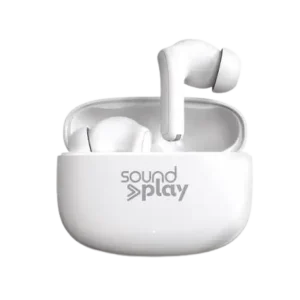
The product illustration identifies the touch-sensitive control area on the earbud and shows the earbuds stored inside their charging case.
The main operating components are:
| Component | Purpose |
| Right Earbud | Audio playback, calls, track controls, power, and voice-assistant functions |
| Left Earbud | Audio playback, calls, track controls, power, and voice-assistant functions |
| Touch Control Area | Accepts tap and press-and-hold commands |
| Ear Tips | Provide the in-ear fit |
| Charging Case | Stores and recharges the earbuds |
| USB-C Charging Connection | Used to recharge the charging case |
| LED Indicators | Show charging status |
Technical Specifications
| Specification | Value |
| Bluetooth Version | 5.4 |
| Earbud Battery | 35 mAh each × 2, 3.7V |
| Charging Case Battery | 500 mAh, 3.7V |
| Input Power Supply | 5V / 0.4A |
| Earbud Charging Time | Approximately 1.5 hours |
| Charging Case Time | Approximately 2 hours |
| Music Playback Time | Approximately 6 hours |
| Frequency Range | 20 Hz–20 kHz |
Before First Use
The earbuds should be fully charged before they are used for the first time.
Each earbud should be placed into its respective charging slot and allowed to reach a full charge before normal operation begins.
How to Turn On the SoundPlay V3 Earbuds
The manual provides two ways to power on the earbuds.
Method 1: Remove Them From the Charging Case
Remove the earbuds from the charging case.
They will turn on as part of their normal startup process.
Method 2: Turn Them On Manually
If the earbuds are outside the charging case or are turned off:
- Touch and hold the RIGHT or LEFT earbud.
- Continue holding for approximately 4 seconds.
- Release when the blue LEDs flicker and the “Battery Percentage” voice prompt is heard.
@akaettetrotman 🎧 Premium sound, unbeatable price! 🎶 Get the Sound Play Earbuds for just $300 for 1 or $450 for 2! 🔥 With adjustable tips for the perfect fit and a charging cable included, you’ll never miss a beat! 🚀 📲 Message or call (1868) 355-6166 to order now! #SoundPlayEarbuds #WirelessFreedom #CrystalClearSound #bestdeal #airpods #airpodspro ♬ original sound – AKAETTE
How to Turn Off the SoundPlay V3 Earbuds
Two power-off methods are provided.
Method 1: Place Them in the Charging Case
Place the earbuds back into their respective positions in the charging case.
Method 2: Turn Them Off Manually
- Touch and hold an earbud for approximately 5 seconds.
- Continue holding until the “Power OFF” voice prompt is heard.
Single-Earbud Usage
Each SoundPlay V3 earbud can be used independently.
This allows either earbud to operate on its own rather than requiring both earbuds to be used together.
How to Pair the SoundPlay V3 With Bluetooth
The earbuds first connect to each other and then connect to the phone or other Bluetooth source.
Step 1: Remove Both Earbuds
Remove both earbuds from the charging case.
The earbuds automatically pair with each other.
Step 2: Keep the Bluetooth Device Nearby
During initial Bluetooth pairing, keep the earbuds within approximately 3 feet of the phone or other smart device.
Step 3: Open Bluetooth Settings
Enable Bluetooth from the smart device’s Settings menu.
Step 4: Select SoundPlay V3
Locate and select:
SoundPlay V3
from the list of available Bluetooth devices.
Step 5: Confirm the Connection
After the Bluetooth connection is established, the earbuds announce:
“Device Connected.”
The SoundPlay V3 earbuds are then ready for use.
Battery Percentage Voice Prompts
When the earbuds are removed from the charging case, a voice prompt announces their approximate remaining battery level.
| Voice Prompt | Approximate Remaining Battery |
| 100% | 81%–100% |
| 75% | 51%–80% |
| 50% | 30%–50% |
| 25% | Less than 30% |
These prompts provide a general battery-level range rather than an exact percentage.
Touch Control Guide
| Function | Touch Command |
| Manual Power On | Hold RIGHT or LEFT earbud for 4 seconds |
| Manual Power Off | Hold an earbud for 5 seconds |
| Answer Call | Touch RIGHT or LEFT earbud twice |
| End Call | Touch RIGHT or LEFT earbud twice |
| Reject Call | Hold RIGHT or LEFT earbud for 2 seconds |
| Play/Pause | Touch RIGHT or LEFT earbud twice |
| Next Song | Touch RIGHT earbud 3 times |
| Previous Song | Touch LEFT earbud 3 times |
| Voice Assistant/Siri | Hold RIGHT or LEFT earbud for 2 seconds |
Phone Call Controls
Answer a Call
Touch either the RIGHT or LEFT earbud twice.
End a Call
Touch either earbud twice.
Reject an Incoming Call
- Touch and hold either the RIGHT or LEFT earbud.
- Hold it for approximately 2 seconds, or until a prompt sound is heard.
Music Playback Controls
Play or Pause Music
Touch the RIGHT or LEFT earbud twice.
Skip to the Next Song
Touch the RIGHT earbud three times.
Return to the Previous Song
Touch the LEFT earbud three times.
The right and left earbuds therefore perform different commands when changing tracks.
Voice Assistant Controls
The SoundPlay V3 can activate the voice-assistant or Siri function on a connected device.
To activate it:
- Touch and hold the RIGHT or LEFT earbud.
- Continue holding for approximately 2 seconds.
- Release after the prompt sound is heard.
The manual notes that this function may not work with every device.
Charging the SoundPlay V3 Earbuds
When the earbud battery becomes low, the earbuds announce:
“Battery Low.”
The earbuds should then be returned to the charging case.
How to Charge the Earbuds
- Place each earbud into its respective slot in the charging case.
- Charging begins automatically.
- The LED indicators on the earbuds glow solid red while charging.
- The LED indicator on the bottom of the charging case turns white.
- The white case indicator turns off after approximately 4 seconds.
- When the earbuds are fully charged, the LEDs on the earbuds turn off.
The listed earbud charging time is approximately 1.5 hours.
Charging the SoundPlay V3 Case
The charging case uses a USB-C connection.
How to Charge the Case
- Connect one end of the USB-C charging cable to the charging port on the case.
- Connect the opposite end to a USB power source, such as:
- An AC wall adapter.
- A computer USB port.
- The case LED flashes green while charging.
- When the case reaches a full charge, the LED remains solid green.
The listed charging time for the case is approximately 2 hours.
LED and Voice Prompt Guide
| Indicator or Voice Prompt | Meaning |
| Blue LEDs flicker + “Battery Percentage” | Earbud has been manually powered on |
| “Power OFF” | Earbud has been manually switched off |
| “Device Connected” | Bluetooth connection is complete |
| “Battery Low” | Earbud battery needs charging |
| Solid red earbud LED | Earbud is charging |
| Earbud LED turns off | Earbud is fully charged |
| White case LED | Appears after earbuds begin charging and turns off after about 4 seconds |
| Flashing green case LED | Charging case is being charged |
| Solid green case LED | Charging case is fully charged |
Important Safety Instructions
The SoundPlay V3 earbuds and charging case should only be used for their intended purpose.
The manual provides the following safeguards:
- Keep the product away from heat sources and direct sunlight.
- Keep the unit away from humidity, water, and other liquids.
- Do not expose the product to extremely high or extremely low temperatures because this may damage the battery.
- Do not operate the unit if it becomes wet or damp.
- Wet operation may create a risk of electric shock, personal injury, or damage to the product.
- Do not use the product after it has been dropped or damaged.
- Electrical repairs should only be performed by a qualified electrician.
- Improper repairs may expose the user to serious risk.
- Keep the product out of children’s reach.
- The product is not a toy.
Battery Disposal
The SoundPlay V3 contains lithium-polymer batteries.
The manual states that lithium-polymer batteries are environmentally safe when fully discharged and directs users to follow applicable local and state laws for proper battery-disposal procedures.
FCC Information
The SoundPlay V3 manual states that the device complies with Part 15 of the FCC Rules.
Operation is subject to two conditions:
- The device may not cause harmful interference.
- The device must accept interference received, including interference that may cause undesired operation.
Unauthorized changes or modifications may void the user’s authority to operate the equipment.
The manual also states that the product has been tested against the limits for a Class B digital device under Part 15 of the FCC Rules.
If radio or television interference occurs, the manual recommends trying one or more of the following actions:
- Reorient or relocate the receiving antenna.
- Increase the separation between the equipment and receiver.
- Connect the equipment to an outlet on a different circuit from the receiver.
- Consult the dealer or an experienced radio/TV technician.
Customer Support
Tzumi provides the following customer-support contacts for SoundPlay V3 owners:
| Support Method | Contact Information |
| Phone | 1-855-GO-TZUMI |
| support@tzumi.com |
The manual identifies the product as SoundPlay V3 Earbuds, distributed by Tzumi Inc., New York, NY 10016, and carries a © 2024 Tzumi Inc. copyright notice.
Frequently Asked Questions
How are the Tzumi SoundPlay V3 earbuds paired with a phone?
Both earbuds should be removed from the charging case so they can automatically pair with each other. Bluetooth should then be enabled on the phone, and SoundPlay V3 should be selected from the device list. Successful connection is confirmed by the “Device Connected” voice prompt.
How are the SoundPlay V3 earbuds turned on manually?
Touch and hold the RIGHT or LEFT earbud for approximately 4 seconds until the blue LEDs flicker and the “Battery Percentage” prompt is heard.
Can one SoundPlay V3 earbud be used by itself?
Yes. The manual states that each earbud can be used independently.
How long do the SoundPlay V3 earbuds take to charge?
The manual lists an approximate earbud charging time of 1.5 hours.
How long does the SoundPlay V3 charging case take to charge?
The charging case takes approximately 2 hours to charge.
How long is the SoundPlay V3 music playback time?
The specification table lists approximately 6 hours of music playback.
How can the next or previous song be selected?
Touch the RIGHT earbud three times for the next song. Touch the LEFT earbud three times for the previous song.
What do the battery-percentage voice prompts mean?
The earbuds announce approximate charge ranges when removed from the case: 100% means 81%–100%, 75% means 51%–80%, 50% means 30%–50%, and 25% means below 30%.