| Document Detail | Information |
| Document Type | User Manual |
| Brand Name | Tzumi |
| Product Name | 10-Watt Wireless Charging Pad |
| PDF File Size | 359 KB |
| Number of Pages | 1 |
| Languages Covered | English |
Tzumi 10-Watt Wireless Charging Pad
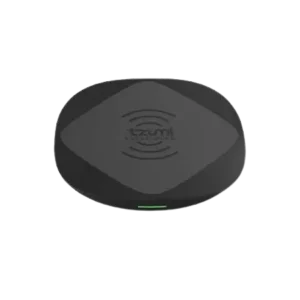
The Tzumi 10-Watt Wireless Charging Pad is a compact Qi wireless charger designed for compatible smartphones and other portable devices. Its low-profile design is intended for use on flat surfaces such as desks and tables, while rubberized slip-resistant silicone surfaces help keep both the charging pad and the connected device in place.
The charger provides up to 10W maximum output and works with Qi-compatible devices. The manual also states that devices using an external wireless transmitter or receiver attachment can be compatible. A Micro-USB connection supplies power to the pad, while an LED indicator communicates power, charging, and error status.
What’s Included
The package contains:
- 1 × Wireless Charging Pad
- 1 × Micro-USB Cable
- User Manual
Product Features
The Tzumi Wireless Charging Pad includes the following features:
- Up to 10W wireless charging output.
- Compatibility with Qi-enabled devices.
- Support for devices using an external wireless transmitter/receiver attachment.
- Compact and lightweight design.
- Slip-resistant silicone surface.
- Micro-USB power input.
- LED charging-status indicator.
- Portable size intended to fit in pockets, laptop bags, small purses, and similar storage spaces.
Parts and Components
The product diagram identifies four main areas of the charging pad.
| Component | Function |
| Qi Wireless Charging Surface / Charging Coil | Area where the compatible device is positioned for wireless charging |
| Slip-Proof Silicone Ring | Helps keep the device stable on the charging surface |
| Micro-USB Port (Input) | Connects the charging pad to its power source |
| Wireless Charging Status Indicator (LED) | Displays power, charging, and error status |
Technical Specifications
| Specification | Value |
| Input | DC 5V-2A |
| Maximum Output | 10W Max |
| Transmission Distance | ≤ 8 mm |
| Dimensions | 100 × 100 × 12 mm |
| Dimensions in Inches | 3.9 × 3.9 × 0.47 in. |
| Compatibility | Qi-compatible devices and devices using an external wireless transmitter/receiver attachment |
Before Charging a Device
Several checks should be completed before placing a smartphone or other portable device on the charger.
Confirm Qi Compatibility
The device should support Qi induction charging. If wireless charging needs to be enabled through the device’s settings, it should be enabled before charging begins.
Remove Metallic Cases
A metallic protective case should be removed before attempting wireless charging.
Check Case Thickness
A thick phone case can reduce charging efficiency. The manual recommends removing the case and attached accessories when faster or more reliable charging is required.
How to Set Up the Tzumi Wireless Charging Pad
1. Connect the Power Cable
The USB end of the supplied Micro-USB cable should be connected to an AC wall charger.
The Micro-USB end should then be connected to the input port on the wireless charging pad.
2. Place the Pad on a Flat Surface
The charging pad should be placed on a sturdy, flat surface such as a table or desk.
3. Check the Startup LED
When the charging pad receives power, the LED rapidly flashes red and green.
This startup sequence indicates that the charger is powered and ready for use.
How to Charge a Smartphone or Portable Device
1. Position the Device
The compatible device should be placed directly on the wireless charging surface.
Correct positioning over the charging area is important because poor alignment can prevent charging.
2. Check the Status Indicator
The manual describes the following LED behavior:
- Red LED: The charging pad is ready for charging.
- Green LED every 1–2 seconds: A device is actively charging.
3. Monitor Charging Progress
The charging time varies according to factors such as the connected device’s age, brand, and model.
The mobile device itself should display its charging progress.
The device may be removed from the pad at any time during normal charging.
LED Indicator Guide
| LED Behavior | Meaning |
| Rapid red and green flashing immediately after power connection | Charging pad has powered on and is ready |
| Red | Pad is ready for charging |
| Green every 1–2 seconds | A device is charging |
| Red/green flashing during an error condition | Check device alignment and possible overheating |
Charging Errors and Indicator Problems
The manual provides error guidance for a red/green flashing status indicator.
| Problem or Indicator | Possible Condition | What to Check |
| LED flashes red and green | Mobile device may not be properly aligned | Check that the device is centered correctly on the charging surface |
| Device does not charge correctly | Device placement may be preventing charging | Recheck alignment on the pad |
| Unit may be overheating | Charging pad or connected device may be getting too warm | Remove the device temporarily |
A metallic or excessively thick protective case can also affect wireless charging performance and should be removed when necessary.
Device Placement and Charging Distance
The charging pad has a stated transmission distance of up to 8 mm.
For normal operation, the device should be placed directly over the Qi wireless charging surface. Attachments or thick cases between the device and charging surface can reduce charging performance.
The manual specifically recommends removing unnecessary attachments when charging efficiency is reduced.
Cleaning and Care
The charging pad should be kept clean without exposing it to liquids or aggressive cleaning products.
How to Clean the Charging Pad
- The exterior should be wiped with a soft, dry cloth when cleaning is needed.
- Accumulated dust should be wiped away periodically.
- Abrasive cleaning agents and chemicals should not be used.
The manual also warns against using harsh substances such as alcohol, benzene, thinners, or detergents on the charger.
Important Safety Instructions
The Tzumi Wireless Charging Pad should only be used for its intended purpose.
Keep Away From Children
The charging pad is not a toy and should be kept out of children’s reach.
Do Not Disassemble or Modify the Charger
The charging pad should not be opened, disassembled, or modified.
Keep Away From Heat
The charger should be kept away from heat sources, including direct sunlight.
The manual specifies that it should not be stored or operated at temperatures:
- Below 32°F (0°C)
- Above 115°F (45°C)
Protect the Charger From Water and Humidity
The charging pad should not be exposed to:
- Water.
- Other liquids.
- Humidity.
- High-moisture environments.
The unit is not waterproof or water-resistant.
If the charger becomes wet or moist, it should not be operated. The manual specifically warns against using it in high-humidity locations such as a bathroom.
Protect the Power Cable
The power cord should not be damaged by:
- Bending.
- Twisting.
- Pulling.
- Heating.
A loose plug should not be used because the manual warns that it may create a fire or electric-shock risk.
Avoid Harsh Cleaning Products
Harsh chemicals and detergents should not be used to clean the charging pad. This includes substances such as alcohol, benzene, and thinners.
Storage and Environmental Conditions
The charging pad should be stored away from:
- Direct sunlight.
- Heat sources.
- Water and liquids.
- High-humidity environments.
- Extremely hot or cold conditions.
The documented storage and operating temperature limits are 32°F to 115°F (0°C to 45°C).
Product and Distribution Information
The manual states that the product was distributed by Tzumi Inc., New York, NY 10016.
It carries a © 2019 Tzumi copyright notice and identifies the product as made in Vietnam.
Frequently Asked Questions
What devices work with the Tzumi 10-Watt Wireless Charging Pad?
The pad is designed for Qi-compatible devices. The manual also states that devices using an external wireless transmitter/receiver attachment can be compatible.
What is the maximum charging output?
The manual lists a maximum output of 10W.
Why is the charging pad flashing red and green?
A rapid red/green flash occurs when the pad is first powered on. Under an error condition, red/green flashing may also indicate incorrect device alignment or a possible overheating condition.
What does the green LED mean while charging?
The LED flashes or displays green approximately every 1–2 seconds while a device is charging.
Why is the phone not charging through its case?
Metallic cases should be removed before charging. A case that is too thick may also reduce charging efficiency, so the manual recommends removing the case and other attachments when necessary.
How should a phone be positioned on the charging pad?
The phone should be placed directly over the Qi wireless charging surface. If charging does not begin correctly, its alignment on the pad should be checked.
Can the wireless charging pad be used in a bathroom?
No. The manual states that the charger is not waterproof or water-resistant and should not be used in areas with high humidity, including bathrooms.
How should the Tzumi Wireless Charging Pad be cleaned?
The exterior should be wiped with a soft, dry cloth, and accumulated dust should be removed periodically. Abrasive products, chemicals, alcohol, benzene, thinners, and detergents should not be used.