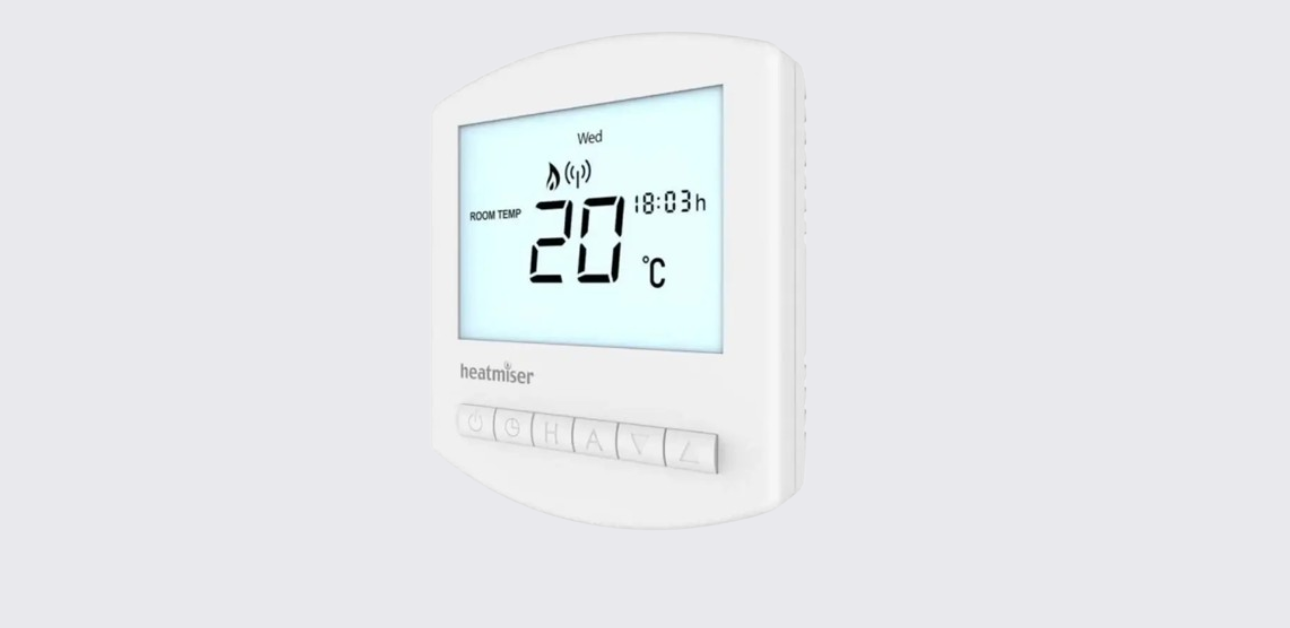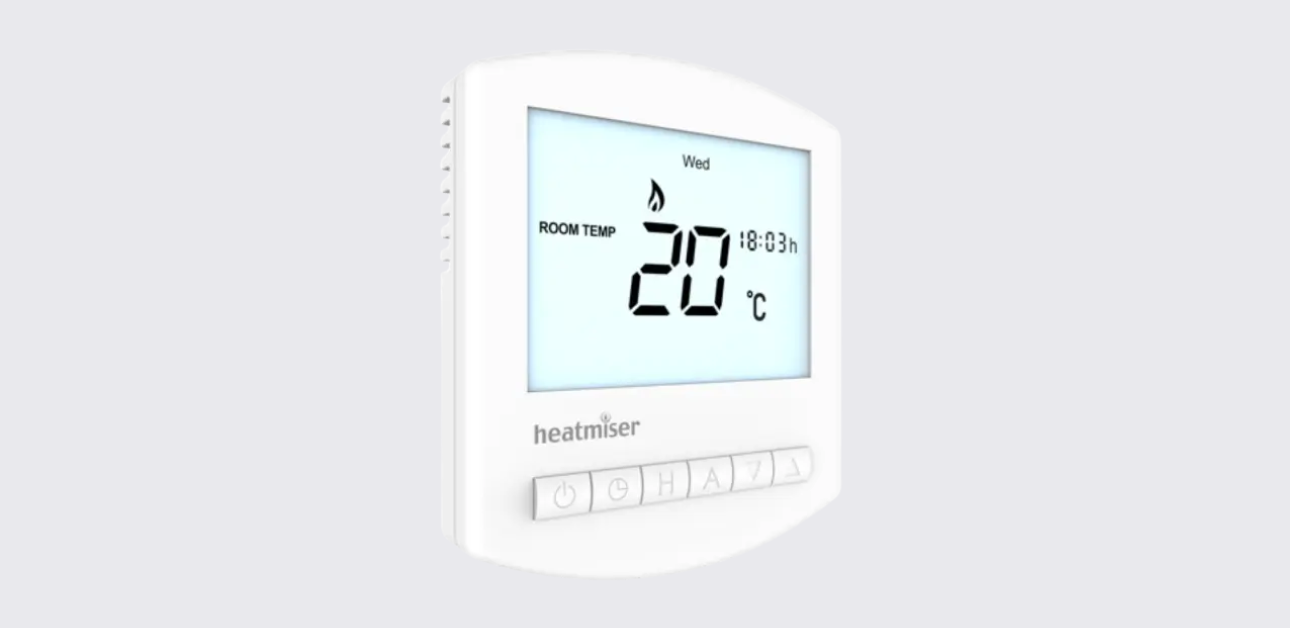
The Heatmiser Slimline-E V3 is an electric underfloor heating thermostat from the Heatmiser Slimline Series. It works as a programmable room thermostat and can also be configured as a time clock.
In thermostat mode, it controls heating based on temperature and schedule settings. In time clock mode, it controls timed outputs for devices such as hot water, towel rails, or lighting.
The official manual covers installation, mode selection, thermostat programming, sensor options, frost protection, temperature hold, holiday mode, optional features, error codes, time clock operation, wiring diagrams, and Heatmiser support details.
What Is a Programmable Room Thermostat?
A programmable room thermostat combines two functions:
- A programmer, which sets heating ON and OFF periods.
- A room thermostat, which senses temperature and switches heating on or off to reach the selected temperature.
The manual explains that setting a higher temperature does not make the room heat faster. The better approach is to find the lowest comfortable temperature and let the thermostat manage the heating automatically.
Important Safety and Installation Notes
The Heatmiser Slimline-E V3 is designed for electric underfloor heating, but it must be installed correctly.
Key safety notes include:
- The thermostat should be flush mounted into a wall back box.
- A 35mm minimum depth back box is required.
- Do not install the thermostat near a direct heat source.
- Do not press hard on the LCD screen.
- The thermostat needs free airflow and should not be covered by curtains or blocked by furniture.
- Nearby electric fires, televisions, wall lamps, or table lamps may affect temperature sensing.
- The built-in air sensor alone must not be used to control electric underfloor heating.
- For electric underfloor heating, use either the floor sensor only or the built-in air sensor and floor sensor together.
Parts and Controls
The Slimline-E V3 has a simple front interface with an LCD screen and six control buttons.
Main Controls
| Control | Function |
| Power button | Turns the thermostat on/off or enables frost protection |
| Clock button | Sets the clock and programming times |
| H button | Confirms time-related settings and starts hold/holiday functions |
| A button | Confirms settings and returns to the main display |
| Down button | Decreases values such as temperature, time, or settings |
| Up button | Increases values such as temperature, time, or settings |
LCD Display Icons and Indicators
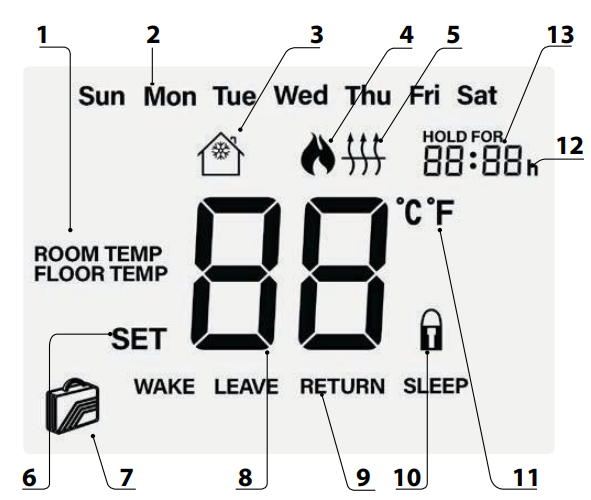
In thermostat mode, the LCD display shows important operating information.
| Display Item | Meaning |
| Room Temp / Floor Temp | Shows the active sensor mode |
| Day indicator | Displays the current day |
| Frost icon | Shows frost protection mode |
| Flame icon | Shows the thermostat is calling for heat |
| Floor temperature limit icon | Appears when the floor sensor reaches the set limit |
| Set icon | Appears when changing programs or temperature settings |
| Holiday icon | Shows holiday mode is active |
| Current temperature | Displays the current sensor temperature |
| Program cycle indicator | Shows Wake, Leave, Return, or Sleep during programming |
| Keypad lock icon | Shows keypad lock is active |
| °C / °F | Displays the selected temperature unit |
| Clock | Shows time in 24-hour format |
| Hold For | Shows remaining time when temperature hold is active |
Product Specifications
| Specification | Detail |
| Product | Heatmiser Slimline-E V3 |
| Product type | Electric underfloor heating thermostat |
| Series | Slimline Series |
| Mounting type | Flush mounted |
| Back box depth | 35mm minimum |
| Power supply | 230VAC |
| Modes | Programmable Thermostat / Time Clock |
| Temperature format | Celsius or Fahrenheit |
| Program modes | 5/2 day, 7 day, or 24 hour |
| Comfort levels | 4 periods: Wake, Leave, Return, Sleep |
| Frost temperature range | 7°C to 17°C |
| Frost default | 12°C |
| Floor temperature limit | 20°C to 45°C |
| Floor limit default | 27°C |
| Output delay | 00 to 15 minutes |
| Sensor options | Built-in air, remote air, floor, built-in + floor, remote air + floor |
| Time display | 24-hour format |
How to Install the Heatmiser Slimline-E V3
The Slimline-E V3 installation process is shown in the official manual with four illustrated steps.
Installation Steps
- Separate the front from the back plate
Insert a small flat-head terminal driver into the slots on the bottom of the thermostat and carefully separate the front half from the back plate. - Place the front panel safely aside
Keep the thermostat front in a safe place while wiring and mounting. - Terminate the wiring
Connect the thermostat according to the wiring diagram in the manual. - Secure the back plate
Screw the thermostat back plate into the wall back box. - Clip the front panel back on
Attach the thermostat front to the back plate.
Installation Do’s and Don’ts
| Do | Don’t |
| Mount the thermostat at eye level | Do not install near a direct heat source |
| Read the full instructions before use | Do not push hard on the LCD screen |
| Use the correct back box depth | Do not block the thermostat with furniture or curtains |
Wiring Diagram Summary
The wiring diagram for the Slimline-E V3 shows connections for:
- Mains supply
- RCD
- Live and neutral
- Load
- Floor probe
- Remote air probe
- Matting or wire
The wiring terminal labels shown in the manual include RT1, RT2, N, N, LOAD, and L. The diagram also shows the floor probe connection and optional remote air probe connection.
Mode Select and Factory Reset
The Slimline-E V3 can work in two modes:
| Mode | Function |
| Mode 01 | Programmable Thermostat |
| Mode 02 | Time Clock |
Thermostat mode is the default setting.
How to Change Mode or Factory Reset
- Hold the Power button to turn off the display.
- Press and hold the Power and Up buttons together until the LCD powers up.
- All icons will briefly appear.
- The device will factory reset and show two mode options.
- Use the Up/Down buttons to select the mode.
- Press A to confirm.
- Press the Power button to turn the display back on.
Thermostat Mode Instructions
Setting the Clock
To set the clock in programmable thermostat mode:
- Turn the thermostat on.
- Press the Clock button twice.
- Use Up/Down to set the hour.
- Press H to confirm.
- Use Up/Down to set the minutes.
- Press H to confirm.
- Use Up/Down to set the day.
- Press A to save and return to the main display.
The manual notes that when Feature 11 is set to manual mode, the clock button does not respond.
Temperature Display and Sensor Use
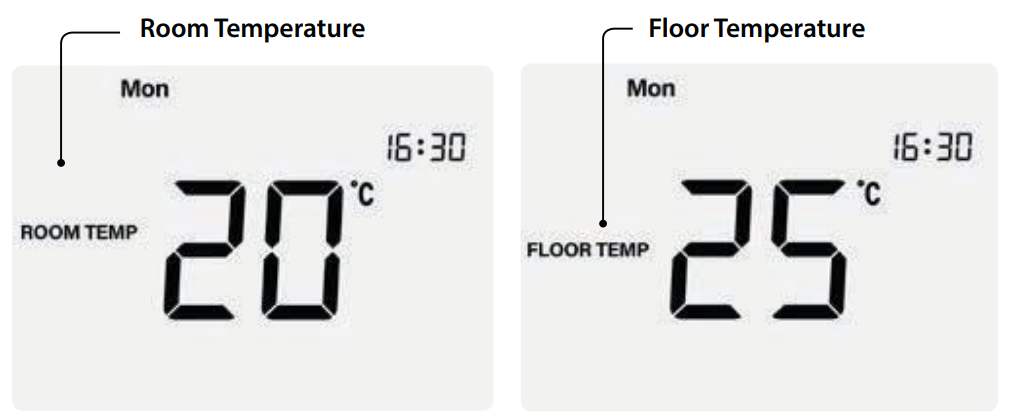
The Slimline-E V3 can use:
- Built-in air sensor
- Floor sensor
- Both air and floor sensors
- Remote air sensor
- Remote air sensor with floor sensor
When both sensors are used, the thermostat displays the room temperature by default. To view the floor temperature, press and hold the A button until the floor temperature appears.
For electric underfloor heating, the manual clearly states that the built-in air sensor alone must not be used. Floor sensor only or air sensor with floor sensor must be used.
Comfort Levels and Heating Programs
The thermostat supports three programming formats:
| Program Mode | Description |
| 5/2 Day Programming | Four levels for weekdays and four different levels for weekends |
| 7 Day Programming | Four levels for each day |
| 24 Hour Programming | Four levels repeated every day |
The four comfort levels are:
- Wake
- Leave
- Return
- Sleep
How to Program Comfort Levels
- Press the Clock button once.
- Use Up/Down to set the required Wake time.
- Press H to confirm.
- Use Up/Down to set the Wake temperature.
- Press H to confirm.
- Repeat the same process for Leave, Return, and Sleep.
- For unused periods, enter –:–.
- Press A to confirm and return to the main display.
Temperature Control
To change the set temperature:
- Press Up or Down.
- The display will show SET and the desired temperature.
- Adjust the value using Up/Down.
- Press A to confirm.
In programmable mode, the new temperature stays active only until the next programmed comfort level. In non-programmable mode, the thermostat maintains the selected temperature constantly.
Temperature Hold
Temperature Hold lets users temporarily override the current program for a selected time.
How to Set Temperature Hold
- Press H.
- Use Up/Down to set the hold time.
- Press H to confirm.
- Use Up/Down to set the hold temperature.
- Press A to confirm.
The thermostat displays Hold For and counts down the remaining time. When the hold period ends, it returns to the normal program.
To cancel Temperature Hold, repeat the steps and reduce the hold time to 00:00.
Holiday Mode
Holiday mode lowers the heating to the frost protection temperature for a set number of days.
How Holiday Mode Works
- The holiday period starts at 00:00 the next day.
- The thermostat maintains the frost protection temperature during the holiday.
- It automatically returns to the normal program when the holiday period ends.
How to Set Holiday Mode
- Press H three times until the suitcase icon appears.
- Use Up/Down to enter the number of holiday days.
- Press A to confirm.
To cancel, reduce the holiday duration to 00 days.
Frost Protection
Pressing the Power button once places the thermostat into frost protection mode.
In this mode:
- The frost icon appears.
- Heating only turns on if the temperature falls below the frost set temperature.
- The flame icon appears if heating is active.
- Pressing the Power button again cancels frost protection.
The frost temperature range is 7°C to 17°C, with a factory default of 12°C.
Heating On and Off
The heating is active when the flame icon appears.
If the flame icon is not visible, the thermostat does not currently need heat to reach the set temperature, but the thermostat remains active.
Turn Thermostat Completely Off
Press and hold the Power button.
The display and heating output will turn off.
Turn Thermostat Back On
Press the Power button once.
Keypad Lock
The thermostat includes a keypad lock to prevent unwanted changes.
Lock or Unlock the Thermostat
- Press and hold A and Down together for 10 seconds.
- The lock icon appears when locked.
- Repeat the same step to unlock.
Optional Thermostat Features
The Slimline-E V3 includes optional settings that usually do not need adjustment unless required.
| Feature | Description | Settings |
| 01 | Temperature format | 00 = °C, 01 = °F |
| 02 | Switching differential | 01°C to 03°C |
| 03 | Frost mode | 00 = enabled, 01 = disabled |
| 04 | Output delay | 00 to 15 minutes |
| 05 | Up/down temperature limit | 00°C to 10°C |
| 06 | Sensor selection | Air, remote air, floor, air + floor, remote air + floor |
| 07 | Floor temperature limit | 20°C to 45°C |
| 08 | Optimum start | 00 to 03 hours |
| 09 | Rate of change | Minutes to raise room temperature by 1°C |
| 10 | Program mode | 5/2 day, 7 day, or 24 hour |
| 11 | Thermostat mode | Manual or programmable |
How to Adjust Optional Features
- Press and hold Power to turn the thermostat off.
- Press and hold the Clock button until the feature screen appears.
- Use the Clock button to cycle through features.
- Use Up/Down to change the setting.
- Press A to confirm.
- Press Power to turn the thermostat back on.
Re-Calibrating the Thermostat
If the displayed temperature needs adjustment, the thermostat can be recalibrated.
Re-Calibration Steps
- Press and hold Power to turn the thermostat off.
- Press and hold Power and Down together until the temperature appears.
- Use Up/Down to set the new calibration temperature.
- Press A to confirm.
- Press Power once to turn the thermostat back on.
Error Codes and Troubleshooting
The official manual lists three main error codes.
| Error Code | Meaning | Recommended Action |
| E0 | Internal sensor fault | Contact the thermostat retailer |
| E1 | Remote floor probe not connected, wired incorrectly, or faulty | Check floor probe wiring or replace the probe |
| E2 | Remote air probe not connected, wired incorrectly, or faulty | Check remote air probe wiring or replace the probe |
Common Troubleshooting Tips
| Problem | Possible Cause | What to Check |
| Heating does not turn on | Set temperature may already be reached | Check whether the flame icon is displayed |
| Thermostat buttons do not respond | Keypad lock may be active | Hold A + Down for 10 seconds |
| Clock button does not respond | Thermostat may be in manual mode | Check Feature 11 |
| Floor temperature not displayed | Sensor mode may not be set correctly | Check Feature 06 |
| Floor overheating protection appears | Floor limit has been reached | Check Feature 07 floor limit |
| Thermostat reads wrong temperature | Calibration may be needed | Re-calibrate the thermostat |
| Error E1 or E2 appears | Probe issue | Check sensor wiring and connection |
Time Clock Mode Overview
In Mode 2 – Time Clock, the Slimline-E V3 can control timed devices around the home, such as:
- Hot water
- Towel rails
- Lighting
However, the manual states that Time Clock mode must not be used to control electric underfloor heating.
Time Clock Display Indicators
| Display Item | Meaning |
| Day indicator | Shows current day |
| Holiday indicator | Shows holiday mode |
| Set | Appears when changing programs or clock settings |
| Program cycle indicators | Shows which period is being edited |
| Keypad lock | Shows lock is active |
| Timer status | Shows current timed output status |
| Clock | Shows time in 24-hour format |
| Hold For | Shows active timer override and remaining time |
Setting Switching Times in Time Clock Mode
- Press the Clock button once.
- Select the Timer ON time for the Wake period using Up/Down.
- Press H to confirm.
- Select the Timer OFF time using Up/Down.
- Press H to confirm.
- Repeat for Leave, Return, and Sleep.
- Set unused periods to –:–.
- Press A to save.
Countdown Mode
Countdown mode activates the output for a chosen time.
How to Use Countdown Mode
- Use Up/Down to set the countdown duration.
- Press A to confirm.
- The display shows Hold For and the remaining time.
- The output remains active while Hold For is displayed.
To cancel countdown mode, reduce the time to 00:00.
Timer Override
The time clock can override its current timer status.
If the current status is Timer ON, pressing A switches it to Timer OFF. The display flashes to show the programmed output has been overridden. The time clock returns to its normal program at the next programmed time.
Time Clock Optional Features
| Feature | Description | Settings |
| 01 | Programming mode | 00 = 5/2 day, 01 = 7 day, 02 = 24 hour |
| 02 | Time clock mode | 00 = Countdown, 01 = Programmable |
Contact Support
Heatmiser provides technical support and online resources for the Slimline-E V3.
Heatmiser UK Ltd
Address:
Heatmiser UK Ltd, Units 1-5 Hurstwood Court, Mercer Way, Shadsworth Business Park, Blackburn, Lancashire, BB1 2QU, United KingdomSupport phone: +44 (0)1254 669090
Website: www.heatmiser.com
Twitter/X: @heatmiseruk
Facebook: facebook.com/thermostats
Official