
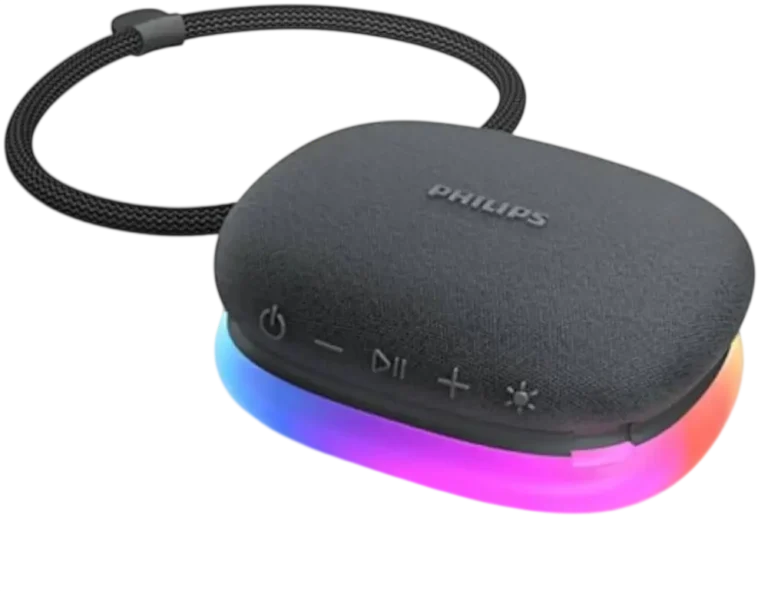
The Philips Wireless Speaker TAS2307 is a compact Bluetooth speaker from the 2000 Series. It runs on a built-in rechargeable battery and charges through a USB-C port. It plays audio from a paired phone, tablet, or other Bluetooth device, and it has a built-in light with three display modes. Five buttons on top control power, volume, playback, and lighting. A lanyard is attached for carrying. The speaker is meant for indoor use. It has no water protection, so keep it away from liquids and moisture.
What’s in the Box
The package contains:
- Speaker (with attached lanyard)
- USB cable
- Quick start guide
- Safety sheet
- Worldwide warranty
Parts and Controls
Five buttons sit on the top of the speaker, with the LED indicator just below them. The DC IN charging socket is on the underside.
| Control | Short press | Long press |
| Power | Turns the speaker on or off | – |
| Volume down (−) | Lowers volume one level | Keeps lowering the volume |
| Play/pause | Pauses or resumes playback | Enters pairing mode, or disconnects the paired device and enters pairing mode |
| Volume up (+) | Raises volume one level | Keeps raising the volume |
| Light | Switches light mode | Turns the light on or off |
The play/pause button also changes tracks. Press it twice quickly for the next track, or three times quickly for the previous one. The LED indicator shows charging status.
Charging the Built-In Battery
Charge the battery fully before first use.
- Connect the USB cable to the USB-C socket (DC IN) on the speaker.
- Plug the other end into an outlet rated 5V 1A.
- Watch the LED indicator. It turns white while charging and goes off when the battery is full.
Use only the USB cable that came with the speaker or one specified by the manufacturer. When unplugging, pull the plug rather than the cable, to avoid electric shock. Check that your power supply voltage matches the rating printed on the back or underside of the speaker (page 4).
Turning the Speaker On and Off
Press the power button to turn the speaker on. A prompt sound confirms it. Press the button again to turn it off, and you will hear the prompt sound again.
As a power-saving feature, the speaker turns off by itself after 15 minutes without a Bluetooth audio signal.
Playing Music over Bluetooth
- Turn on the speaker. It enters Bluetooth mode automatically, with a white breathing light. You can also hold the play/pause button for 3 seconds to enter pairing mode.
- Make sure Bluetooth is enabled on your device.
- Select “Philips S2307” in your device’s Bluetooth list.
- Play audio on your device to start streaming.
The speaker reconnects to the last connected device. Maximum pairing distance is 20 meters (66 feet). Keep the speaker away from other electronic devices that may cause interference (page 5).
Disconnecting a Device
Use either method:
- Press and hold the play/pause button until you see the white breathing light.
- On the connected device, select “Philips S2307” in the Bluetooth list and cancel the pairing. Once disconnected, the speaker shows the white breathing light.
Light Effects
| Light effect | Bluetooth status |
| White breathing light | Ready for pairing |
| White light | Connected |
| Colorful light | Connected, in a color mode |
Once Bluetooth is connected, a short press on the light button cycles through three modes: symphony, multi-color breathing, and white breathing. A long press turns the light on or off.
Product Specifications
| Item | Specification |
| Output power (RMS) | 5 W |
| Maximum input power | 5 W |
| Impedance | 4 Ω |
| Frequency response | 160 Hz–18 kHz |
| Signal-to-noise ratio | >70 dB |
| Driver diameter | 45 mm |
| Passive radiators | 1 |
| Bluetooth version | 5.3 |
| Bluetooth frequency range | 2402–2480 MHz |
| Bluetooth range | Up to 20 m |
| Maximum transmission power | <10 dBm |
| Bluetooth profiles | A2DP, AVCTP, AVRCP, HFP |
| USB port | 5V 1A |
| Built-in lithium battery | 1500 mAh |
| Dimensions (W x H x D) | 103.3 x 46.6 x 88 mm |
| Weight (main unit) | 200 g ±5 g |
| Operating ambient temperature | 0°C–40°C |
Product information is subject to change without notice.
Safety Instructions
- Keep the speaker away from dripping or splashing liquid. Do not place liquid-filled objects or lit candles on it.
- Use it indoors only, away from water and moisture.
- Place it on a flat, hard, stable surface, and never on other electrical equipment.
- Leave enough free space around it for ventilation.
- Keep it away from direct sunlight, naked flames, and heat.
- Use it only in temperatures between 0°C and 40°C.
- Use only attachments and accessories specified by the manufacturer.
- Never remove the casing, and never lubricate any part of the speaker.
Battery Precautions
The battery is built in. Throwing it into fire or a hot oven, or crushing or cutting it, can cause an explosion. Extreme heat, extreme cold, or very low air pressure can also create hazards, including leakage of flammable liquid or gas. If a battery is replaced with the wrong type, there is a risk of explosion. Replace it only with the same or an equivalent type (page 2).
Battery Care and Storage
Lithium batteries lose charge capacity over time through self-discharge. If you won’t use the speaker for a while, charge the built-in battery to around 50% every 6 months to help preserve its life (page 2).
For disposal, disconnect the product from power before removing the integrated battery. Follow local rules for separate collection of electrical products and batteries. Never throw the product or its battery in household waste (page 8).
Troubleshooting
Check the points below before requesting service. If the problem remains, visit www.philips.com/support. Have the speaker nearby, along with its model and serial numbers, when you contact Philips. To keep the warranty valid, never try to repair the speaker yourself.
No power
Make sure the speaker is fully charged and the USB cable is properly connected to the speaker’s socket.
No sound
Raise the volume on the speaker and on the connected device. Restart the speaker. Also confirm your Bluetooth device is within range.
No response from the speaker
The speaker may have shut off to save power after 15 minutes with no audio signal. Turn it back on.
Cannot connect with your Bluetooth device
Check these causes:
- Bluetooth is not enabled on your device.
- The speaker is not in pairing mode.
- The speaker is already connected to another Bluetooth device. Disconnect it and try again.
Poor Bluetooth reception or audio quality
Move the device closer to the speaker and remove any obstacles between them.
Frequently Asked Questions
How do I put the TAS2307 into pairing mode?
The speaker enters pairing mode on its own when you turn it on. You can also hold the play/pause button for 3 seconds. A white breathing light means it is ready. Then select “Philips S2307” in your device’s Bluetooth list.
How far can I be from the speaker while connected?
The maximum pairing distance is 20 meters (66 feet). Obstacles and nearby electronic devices can interfere with the signal, so keep the speaker and your device close together for best results.
How do I change or turn off the lights?
Connect your device first. A short press on the light button switches between symphony, multi-color breathing, and white breathing. A long press turns the light on or off.
Why did my speaker turn off by itself?
It turns off automatically after 15 minutes without a Bluetooth audio signal. This is a power-saving feature, not a fault. Turn it on again with the power button.
How do I skip tracks?
Press the play/pause button twice quickly for the next track, or three times quickly for the previous track. A single press pauses or resumes playback, and the + and − buttons adjust volume.
Can I use the speaker outdoors or near water?
No. It is designed for indoor use only and should be kept away from water, moisture, and any dripping or splashing. The temperature range for use is 0°C to 40°C.
How should I store the speaker for a long time?
Charge the built-in battery to around 50% every 6 months while it is not in use. Store it away from heat and direct sunlight.
How long does the battery last on a charge?
The manual gives the battery size (1500 mAh) and charging input (5V 1A) but no playtime or full-charge time. Charge the speaker until the LED indicator goes off to know it is full.