Wireless earbuds have become more than just accessories—they’re essential tools for work, play, and travel. Compact, stylish, and increasingly powerful, they give us freedom from tangled cables while delivering immersive sound.
Among the growing list of budget-friendly wireless earbuds, the TZUMI ProBuds V2 stand out for their combination of audio performance, convenience, and affordability.
Key Features
The ProBuds V2 are designed to balance functionality and simplicity. Here’s what you get:
1. Bluetooth 5.0 for Seamless Pairing
Equipped with Bluetooth 5.0, the ProBuds V2 connect quickly and reliably. Once paired, they remember your device and auto-connect when removed from the charging case.
2. High-Quality Audio for Music and Calls
The earbuds deliver crisp highs, balanced mids, and punchy bass, offering a well-rounded listening experience. Built-in microphones ensure clear call quality.
3. Battery Life That Lasts
- Up to 5 hours of continuous playback.
- 40 hours standby time.
- The charging case extends usage with multiple recharges, keeping you powered on the go.
4. Touch Controls
Tap-sensitive panels let you manage calls and music without reaching for your device. You can play, pause, skip, or reject calls with simple gestures.
5. Lightweight, True Wireless Design
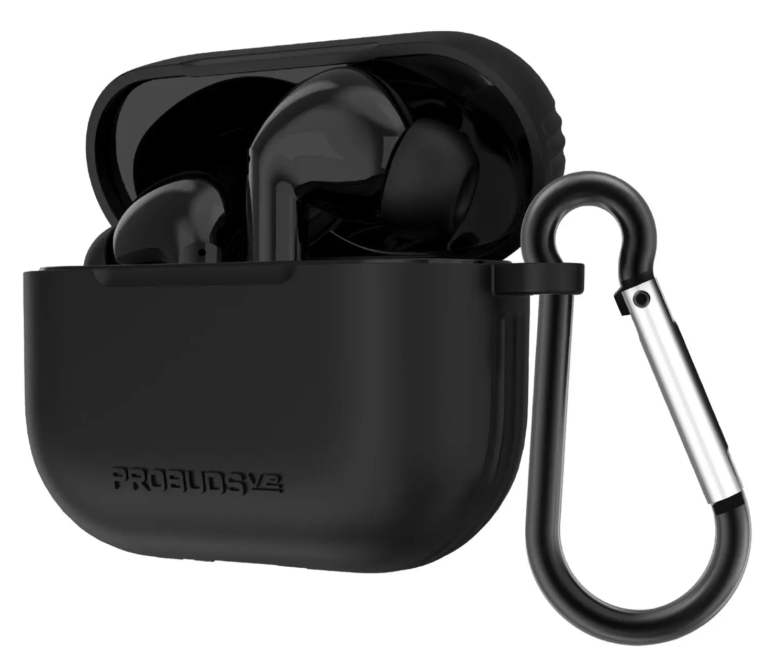
The ProBuds V2 are compact and comfortable, with silicone tips in different sizes for a secure fit. A neck strap and carrying case add extra convenience.
6. IPX4 Water Resistance
They resist splashes and sweat, making them suitable for workouts, though not fully waterproof.
Pairing Instructions for ProBuds V2
Pairing your earbuds should be quick and effortless. Follow these steps:
- Charge Fully First – Place the earbuds in the charging case until the LED lights indicate full charge.
- Remove the Earbuds – Take them out of the case; they should turn on automatically.
- Enable Bluetooth – On your phone, tablet, or laptop, turn on Bluetooth.
- Activate Pairing Mode – Press and hold the touch panel on both earbuds for about 3 seconds until the LEDs flash.
- Find & Select Device – Look for “TZUMI ProBuds V2” in your Bluetooth settings and tap to connect.
- Auto-Reconnect – Once paired, they will automatically connect to your device whenever you remove them from the case.
Pro Tip: If pairing fails, reset the earbuds by placing them back in the case and holding the touch panels for 10 seconds until the lights reset.
Touch Controls: How to Use Them
The ProBuds V2 rely on intuitive touch gestures. Here’s a breakdown:
- Play/Pause Music → Tap either earbud twice.
- Next Track → Tap the right earbud three times.
- Previous Track → Tap the left earbud three times.
- Answer/End Call → Tap either earbud twice.
- Reject a Call → Tap and hold either earbud for 2 seconds.
These controls make it easy to switch songs, manage calls, and stay hands-free.
TZUMI SoundMates Pro ANC User Manual
Battery Life and Charging
Battery performance is one of the key factors for earbuds. Here’s what to expect with the ProBuds V2:
- Playback per charge: ~5 hours (varies with volume).
- Standby time: 40 hours.
- Case recharge capacity: Up to 3–4 full charges.
- Charging port: USB-C cable included.
- Recharge time: ~2 hours for the case.
When charging, the LED indicator blinks green. If one earbud isn’t charging, clean the charging contacts and ensure it’s seated correctly.
Troubleshooting Guide
Like all earbuds, the ProBuds V2 can occasionally run into issues. Here’s how to solve the most common problems:
1. One Earbud Not Working
- Place both earbuds back into the case.
- Reset them by holding down the touch panel for 10 seconds.
- Re-pair with your device.
2. Not Connecting to Bluetooth
- Delete “TZUMI ProBuds V2” from your device’s paired list.
- Restart Bluetooth and try pairing again.
- Make sure the earbuds are in pairing mode (LEDs flashing).
3. Poor Audio Quality
- Ensure a strong Bluetooth signal—stay within 30 feet.
- Clean the silicone tips and speaker grills.
- Try different ear tip sizes for a tighter fit.
4. Short Battery Life
- Fully charge before first use.
- Avoid leaving earbuds uncharged for long periods.
- Check if volume levels are draining the battery faster.
Are ProBuds V2 Waterproof?
The ProBuds V2 are IPX4-rated, meaning they’re resistant to sweat and light splashes but not waterproof. Avoid submerging them in water or using them in heavy rain.
If you’re looking for waterproof earbuds, consider alternatives with IPX7 or higher ratings.
TZUMI SoundPlay V3 Earbuds User Guide
Pros and Cons
After testing the ProBuds V2 extensively, here’s a balanced review:
Pros
- Excellent audio clarity with balanced sound.
- Reliable Bluetooth 5.0 connectivity.
- Comfortable fit with multiple ear tip sizes.
- Intuitive touch controls.
- Affordable price point.
- Portable charging case with extra power.
Cons
- Average battery life (5 hours playback is decent but not class-leading).
- No Active Noise Cancellation (ANC).
- Limited water resistance (IPX4 only).
- Single device connection only (no multipoint pairing).
TZUMI ProBuds V2 vs SoundMates V2
| Feature | ProBuds V2 | SoundMates V2 |
| Bluetooth Version | 5.0 | 5.0 |
| Battery Life | 5 hours playback, 40 hours standby | 4 hours playback, 35 hours standby |
| Charging Case | 500 mAh, USB-C | 400 mAh, Micro-USB |
| Water Resistance | IPX4 | IPX3 |
| Noise Cancellation | Passive isolation only | Passive isolation only |
| Price Range | Budget-friendly | Budget-friendly |
Verdict: The ProBuds V2 edge out the SoundMates V2 with slightly better battery life, USB-C charging, and higher water resistance.
User Feedback and Ratings
At major retailers like Walmart, the ProBuds V2 have received thousands of reviews averaging 4.3/5 stars. Most buyers praise the sound quality and ease of use, while critiques often focus on battery life and lack of advanced features like ANC.
This makes them ideal for casual listeners and budget-conscious buyers but not for audiophiles seeking premium performance.
TZUMI SoundPlay Headphones User Guide
FAQs
How do I reset ProBuds V2?
Place both earbuds in the charging case, hold the touch panels for 10 seconds, and re-pair.
Can I use one earbud at a time?
Yes, you can use either left or right earbud independently.
Do they support fast charging?
No, standard USB-C charging is supported.
Are ProBuds V2 good for workouts?
Yes, the IPX4 rating makes them sweat-resistant, but avoid heavy rain or swimming.
Final Verdict
The TZUMI ProBuds V2 earbuds strike a sweet spot between affordability and functionality. They deliver reliable audio quality, intuitive controls, and a lightweight design—perfect for everyday use. While they lack advanced features like ANC and extended battery life, they remain a solid choice for users seeking budget-friendly wireless earbuds that simply work.
TZUMI Bluetooth Speaker User Guide
If you’re looking for earbuds that handle music, calls, and workouts without breaking the bank, the ProBuds V2 are worth considering.
Official User Manual (PDF)
View Here on scribd.com