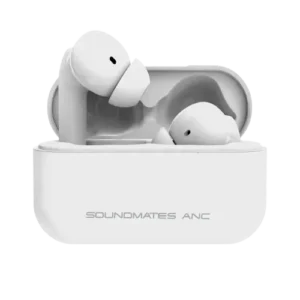
| Document Detail | Information |
| Document Type | User Manual |
| Brand Name | Tzumi |
| Product Name | Soundmates Pro ANC |
| PDF File Size | 1.22 MB |
| Number of Pages | 2 |
| Languages Covered | English, French |
Tzumi Soundmates Pro ANC
The Tzumi Soundmates Pro ANC are true wireless Bluetooth 5.0 earbuds with active noise canceling, touch controls, a rechargeable charging case, and automatic pairing. They are designed for wireless music playback and phone calls while allowing the user to switch active noise canceling on or off from the right earbud.
The earbuds turn on automatically when removed from the charging case and can also be powered manually using the touch controls. The charging case uses a USB Type-C connection, while status lights on the earbuds and case indicate charging progress. The manual also provides a reset procedure for clearing saved Bluetooth connection records when pairing needs to be started again.
Main Features
The manual identifies the following primary features:
- Active noise canceling.
- Bluetooth 5.0.
- Automatic pairing.
- Touch-sensitive earbud controls.
- Rechargeable charging case.
- Approximately 5 hours of playback with ANC enabled.
- Multiple additional earbud charges from the charging case.
The manual contains conflicting recharge-count information: its feature panel states 4× recharge in case, while the technical specification table states that the case recharges the earbuds 3 times. This conflict should be checked before publishing a definitive recharge-count claim.
What’s Included
The package contents shown in the manual include:
- Soundmates ANC earbuds.
- Charging carry case.
- USB Type-C charging cable.
- Small, medium, and large earbud tips.
Product Overview
The product diagram identifies the following main components:
| Component | Purpose |
| Soundmates ANC Earbuds | Left and right wireless earbuds |
| Touch Area | Used for calls, music, power, and ANC controls |
| Ear Tip | Fits in the ear; multiple sizes are supplied |
| Charging Carry Case | Stores and recharges the earbuds |
| USB Type-C Port | Used to recharge the case |
| LED Light | Shows charging status |
The manual illustrates touch areas on both earbuds and the USB Type-C charging connection on the case.
Technical Specifications
| Specification | Manual Value |
| Bluetooth Version | V5.0 |
| Earbud Battery | Lithium Battery, 40 mAh each |
| Charging Case Battery | Lithium Battery, 500 mAh each, as printed in the manual |
| Charging Port | Type-C |
| Input Voltage | 4.5–5.5V; supports max. 12V voltage protection |
| Earbud Charging Time | Approximately 1.5 hours |
| Case Charging Time | Approximately 2 hours |
| Playing Time — ANC Off | Approximately 6 hours |
| Playing Time — ANC On | Approximately 5 hours |
| Case Recharge Count | 3 times, according to the specification table |
| Standby Time — Earbuds in Charging Case | 180 days |
| Frequency | 20 Hz–20 kHz |
How to Pair the Soundmates Pro ANC
The earbuds use Bluetooth pairing with the device name Soundmates ANC.
Initial Bluetooth Pairing
- The earbuds should be removed from the charging case.
- The Bluetooth pairing list should be opened on the phone or other compatible device.
- Soundmates ANC should be selected from the Bluetooth device list.
- After connection, the earbuds are ready for use.
The earbuds are designed to pair with each other automatically before connecting to the phone.
How to Turn the Earbuds On
The Soundmates Pro ANC can be powered on in either of two ways.
Automatic Power On
The earbuds should be removed from the charging case. They will automatically power on.
Manual Power On
Either the right or left earbud touch control should be held for approximately 2 seconds.
The earbud announces “Power On” when it starts.
How to Turn the Earbuds Off
Two power-off methods are provided.
Using the Charging Case
Both earbuds can be placed back into the charging case.
Manual Power Off
The touch control on an earbud should be held for approximately 5 seconds.
The user will hear “Power OFF” when the earbud switches off.
Touch Control Guide
| Function | Touch Command |
| Power On | Hold the right or left earbud for 2 seconds |
| Power Off | Hold an earbud for 5 seconds |
| Answer Call | Touch right or left earbud once |
| End Call | Touch right or left earbud twice |
| Reject Call | Hold right or left earbud for 2 seconds until the prompt is heard |
| Play/Pause | Touch right or left earbud twice |
| Next Song | Touch the right earbud 3 times |
| Previous Song | Touch the left earbud 3 times |
| ANC On/Off | Hold the right earbud for 2 seconds |
Phone Call Controls
Answer a Call
Either the right or left earbud should be touched once.
End a Call
Either earbud should be touched twice.
Reject an Incoming Call
The right or left earbud should be touched and held for approximately 2 seconds until the prompt sound is heard.
Music Playback Controls
Play or Pause Music
The right or left earbud should be touched twice.
Skip to the Next Song
The right earbud should be touched three times.
Return to the Previous Song
The left earbud should be touched three times.
The left and right earbuds therefore perform different functions for track navigation.
Active Noise Canceling Mode
The Soundmates Pro ANC includes an active noise canceling mode controlled from the right earbud.
To switch ANC:
- The right earbud touch control should be held for approximately 2 seconds.
- The user should wait for the voice prompt.
- The earbuds announce either “Noise Canceling ON” or “Noise Canceling OFF.”
The control can be repeated to switch between the two states.
Battery Life With ANC On or Off
The specification table gives the following approximate playback times:
| ANC Setting | Approximate Playing Time |
| ANC Off | 6 hours |
| ANC On | 5 hours |
Battery runtime can therefore be shorter while active noise canceling is enabled.
Charging the Earbuds
The earbuds recharge inside the supplied charging case.
How to Charge the Earbuds
- Both earbuds should be placed into the charging case.
- Charging begins automatically when the case has remaining battery power.
- The case indicator flashes red while the earbuds are charging.
- The earbud LEDs remain red during charging.
- The earbud LEDs turn off when the earbuds are fully charged.
- After the earbuds finish charging, the light on the case remains solid red.
The approximate earbud charging time listed in the manual is 1.5 hours.
Charging the Carry Case
The charging case uses the included USB Type-C cable.
The approximate case charging time is 2 hours.
The manual lists an input range of 4.5–5.5V and states that the unit supports maximum 12V voltage protection.
Resetting Earbud Pairing
The manual provides a reset procedure for clearing saved connection records and pairing the earbuds again.
Reset Procedure
- Both earbuds should be removed from the charging case.
- Both earbuds must be powered off.
- The touch controls on the left and right earbuds should both be held for approximately 10 seconds.
- The user should continue holding until “Device Pairing” is heard.
- This process clears the saved connection records.
- The earbuds will automatically pair with each other again.
- The user should wait until “Soundmates Connected” is heard.
- The Bluetooth pairing list should then be opened on the phone.
- Soundmates ANC should be selected to reconnect the earbuds.
The manual specifically reminds the user to make sure both earbuds are powered off before starting the reset procedure.
LED and Voice Prompt Guide
| Indicator or Prompt | Meaning |
| “Power On” | Earbud has been manually powered on |
| “Power OFF” | Earbud has been manually powered off |
| Earbud LED solid red | Earbud is charging |
| Earbud LED turns off | Earbud charging is complete |
| Case light flashing red | Earbuds are charging |
| Case light solid red after charging | Earbud charging cycle has finished |
| “Noise Canceling ON” | ANC has been enabled |
| “Noise Canceling OFF” | ANC has been disabled |
| “Device Pairing” | Pairing records are being cleared/reset |
| “Soundmates Connected” | Earbuds have paired with each other |
Important Safeguards
The manual provides several safety requirements for normal use.
- The product should only be used for its intended purpose.
- The unit should be kept away from heat sources, direct sunlight, humidity, water, and other liquids.
- It should not be exposed to extremely high or extremely low temperatures because this may damage the battery.
- The earbuds should not be operated if they become wet or moist.
- The product should not be used after it has been dropped or otherwise damaged.
- Electrical repairs should only be carried out by a qualified electrician.
- Improper repairs may create serious risk.
- The product should be kept out of the reach of children.
- The Soundmates Pro ANC are not a toy.
Battery Disposal
The product contains a lithium-polymer battery.
The manual states that lithium-polymer batteries are environmentally safe when fully discharged and directs users to follow applicable local and state laws for proper battery disposal procedures.
FCC Information
The manual states that the device complies with Part 15 of the FCC Rules.
Operation is subject to two conditions:
- The device may not cause harmful interference.
- The device must accept interference received, including interference that could cause undesired operation.
The manual also warns that changes or modifications not expressly approved by the party responsible for compliance could void the user’s authority to operate the equipment.
The device is described as having been tested against the limits for a Class B digital device under Part 15 of the FCC Rules.
If interference occurs, the manual recommends measures including:
- Reorienting or relocating the receiving antenna.
- Increasing the distance between the equipment and receiver.
- Connecting the equipment to an outlet on a different circuit.
- Consulting the dealer or an experienced radio/TV technician.
Customer Support
The manual provides the following Tzumi technical support information:
| Support Method | Contact |
| Phone | 1-855-GO-TZUMI |
| support@tzumi.com |
The product information on the manual identifies Tzumi Inc., New York, NY 10016 as the distributor and carries a © 2021 Tzumi Inc. copyright notice.
Frequently Asked Questions
How are the Tzumi Soundmates Pro ANC paired with a phone?
The earbuds should be removed from the charging case, after which the phone’s Bluetooth menu should be opened and Soundmates ANC selected from the available devices.
How is active noise canceling turned on?
The touch control on the right earbud should be held for approximately 2 seconds until the “Noise Canceling ON” prompt is heard.
How is active noise canceling turned off?
The right earbud should again be held for approximately 2 seconds until “Noise Canceling OFF” is heard.
How long do the Soundmates Pro ANC earbuds play on one charge?
The specification table lists approximately 6 hours with ANC off and approximately 5 hours with ANC on.
How long do the earbuds take to charge?
The manual lists an approximate earbud charging time of 1.5 hours.
How long does the charging case take to charge?
The charging case takes approximately 2 hours according to the specification table.
How are the Soundmates Pro ANC reset?
Both earbuds should first be powered off. The touch controls on both earbuds should then be held for approximately 10 seconds until “Device Pairing” is heard. After the earbuds pair with each other and announce “Soundmates Connected,” the user can reconnect to Soundmates ANC from the phone’s Bluetooth menu.
What does the red LED mean while charging?
A solid red LED on an earbud indicates that it is charging. The earbud LED turns off after it reaches a full charge.