
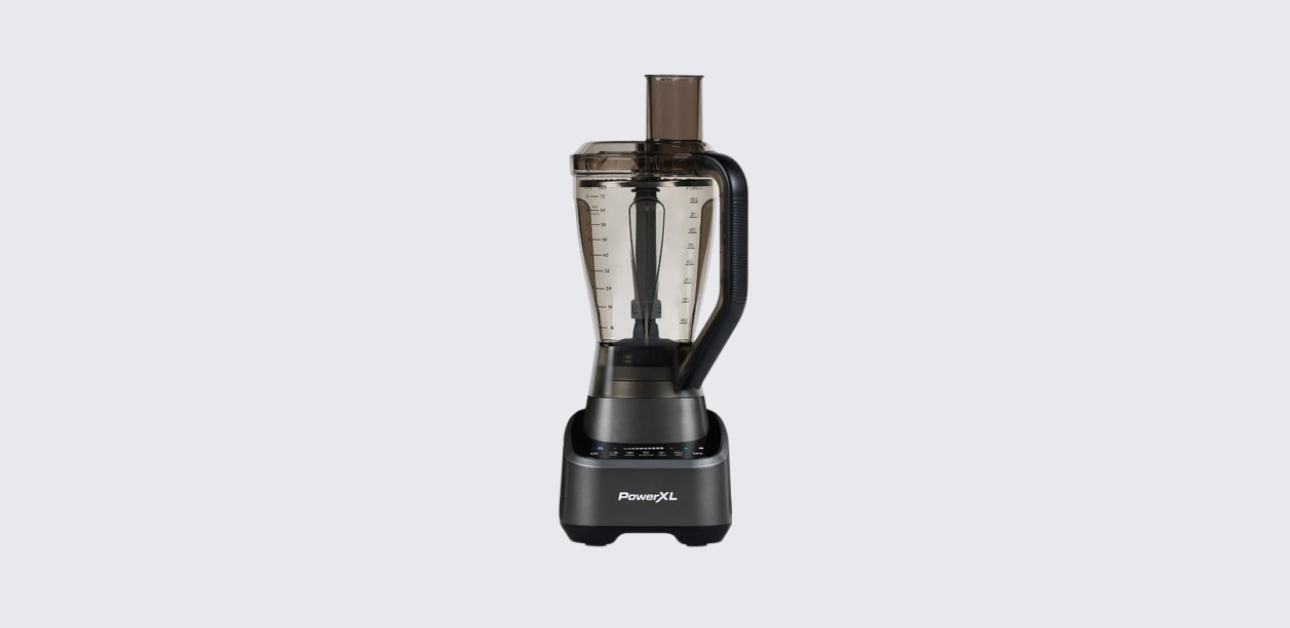
The PowerXL SensiMax BL7019 Series is a multi-function kitchen appliance that combines a high-powered blender and food processor into one system. Equipped with SensiMax™ Technology, the appliance automatically detects ingredients and adjusts blending performance for better results. It includes smart blending modes, manual speed controls, food processing attachments, dicing accessories, slicing discs, and a personal blending cup for on-the-go drinks.
The most important information from the official user manual, including product features, parts, setup instructions, operation, troubleshooting, cleaning, and maintenance.
Product Overview
The PowerXL SensiMax BL7019 is designed for blending, chopping, crushing, dicing, slicing, shredding, and food preparation. The appliance automatically detects whether the blender jar or food processor attachment is installed and displays the appropriate functions on the touchscreen control panel.
Key capabilities include:
- Ice crushing
- Smoothie preparation
- Chopping fruits and vegetables
- Food processing
- Dicing ingredients
- Slicing vegetables
- Shredding cheese and vegetables
- Julienne cutting
- Personal blending
The appliance uses Smart Sensing technology to automatically adjust blending times based on ingredient consistency and volume.
PowerXL BL7019 Specifications
| Specification | Details |
| Product Name | PowerXL Blender/Food Processor |
| Series | BL7019 |
| Technology | SensiMax™ Smart Sensing |
| Voltage | 120V AC, 60Hz |
| Power (BL7019-2MPLA) | 1500W |
| Power (BL7019-2MPTV) | 6.5A |
| Power (BL7019-3MPTV) | 6.5A |
Parts and Components
Main Blender Components
The blender includes the following primary parts:
| Part | Description |
| Blender Lid | Covers the blending jar |
| Pour Spout | Easy pouring after blending |
| Ingredient Slot | Add ingredients while blending |
| Large Blending Jar | Main blending container |
| Blade Assembly | Stainless steel cutting blades |
| Appliance Base | Houses motor and controls |
| Touch Screen | Function selection and operation |
Included Accessories
Depending on the model, the appliance may include:
- Food processor pusher
- Food processor lid
- Dicing blade
- Dicing disc
- Dicing shaft
- Food processor base
- Julienne disc
- Thick slicing disc
- Thin slicing disc
- Blade shaft
- Personal blender jar with lid
- Dicing cleaning tool
- Storage case
The BL7019-3MPTV model includes the most complete accessory package.
SensiMax Smart Technology
One of the appliance’s main features is its Smart Sensing system.
The following functions automatically adjust blending performance based on ingredients:
- Crush
- Smoothie
- Chop
When a smart function is selected, the appliance first analyzes the contents inside the jar and then automatically adjusts blending time and speed. The countdown shown on the display serves only as a guide because actual blending duration changes based on food consistency.
If additional liquid is needed, the display shows:
AL (Add Liquid)
This indicates the mixture is too thick for proper blending.
Touchscreen Control Panel Overview
The touchscreen control panel provides access to all blender and food processor functions.
Control Buttons
| Control | Function |
| Power | Turns appliance on/off |
| Crush | Smart ice crushing |
| Smoothie | Smart smoothie program |
| Chop | Smart chopping mode |
| Pulse | Short bursts of power |
| Dice | Food dicing operation |
| Disc | Slicing, shredding, julienne processing |
| Speed Slider | Manual speed adjustment |
| Start | Begins operation |
| Stop | Stops operation |
Blending Functions Explained
Crush
Designed for:
- Ice cubes
- Frozen fruit
- Frozen ingredients
The appliance can crush up to 2 cups of ice or frozen food. Additional liquid may be required for larger batches.
Smoothie
Creates:
- Fruit smoothies
- Protein shakes
- Frozen drinks
The Smart Sensing system automatically adjusts blending performance for smoother textures.
Chop
Ideal for:
- Fruits
- Vegetables
- Nuts
- Cooked meats
The appliance can chop ingredients from coarse to fine textures.
Pulse
Pulse mode provides short bursts of power for:
- Thick smoothies
- Milkshakes
- Ice breaking
- Ingredient redistribution
The manual recommends using Pulse for no more than 5 seconds at a time and no more than 2 minutes total.
Manual Speed Control
The speed slider allows precise control for:
- Mixing gravies
- Making breadcrumbs
- Pureeing fruits
- Pureeing vegetables
- General blending tasks
Lower speeds work best for mixing, while higher speeds are suitable for pureeing.
How to Set Up the Blender
Before first use:
- Remove all packaging materials.
- Remove protective stickers and plastic bands.
- Wash all removable parts.
- Register the warranty.
- Assemble the blender jar and blade assembly.
- Place the jar on the motor base.
- Plug into a wall outlet.
Blender Assembly
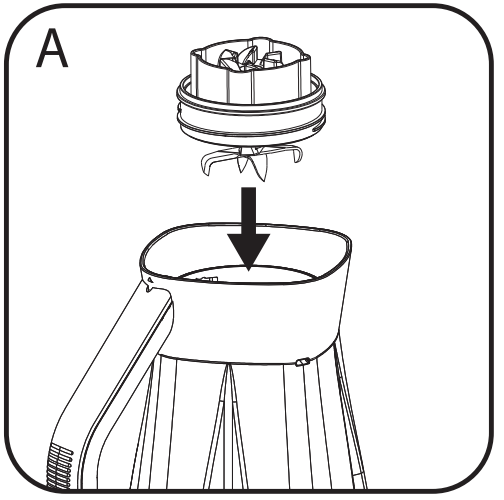
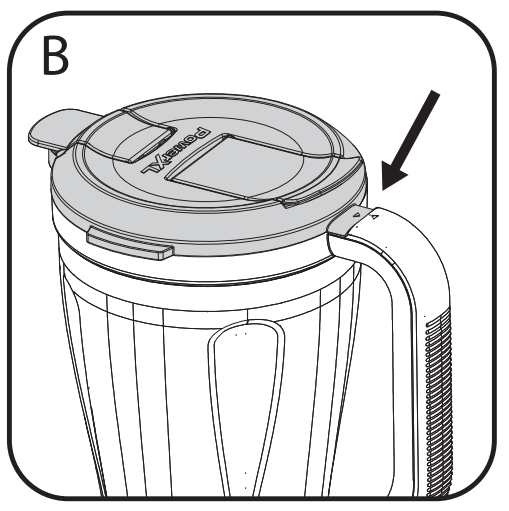
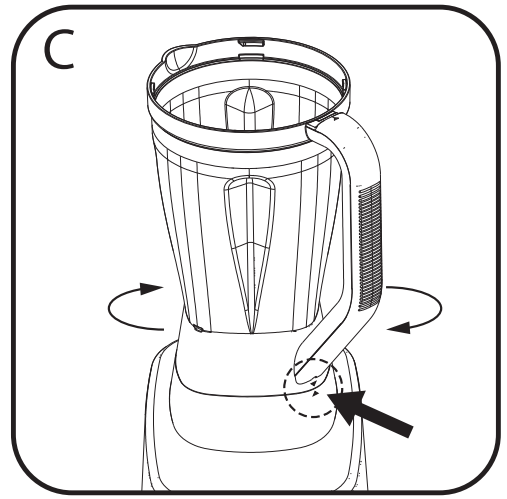
- Turn the jar upside down.
- Insert the blade assembly into the bottom opening.
- Rotate clockwise until secure.
- Install the lid.
- Place the jar onto the appliance base.
- Rotate until locked.
How to Use the Blender
For best results:
- Ensure the appliance is off.
- Add ingredients in the following order:
- Liquids
- Powders
- Soft foods
- Hard foods
- Ice
- Secure the lid.
- Select a smart function or manual speed.
- Press Start.
- Add ingredients through the ingredient slot if necessary.
Important notes:
- Always keep the lid installed during operation.
- Do not blend less than 474 mL of ingredients in the main jar.
- Never remove the lid while blending.
Using the Personal Blender Cup
The included personal blender cup is designed for single-serve beverages.
Guidelines:
- Do not blend hot liquids.
- Use at least 236 mL of ingredients.
- Do not fill beyond the MAX line.
- Hold the cup during blending.
- Install the drinking lid after blending for portable use.
Food Processor Functions
The appliance can operate as a food processor using dedicated attachments.
Available processing functions include:
- Dicing
- Slicing
- Shredding
- Julienne cutting
The touchscreen automatically displays the correct processing functions when the food processor attachment is installed.
Dicing Function
The dicing system can process foods such as:
- Cheese
- Ham
- Firm vegetables
- Cucumbers
For best results:
- Cut food ends for uniform cubes.
- Process softer foods first.
- Freeze soft cheese for 10 minutes before dicing.
- Avoid raw meat and chicken.
Slicing and Shredding Function
The reversible slicing discs allow:
- Thin slicing
- Thick slicing
- Fine shredding
- Coarse shredding
Suitable foods include:
- Carrots
- Potatoes
- Cabbage
- Cheese
- Cucumbers
The manual recommends using gentle pressure on the food pusher and allowing the appliance to perform the cutting work.
Julienne Function
The Julienne disc creates thin vegetable strips suitable for:
- Salads
- Stir-fries
- Garnishes
Available sizes include:
- 3 mm strips
- 6 mm strips
The Julienne disc is available on selected models.
Blending Tips
For better results:
- Cut food into pieces smaller than ¾ inch.
- Add liquids first.
- Use Pulse for frozen ingredients.
- Start with low speed and increase gradually.
- Avoid overfilling the jar.
- Do not run continuously for more than 2 minutes.
Avoid blending:
- Bones
- Large frozen chunks
- Raw potatoes
- Raw turnips
- Hard cured meats
- Boiling liquids
Troubleshooting
AL Error
Cause: Mixture is too thick or an air pocket formed above the blades.
Solution: Add liquid, stir ingredients, and restart blending.
H Error
Cause: Motor temperature is approaching overheating levels.
Solution: Power off the blender and allow it to cool for approximately one minute.
Er Error
Cause: Touchscreen was activated continuously for more than 30 seconds.
Solution: Clean and dry the touch panel, then restart the appliance.
Smart Functions Not Working
If Smart Sensing functions become inaccurate:
- Add 1 cup of water to the blender jar.
- Install the jar and lid.
- Press Crush and Chop simultaneously for 3–5 seconds.
- When “C” appears, press Play.
- Wait for calibration to complete.
Cleaning and Maintenance
After each use:
- Turn off and unplug the appliance.
- Remove the jar.
- Remove the blade assembly carefully.
- Wash removable parts with warm soapy water.
- Dry thoroughly before storage.
Important:
- Blades are extremely sharp.
- Never immerse the motor base in water.
- Only qualified service personnel should perform repairs.
Safety Information
Important safety reminders include:
- Never blend hot liquids.
- Keep hands away from moving blades.
- Always operate with the lid installed.
- Never exceed the maximum fill level.
- Always use the food pusher for food processing.
- Keep children away during operation.
- Unplug before cleaning or changing accessories.
Warranty Registration and Support
PowerXL recommends registering the appliance warranty after purchase through:
https://hpcsupport.spectrumbrands.com/productRegistration/
For service and repairs, contact authorized PowerXL customer support as described in the official manual. Only qualified personnel should perform internal repairs.