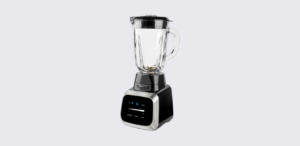
The PowerXL Smart Pro Blender BL6018-1BP is a high-capacity countertop blender designed for smoothies, frappés, salsa, frozen drinks, and everyday blending tasks. Equipped with Smart Sensing Technology, the blender automatically detects ingredient loads and adjusts blending performance to deliver consistent results with minimal effort. It features a large 68-ounce glass blending jar, touchscreen controls, pre-programmed blending functions, manual speed adjustment, and pulse operation.
This guide summarizes the key information from the official PowerXL Smart Pro Blender manual, including setup, operation, controls, troubleshooting, cleaning, and warranty information.
Product Overview
The PowerXL Smart Pro Blender combines manual speed control with intelligent blending programs. Its Smart Sensing system automatically adjusts blending cycles based on the quantity and consistency of ingredients, making it easier to prepare smoothies, frozen beverages, sauces, and other blended recipes.
The appliance features a modern touchscreen interface with dedicated functions for:
- Smoothies
- Frappés
- Salsa
- Pulse blending
- Manual speed control
The large glass jar allows users to prepare family-sized batches while maintaining durability and stability during operation.
PowerXL Smart Pro Blender Specifications
| Specification | Details |
| Model Number | BL6018-1BP |
| Voltage | 120V |
| Frequency | 60Hz |
| Current Rating | 8.5A |
| Jar Capacity | 68 oz Glass Jar |
| Technology | Smart Sensing Technology |
Parts and Components
The blender consists of the following main parts:
| Part | Description |
| Lid Cap | Removable center cap for adding ingredients |
| Lid | Covers the blending jar |
| 68 oz Glass Blending Jar | Main blending container |
| Blade Assembly | Stainless steel cutting blades |
| Jar Base | Secures blade assembly to jar |
| Motor Base | Houses the motor and controls |
| Touchscreen | Digital control panel |
Control Panel Components
The touchscreen includes:
- Start button
- Stop button
- Power button
- Pulse function
- Speed slider
- Smoothie program
- Frappé program
- Salsa program
Smart Sensing Technology
The Smart Pro Blender uses automatic sensing technology to adjust blending cycles according to the amount and consistency of food inside the jar.
When a smart function is selected and the Start button is pressed, the blender automatically blends, pauses, and adjusts speeds as needed. Once the cycle is complete, the appliance shuts off automatically.
This technology removes much of the guesswork involved in preparing smoothies, frozen drinks, and sauces.
How to Set Up the PowerXL Smart Pro Blender
Before using the blender for the first time:
- Remove all packaging materials.
- Remove stickers and protective materials.
- Save the instruction manual.
- Wash all removable parts before use.
Blender Assembly
To assemble the blender:
- Turn the blending jar upside down.
- Insert the blade assembly into the bottom opening.
- Attach the jar base and tighten clockwise.
- Turn the jar upright.
- Install the lid and lid cap.
- Place the jar onto the blender base.
- Plug in the appliance.
The blender is now ready for operation.
How to Use the Blender
For best results:
- Ensure the appliance is switched off.
- Add ingredients in the recommended order:
- Liquids
- Powders
- Soft foods
- Hard foods
- Ice
- Secure the lid and lid cap.
- Plug the appliance into a wall outlet.
- Select a speed or blending function.
- Press Start.
The lid cap can be removed during blending to add ingredients, but the main lid should remain in place while the appliance is operating.
Touchscreen Controls Explained
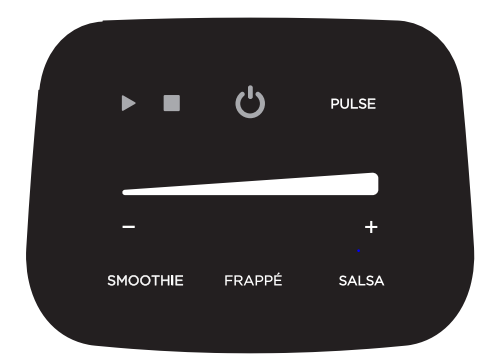
Power Button
When the blender is plugged in, only the power symbol is visible. Touching it activates the touchscreen controls.
If the screen remains inactive for 30 seconds, it dims automatically to conserve energy.
Start Button
After selecting a speed or smart function, press Start to begin blending.
Stop Button
Stops the blender immediately at any time during operation.
Speed Slider
The touchscreen speed slider allows precise manual control.
- Move toward “-” for lower speeds.
- Move toward “+” for higher speeds.
This feature is useful when adjusting blending consistency manually.
Pulse Function
Pulse mode provides short bursts of power and is ideal for:
- Ice crushing
- Frozen ingredients
- Chunky textures
For safety, Pulse requires two button presses before activation.
The manual recommends using Pulse for no more than 5 seconds at a time and no more than 2 minutes total.
Smart Functions
The PowerXL Smart Pro Blender includes three automatic programs.
Smoothie Function
Best for:
- Fruit smoothies
- Protein shakes
- Breakfast drinks
The blender automatically adjusts the blending cycle for smooth consistency.
Frappé Function
Designed for:
- Milkshakes
- Frozen coffee drinks
- Margaritas
- Daiquiris
The program uses blending and pulsing cycles to handle frozen ingredients efficiently.
Salsa Function
Ideal for:
- Salsa
- Guacamole
- Dips
- Chunky sauces
The program maintains texture while preventing over-processing.
Speed and Function Guide
| Function | Purpose |
| Low Speed | Blending and quick cleaning |
| Medium Speed | Breadcrumbs and dry ingredients |
| High Speed | Pureeing fruits and vegetables |
| Pulse | Ice crushing and frozen foods |
| Smoothie | Smooth drinks and shakes |
| Frappé | Frozen beverages |
| Salsa | Chunky sauces and dips |
Blending Tips and Best Practices
For optimal performance:
- Cut ingredients into pieces smaller than ¾ inch.
- Add liquid ingredients first.
- Start blending at low speed before increasing speed.
- Use Pulse when blending ice or frozen ingredients.
- Avoid overfilling the jar.
- Do not run continuously for more than 1½ minutes.
If ingredients stick to the sides:
- Press Stop.
- Remove the lid.
- Scrape down the sides with a rubber spatula.
- Resume blending.
Foods to Avoid Blending
The manual advises against blending:
- Large frozen chunks
- Raw potatoes
- Sweet potatoes
- Raw turnips
- Bones
- Hard cured meats
- Boiling liquids
Allow hot liquids to cool for at least five minutes before blending.
Troubleshooting Guide
Error 1: Air Bubble Detected
Symptoms
The touchscreen flashes continuously.
Cause
A large air bubble has formed in an overly thick or dry mixture.
Solution
- Add more liquid.
- Stir the mixture.
- Resume blending.
Error 2: Motor Overheated
Symptoms
The touchscreen displays two quick flashes followed by one longer flash repeatedly.
Cause
The motor has overheated.
Solution
- Unplug the blender.
- Allow it to cool for approximately 20 minutes.
- Restart after cooling.
Cleaning and Maintenance
Always unplug the appliance before cleaning.
Routine Cleaning
- Remove the blending jar.
- Unscrew the jar base.
- Remove the blade assembly carefully.
- Wash removable components.
The glass jar can be placed on the dishwasher’s bottom rack, while smaller parts should be placed on the top rack.
Quick Self-Clean Method
For fast cleanup:
- Add 1 cup of hot water.
- Add one drop of dish soap.
- Blend on low speed for 30 seconds.
- Rinse thoroughly.
Cleaning Precautions
- Never immerse the motor base in water.
- Do not use abrasive cleaners.
- Avoid rough scouring pads.
- Handle blades carefully.
Safety Information
Important safety reminders include:
- Always operate with the lid installed.
- Keep hands away from moving blades.
- Never place the blade assembly on the base without the jar attached.
- Supervise children around the appliance.
- Unplug before cleaning or changing components.
- Never immerse the appliance in water.
Warranty and Customer Support
The PowerXL Smart Pro Blender includes a two-year limited warranty covering defects in materials and workmanship. Proof of purchase is required.
https://hpcsupport.spectrumbrands.com/productRegistration/
General Warranty Support: 800-577-1557
Parts and Accessories: 1-800-738-0245