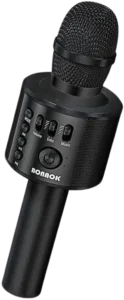
| Brand Name | BONAOK |
| Product Name | Q37 Wireless Microphone & HIFI Speaker |
| Model Number | Q37 |
| File Size | 0.53 MiB |
| Number of Pages | 2 |
| Languages Covered | English and Japanese |
BONAOK Q37 Wireless Microphone & HIFI Speaker
The BONAOK Q37 combines a handheld wireless microphone with a built-in HiFi speaker for singing, music playback and compatible phone recording. It connects to mobile devices over Bluetooth under the device name Q37 and also includes an audio/recording cable for wired recording. BONAOK-Q37-Wireless-Microphone-…
The microphone uses a built-in lithium-ion battery, charges from a DC 5V USB connection, and normally requires about 2 hours for charging. The manual states an operating time of approximately 8 to 10 hours under normal conditions. BONAOK-Q37-Wireless-Microphone-…
What’s Included
The accessory section on page 1 shows two standard accessories:
| Accessory | Purpose |
| USB Cable | Charges the microphone |
| Audio/Recording Cable | Connects the microphone to a compatible phone for recording |
BONAOK-Q37-Wireless-Microphone-…
Parts and Controls
The product diagram on page 1 identifies the main controls on the microphone’s front control panel.
| Control | Function |
| Bluetooth / SD Card Switch | Switches the audio operating mode |
| Previous | Moves to the previous track |
| Play/Pause | Starts or pauses music playback |
| Next | Moves to the next track |
| Power Switch | Turns the microphone on or off |
| Voice Volume Control | Adjusts microphone voice level |
| Echo Control | Adjusts the amount of reverberation/echo |
The manual’s operating instructions specifically direct the user to adjust voice volume and echo to a suitable level before singing. BONAOK-Q37-Wireless-Microphone-…
Technical Specifications
| Specification | Manual Value |
| Model | Q37 |
| Microphone Type | Capacitance |
| Speaker Output Power | 5W / 6W |
| Frequency Range | 100 Hz-10 kHz |
| Maximum Sound Pressure Level | Greater than 115 dB at 1 kHz, THD <1% |
| Reverb Mode | Echo sound reverberation |
| Power Supply | Built-in lithium-ion battery |
| Battery Capacity | 2200 mAh / 2600 mAh |
| Charging Voltage | DC 5V |
| Normal Charging Time | Approximately 2 hours |
| Normal Operating Time | Approximately 8-10 hours |
The specification section lists two values for speaker output power and battery capacity, so both values are retained here rather than selecting one that may not apply to every Q37 version. BONAOK-Q37-Wireless-Microphone-…
Before First Use
Before using the Q37:
- Check that the USB charging cable and audio/recording cable are present.
- Charge the internal battery if needed.
- Turn the microphone on using its Power button.
- Pair it with a phone over Bluetooth when wireless playback is required.
- Set voice volume and echo to a comfortable level before singing. BONAOK-Q37-Wireless-Microphone-… BONAOK-Q37-Wireless-Microphone-…
How to Turn the BONAOK Q37 On and Off
Press the Power button to turn the microphone on.
When it powers on, the blue indicator light turns on.
Press the Power button again to turn the microphone off, after which the blue light turns off. BONAOK-Q37-Wireless-Microphone-…
How to Connect the BONAOK Q37 to Bluetooth
The Bluetooth device name is:
Q37
To pair the microphone with a phone:
- Turn the Q37 on.
- Open Bluetooth settings on the mobile phone.
- Turn Bluetooth on.
- Search for nearby Bluetooth devices.
- Select Q37.
- Wait for the device to confirm that pairing has completed. BONAOK-Q37-Wireless-Microphone-…
Bluetooth Pairing Password
If the phone asks for a Bluetooth pairing password, enter:
0000 BONAOK-Q37-Wireless-Microphone-…
How to Play Music
After Bluetooth pairing:
- Open a music or karaoke application on the connected phone.
- Select a song or accompaniment track.
- Start playback.
- Adjust music volume from the phone.
- Use the microphone controls to sing along. BONAOK-Q37-Wireless-Microphone-…
The manual gives Kugou as one example of a music application, but the same basic procedure applies to compatible music or singing apps.
How to Adjust Voice and Echo
The Q37 allows the user to adjust microphone sound separately from phone music playback.
Before singing:
- Set the voice volume to a comfortable level.
- Adjust the echo/reverberation control until the preferred effect is reached.
- Adjust music volume from the connected phone. BONAOK-Q37-Wireless-Microphone-…
If there is no noticeable reverberation, the troubleshooting section specifically recommends adjusting the Echo control. BONAOK-Q37-Wireless-Microphone-…
How to Record With the BONAOK Q37
The manual provides a wired recording method using the included audio/recording cable.
Recording With the Audio Cable
- Connect the Micro-USB side of the recording cable to the microphone.
- Connect the 3.5 mm audio connector to the compatible phone.
- Open a recording or singing application.
- Begin recording according to the application’s controls. BONAOK-Q37-Wireless-Microphone-…
Bluetooth Disconnects During Wired Recording
When the audio cable is connected, Bluetooth automatically disconnects. BONAOK-Q37-Wireless-Microphone-…
Recording on iOS
The manual gives separate guidance for iOS users:
- Connect the iPhone to the microphone through Bluetooth.
- Open a compatible singing app.
- Record through that application. BONAOK-Q37-Wireless-Microphone-…
The troubleshooting section notes that iOS support for Bluetooth recording can depend on the application being used. BONAOK-Q37-Wireless-Microphone-…
How to Charge the BONAOK Q37
The microphone automatically shuts down when its battery voltage becomes too low. BONAOK-Q37-Wireless-Microphone-…
Charging Steps
- Connect the USB charging cable to the microphone.
- Connect the other end to a compatible standard USB power connection.
- Check the red charging indicator.
- Leave the microphone charging until the red light goes out. BONAOK-Q37-Wireless-Microphone-…
Charging Light Meaning
| Indicator | Meaning |
| Red light on | Battery is charging |
| Red light off after charging | Charging is complete |
The manual states that normal charging takes approximately 2 hours and that the red indicator automatically turns off when charging finishes. BONAOK-Q37-Wireless-Microphone-…
BONAOK Q37 Battery Life
Under normal conditions, the manual lists an operating time of approximately:
8-10 hours BONAOK-Q37-Wireless-Microphone-…
Actual runtime can vary with speaker volume, battery condition and usage.
Low-Battery Behavior
When battery voltage falls too low, the Q37 automatically switches itself off. BONAOK-Q37-Wireless-Microphone-…
If the microphone unexpectedly powers off, charging the battery should therefore be one of the first troubleshooting steps.
BONAOK Q37 Troubleshooting Guide
The FAQ table in the official manual lists common operating problems, possible causes and recommended solutions. BONAOK-Q37-Wireless-Microphone-…
| Problem | Possible Cause | Recommended Action |
| LED does not light | Battery power is low or charging cable is not connected correctly | Charge the microphone and check the charging cable |
| Microphone not working | Unit is not switched on or voice level is incorrectly adjusted | Turn the microphone on and adjust voice volume |
| No reverberation / echo | Echo control is not adjusted | Adjust Echo to a suitable level |
| Noise during use | Environmental noise or phone-signal interference | Change the distance between the microphone and phone |
| Poor recording | Phone compatibility or weak phone processing performance | Restart the phone or try another compatible phone |
| Music playback stutters | Bluetooth distance is too great or there are obstacles | Move closer to the phone and remove obstructions |
| Accompaniment is weak or silent | Phone volume is low or the music file is poor quality | Increase phone volume or use a higher-quality music file |
| Bluetooth will not pair | Phone is too far away or microphone is already paired to another phone | Move closer or disconnect the previous phone |
| Music sounds distorted | Volume is too high or microphone battery is too low | Lower phone volume and charge the microphone |
| Bluetooth recording does not work on phone | iOS does not support the selected Bluetooth recording method/app | Try a compatible singing app or Android device |
LED Does Not Turn On
If the indicator does not illuminate:
- Charge the microphone.
- Check that the USB charging cable is connected properly.
- Allow the battery to charge before attempting to switch the microphone on again. BONAOK-Q37-Wireless-Microphone-…
Microphone Is Not Working
If the microphone produces no voice output:
- Make sure the microphone is switched on.
- Adjust the voice-volume control.
- Check the battery charge if the unit cannot remain powered. BONAOK-Q37-Wireless-Microphone-…
No Echo or Reverberation
If the microphone sounds dry with no echo effect, adjust the Echo control until the preferred reverberation is heard. BONAOK-Q37-Wireless-Microphone-…
Noise or Interference
The manual lists environmental noise and mobile-phone signal interference as possible causes.
Try changing the distance between the microphone and phone until the interference is reduced. BONAOK-Q37-Wireless-Microphone-…
Poor Recording Quality
Poor recording may result from the phone not matching the microphone well or from limited phone processing performance.
The official troubleshooting guidance recommends:
- Restarting the phone.
- Trying the recording again.
- Using another compatible phone if the problem continues. BONAOK-Q37-Wireless-Microphone-…
Music Playback Keeps Cutting Out
If music becomes intermittent or stutters:
- Move the Q37 closer to the connected phone.
- Remove physical obstructions between the phone and microphone. BONAOK-Q37-Wireless-Microphone-…
Accompaniment Is Too Quiet
If background music sounds weak:
- Increase the mobile phone’s volume.
- Check the quality of the music file.
- Use a higher-quality version of the song when necessary. BONAOK-Q37-Wireless-Microphone-…
Bluetooth Will Not Pair
If the Q37 cannot connect:
- Move the microphone closer to the phone.
- Check whether the microphone is already connected to another phone.
- Disconnect the previous device if necessary.
- Search for Q37 again in Bluetooth settings. BONAOK-Q37-Wireless-Microphone-…
If a pairing code is requested, use 0000. BONAOK-Q37-Wireless-Microphone-…
Sound Is Distorted
The troubleshooting table lists two common causes:
- Phone volume is too high.
- Battery power is too low.
Reduce the phone volume and recharge the microphone. BONAOK-Q37-Wireless-Microphone-…
Bluetooth Recording Does Not Work on iPhone
The manual notes that iOS may not support the required Bluetooth recording output in every application.
It recommends trying another singing app or using a compatible Android phone when necessary. BONAOK-Q37-Wireless-Microphone-…
Service and Warranty Information
The service section states:
- 30-day no-reason money-back guarantee
- 1-year warranty
- 24-hour customer service BONAOK-Q37-Wireless-Microphone-…
The document also says that returns and exchanges are available only for orders placed directly through BONAOK. BONAOK-Q37-Wireless-Microphone-…
The manual encourages customers to contact BONAOK if they have a problem or want to provide feedback, but this particular document does not print a support email address or telephone number. BONAOK-Q37-Wireless-Microphone-…
FCC Compliance
The Q37 complies with Part 15 of the FCC Rules.
Operation is subject to two conditions:
- The device may not cause harmful interference.
- The device must accept received interference, including interference that may cause undesired operation. BONAOK-Q37-Wireless-Microphone-…
The equipment has been tested as a Class B digital device. If it causes interference to radio or television reception, the manual recommends:
- Reorienting or relocating the receiving antenna.
- Increasing separation between the equipment and receiver.
- Connecting the equipment to an outlet on another circuit.
- Consulting a dealer or experienced radio/TV technician. BONAOK-Q37-Wireless-Microphone-…
The manual also states that unapproved modifications may void the user’s authority to operate the equipment. BONAOK-Q37-Wireless-Microphone-…
FCC and ISEDC RF Exposure
The microphone complies with FCC radiation-exposure limits for an uncontrolled environment.
The transmitter should not be co-located or operated together with another antenna or transmitter. BONAOK-Q37-Wireless-Microphone-…
The document also includes Innovation, Science and Economic Development Canada licence-exempt RSS compliance and RF-exposure statements. BONAOK-Q37-Wireless-Microphone-…
Frequently Asked Questions
How do you connect the BONAOK Q37 microphone to Bluetooth?
Turn the Q37 on, open Bluetooth settings on the phone and select Q37 from the available devices. If a password is requested, enter 0000. BONAOK-Q37-Wireless-Microphone-…
How long does the BONAOK Q37 take to charge?
The official manual states that normal charging takes approximately 2 hours. The red charging light turns off automatically when charging is complete. BONAOK-Q37-Wireless-Microphone-…
How long does the BONAOK Q37 battery last?
The manual lists approximately 8 to 10 hours of normal operation after charging. BONAOK-Q37-Wireless-Microphone-…
Why is my BONAOK Q37 microphone not working?
Check that the microphone is turned on, raise the voice-volume level and make sure the battery is charged. If there is still no output, inspect the charging cable and recharge the unit. BONAOK-Q37-Wireless-Microphone-…
Why won’t the BONAOK Q37 connect to Bluetooth?
Move the microphone closer to the phone and check whether it is already paired with another device. Disconnect the previous phone, search for Q37 again and use 0000 if a pairing code is requested. BONAOK-Q37-Wireless-Microphone-… BONAOK-Q37-Wireless-Microphone-…
How do you record with the BONAOK Q37?
Connect the included audio/recording cable between the microphone and compatible phone, then open a recording application and begin recording. Connecting the cable automatically disconnects Bluetooth. The manual provides a separate Bluetooth-based recording method for iOS users. BONAOK-Q37-Wireless-Microphone-…
Why is there no echo on the BONAOK microphone?
The Echo control may be set too low. Adjust the echo/reverberation setting until the desired effect is heard. BONAOK-Q37-Wireless-Microphone-…
Why does music stutter on the BONAOK Q37?
The manual associates interrupted playback with excessive Bluetooth distance or physical obstructions between the microphone and phone. Move the microphone closer and reduce obstacles between the two devices. BONAOK-Q37-Wireless-Microphone-…