
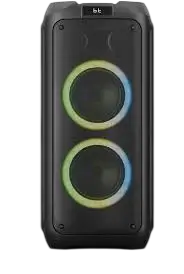
The Philips Party Speaker 4000 Series TAX4509 is a floor-standing Bluetooth speaker with a built-in rechargeable battery, so it can run on AC power or on its own. Besides Bluetooth streaming, it plays MP3 files from a USB drive or TF card, tunes FM radio, and accepts a wired AUX connection. It also has two microphone inputs and a guitar input, which suit karaoke or live playing. Other features include bass and treble knobs, a DBB bass boost, ten light modes, and a recording function. Two identical speakers can be paired for stereo (TWS) playback. A remote control is included.
What’s in the Box
- Main unit (1)
- AC power cord (1)
- Quick start guide (1)
- Safety sheet (1)
- Warranty card (1)
- Remote control (1), battery not included
Microphones, the guitar cable and the AUX audio cable are not supplied.
Product Specifications
| Item | Specification |
| Power output (RMS) | 60W |
| Speaker impedance | Bass 4Ω, Tweeter 6Ω |
| Sensitivity | Bass 88 dB±3dB/m/W, Tweeter 89 dB±3dB/m/W |
| Frequency response | 40Hz–20KHz, -12dB |
| Total harmonic distortion | ≤1% |
| Signal-to-noise ratio | ≥65 dB |
| Bluetooth | Version 5.0, 2.402–2.480 GHz ISM band, 10 m (free space) |
| USB | USB 2.0 Full Speed |
| AC power | 100–240V ~, 50/60 Hz |
| Battery | 7.4V, 5200mAh built-in rechargeable |
| Battery life | Up to 16 hours |
| Battery charge time | 6 hours |
| Weight | 10.7 kg |
| Dimensions (W x H x D) | 325.5 x 705 x 325.5 mm |
The 16-hour figure assumes Bluetooth streaming with lights off, volume set to 14 and DBB off. Actual battery life varies with the music, how you use the speaker, and the battery’s age (p. 13).
Parts and Controls
Top Panel
The top panel holds the power button, two microphone inputs (MIC in1 and MIC in2), the Guitar in jack, the Audio in (AUX) jack, and the USB port and TF card slot. The knobs are:
- Guitar vol
- Treble
- Bass
- Vol (main volume)
- Mic vol
- Echo
The buttons cover the following:
- Previous and next track
- Play/pause
- Bluetooth mode
- Source selection (Bluetooth, AUX, FM, USB, TF)
- Light mode
- DBB
- Record
The AC IN socket is on the rear panel. The model and serial numbers are on the back of the unit, and the manual provides space to write them down.
Remote Control
The remote handles mute, source switching, volume, play/pause, track or channel skipping, DBB, and recording. It also has number keys for choosing a track or stored FM channel directly. A number larger than the total tracks or stored channels gets no response. In USB or TF mode, a repeat button switches between Repeat ONE and Repeat ALL.
To install the battery, slide off the compartment cover, insert two AAA 1.5V batteries with the polarity matching the markings, and slide the cover back. Effective range is 19.7 feet (6 m), and obstacles or other infrared devices nearby can cause erratic operation. Don’t mix old and new batteries or different battery types, and remove the batteries if you won’t use the remote for a long time (p. 5).
Power and Battery
- Plug the AC power cord into the AC IN socket on the rear panel.
- Plug the other end into a power outlet.
- Press the power button on the top panel to turn the speaker on or off.
Complete all other connections before connecting AC power. Check that your outlet voltage matches the voltage printed on the unit, and when unplugging, pull the plug rather than the cord (p. 7).
The display shows a charging indicator while the battery charges. When the speaker is on and not charging, the display shows the battery level, including a low battery warning. If you store the speaker unused for a long time, charge the built-in lithium battery to around 50% every six months to help preserve its capacity (p. 8).
Playing Audio
Bluetooth
- Press the Bluetooth button (or the source button) to switch to Bluetooth mode. “bt” appears on the screen and blinks.
- On your phone or tablet, turn on Bluetooth and select Philips TAX4509.
- A prompt sound confirms the connection, and the screen stops blinking.
- Start playback on your device.
To disconnect, hold the Bluetooth button for 3 seconds. The screen blinks “bt” again and you hear a prompt sound. Disconnect the current device before connecting another. If a device moves out of range, the speaker disconnects and goes back to pairing mode. Range is about 10 meters (30 feet) and shrinks with obstacles or nearby electronic interference (p. 9).
USB or TF Card
Insert a USB drive or TF card and the speaker switches to that source automatically. Use the previous and next buttons to change tracks and the play/pause button to pause or resume. Both sources support MP3 audio only. Supported file systems are FAT, FAT12, FAT16, FAT32 and exFAT. Drives and cards larger than 128G may not play or record correctly (p. 13).
FM Radio
Press the source button until the display shows an FM frequency. Hold the play/pause button for 3 seconds and the speaker scans for stations, saves them automatically, and plays the first one. The previous and next buttons then move through the saved stations.
AUX Input
Press the source button until “AUX” appears. Connect an audio cable (not supplied) from the speaker’s AUX socket to the headphone jack of your device, then play audio on the device.
Sound and Lighting
Turn the Bass and Treble knobs to shape the sound, and use the DBB button to switch the bass boost on or off. DBB is off by default. The light button cycles through light modes 1 to 10 and then off.
Microphone, Guitar and Recording
Plug a microphone into Mic 1 or Mic 2 and adjust it with the Mic vol knob. The Echo knob sets the echo level. For a guitar, use a 6.3mm (1/4″) connector (not supplied) in the Guitar in jack and set the level with Guitar vol.
Recording needs a USB drive or TF card plus a connected microphone or guitar. It works in AUX, USB, TF or FM mode, and it is not available in Bluetooth mode. What gets recorded depends on the mode:
- AUX mode: microphone or guitar plus the AUX input
- FM mode: microphone or guitar plus the radio
- USB or TF mode: microphone or guitar only
Recordings are saved in a “Record” folder that the speaker creates on the drive.
- Short press Record to start recording.
- Press play/pause to pause or resume the recording.
- Short press Record again to stop and return to the current source.
- To play back a recording, hold Record for 3 seconds.
- To delete the recording while it plays, hold Record for 3 seconds again.
Stereo Pairing (TWS)
TWS works only between two identical Philips TAX4509 speakers (p. 11).
- Turn on both speakers. They start in Bluetooth mode and “bt” blinks.
- Hold the play/pause-skip button (the one that also enters TWS) on either speaker for 3 seconds. Both speakers enter stereo pairing mode, and the primary speaker plays a prompt sound.
- When connected, the primary speaker shows “bt” and the secondary shows “sec”. Both play a prompt sound.
- To exit TWS, hold the same button for 3 seconds on either speaker. Both return to Bluetooth mode.
Once paired, the following controls on either speaker apply to both: volume, play/pause, previous/next, DBB, treble, bass and light mode. Microphone volume, echo and guitar volume work only on the primary speaker, and the microphone or guitar must be plugged into that speaker. The source button on the secondary speaker doesn’t work, but pressing it on the primary speaker changes that speaker’s source.
Safety Instructions
- Never remove the casing, lubricate any part, or try to repair the unit yourself. Doing so can void the warranty. Refer servicing to qualified personnel.
- Keep the speaker away from rain, moisture, dripping or splashing. Don’t place liquid-filled objects or lit candles on it.
- Keep it away from direct sunlight, open flames, heat sources and other electrical equipment. Don’t place it on other electrical equipment.
- Keep the power cord, plug or adaptor easy to reach, and protect the cord from being walked on or pinched.
- Unplug the unit during lightning storms or when it will be unused for long periods.
- Use only attachments, accessories and carts or stands specified by the manufacturer.
- Servicing is needed if the unit is damaged, liquid or objects get inside, it has been dropped, or it doesn’t work normally.
- Keep at least 20 cm between the speaker’s radio transmitter and your body (p. 3–4).
Cleaning and Maintenance
Wipe the cabinet with a soft cloth slightly moistened with a mild detergent solution. Don’t use alcohol, spirits, ammonia or abrasive cleaners (p. 13).
Troubleshooting
| Problem | What to try |
| No power | Make sure the unit is charged or connected to power, all cables are secure, and the speaker is switched on. The unit goes into standby automatically 15 minutes after playback ends with no controls used. |
| No response from the unit | Unplug the AC power cord, reconnect it, and turn the unit on again. |
| No sound | Raise the volume. |
| Some USB files won’t play | The folder or file count may exceed a limit, which isn’t a malfunction, or the file formats may be unsupported. |
| USB device not supported | The device is incompatible. Try a different one. |
| Poor audio quality over Bluetooth | Move the device closer and clear any obstacles. |
| Can’t connect a Bluetooth device | Make sure Bluetooth is on for that device, and disconnect any other device already connected to the speaker. |
| Bluetooth connects and drops repeatedly | Move the device closer and clear any obstacles. |
If the problem continues, visit www.philips.com/support and have the model and serial numbers ready.
Frequently Asked Questions
How do I pair my phone with the TAX4509?
Press the Bluetooth button so “bt” blinks on the screen, then select Philips TAX4509 in your phone’s Bluetooth list. A prompt sound confirms the connection.
How long does the battery last, and how long does it take to charge?
Battery life is up to 16 hours under the test conditions listed in the specifications. A full charge takes about 6 hours. Louder volume, lights and other sources may shorten runtime.
Can I use the speaker while it’s charging?
Yes. The speaker can run from AC power through the AC IN socket, and the display shows a charging indicator while the battery charges.
Why can’t I record while in Bluetooth mode?
Recording isn’t supported in Bluetooth mode. Switch to AUX, USB, TF or FM mode and make sure a USB drive or TF card and a microphone or guitar are connected.
What USB drives and memory cards work?
USB 2.0 flash drives and TF cards with the file systems listed above work, with MP3 audio only. Drives or cards over 128G may not play or record correctly.
Can I connect two speakers for stereo sound?
Yes, but only two identical Philips TAX4509 speakers. Use the TWS steps above. Plug the microphone or guitar into the primary speaker if you want to use those inputs.
How far can the Bluetooth connection reach?
About 10 meters (30 feet) in free space. Walls, obstacles and nearby electronic devices can reduce this, and the speaker disconnects and returns to pairing mode if the device goes out of range.
Does the manual give a battery replacement procedure?
No. It only says to disconnect the product from power before removing the integrated battery, and it tells you not to open the casing or attempt repairs yourself. Contact Philips support for service.