
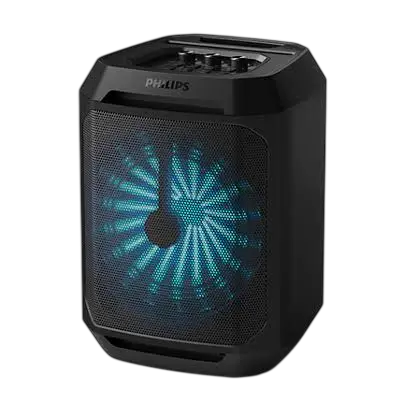
The Philips Party Speaker TAX2208, part of the 2000 Series, is a portable Bluetooth speaker with a built-in rechargeable battery and a carry handle. Besides Bluetooth streaming, it takes a wired audio device through a 3.5mm input and plays MP3 files from a USB drive. It also has a 6.3mm microphone input with volume and echo controls for karaoke. Light effects, a Dynamic Bass Boost (DBB) button, and True Wireless Stereo (TWS) pairing for two identical speakers round out the feature set.
What’s in the Box
- Party speaker (main unit)
- Type-C charging cable
- Quick start guide
- Safety sheet
- Warranty card
The 3.5mm audio cable and the microphone are not supplied.
Parts and Controls
Top panel
- Knobs: Mic vol, Echo, and Vol (main volume)
- Playback buttons: Previous track, Play/Pause, and Next track
- Sound and light buttons: DBB, Light mode switch, and the TWS pair button
- Power and Bluetooth: a Standby button, which also checks battery level, and a Bluetooth button with a white indicator
Rear panel
- Mic in: 6.3mm microphone input
- Audio in: 3.5mm socket for an external device such as an MP3 player
- USB: port for audio playback from a USB device
- Type-C 5V in: charging input
- Battery level indicator: four LEDs
What the buttons do
| Control | Action |
| Standby | Press and hold to switch the speaker on or off. A short press shows the battery level while the speaker is on and not charging. |
| Bluetooth | Press to enter Bluetooth mode. Press and hold to disconnect the current device. |
| DBB | Press to turn Dynamic Bass Boost on or off. |
| TWS | Press to enter TWS pairing mode (two identical TAX2208 speakers only). |
| Light mode | Press repeatedly to cycle through the light modes or turn the light off. |
| Play/Pause | Pause playback, press again to resume. |
| Previous / Next | Skip to the previous or next track. |
Charging the Battery
Plug the Type-C cable into the Type-C 5V input to charge the built-in battery. The battery indicators blink in different patterns to show charging progress (page 4). When the battery is fully charged, the four indicators go out.
To check the charge while the speaker is on and not charging, short press the Standby button. Four lit white LEDs mean roughly 100%. When the battery runs low, all the battery indicators blink together and you hear a prompt tone.
The speaker enters Bluetooth pairing mode every time you turn it on.
Playing Audio Through Bluetooth
The speaker can remember up to eight paired devices. Pairing a ninth replaces the first. The operating range is about 10 meters (30 feet), and obstacles or nearby electronics can reduce it.
Connect a device for the first time
- Press and hold the Standby button to switch on the speaker. It enters pairing mode automatically, and the white button backlight and blue speaker light blink.
- Turn on Bluetooth on your phone or tablet and search for devices.
- Select Philips TAX2208. When the connection succeeds, the button backlight stays solid white.
Connect manually from another source
If the speaker is using the Audio in source, short press the Bluetooth button to switch to Bluetooth and enter pairing mode. Then repeat steps 2 and 3 above.
Disconnect a device
Press and hold the Bluetooth button to disconnect the current device. Disconnect it before connecting a different one. The speaker also disconnects by itself when the device moves out of range.
To clear the Bluetooth pairing information, press and hold the Bluetooth button until the backlight blinks quickly three times and you hear a prompt tone (page 7).
Stereo Sound with Two Speakers (TWS)
TWS works only with two identical Philips TAX2208 speakers.
- Choose one speaker as the master and connect it to your Bluetooth device.
- Long press the TWS button on the master speaker until you hear a prompt tone.
- Long press the TWS button on the other (slave) speaker until you hear a prompt tone.
- When TWS is connected, the button backlight lights up on both speakers.
To leave TWS, long press the TWS button on either speaker until the prompt tone sounds and the backlight goes off.
While paired, these controls on the master are mirrored on the slave: volume, play/pause, previous and next track, light mode, and DBB. Microphone volume, echo, and power on/off are not synchronized, so power each speaker separately.
Using an External Device (Audio In)
- Press and hold the Standby button to turn on the speaker.
- Connect a 3.5mm-to-3.5mm audio cable (not supplied) from the speaker’s Audio in jack to the headphone jack of your player.
- The Bluetooth backlight goes off and the speaker switches to Audio in automatically.
- Start playback on the player itself.
To return to Audio in after using another source, re-insert the cable into the Audio in jack.
Playing Music from USB
Check the print next to the USB port first. If it reads “USB”, the speaker plays audio from a USB device directly. If it reads “USB device”, yours is an early version that does not support USB audio playback, and the manual advises against upgrading its software (page 9). USB playback applies only to units from production batches after May 2025. For speakers bought before May 2025, the manual strongly advises against upgrading the software and says the user bears sole responsibility for any consequences.
Requirements:
- The USB device must contain MP3 files, the only supported format.
- The USB port supports 5V, 2A.
To play, insert the USB device. The speaker switches to USB mode and starts playing automatically. Press the Play/Pause button to start, pause, or resume, and press and hold the Next control to skip to the next track.
Updating firmware via USB
If your speaker is eligible, the update is downloaded from www.philips.com/support (search your model, then “Software and drivers”). Download and unzip the file, then copy the “.upd” upgrade file onto a USB disk. Insert the disk into the speaker’s USB port while the speaker is powered off, then follow the button instructions on page 9 until you hear a prompt sound. When the upgrade finishes, remove the USB stick and turn the speaker back on.
Singing with a Microphone
Plug a wired microphone (not supplied) into the 6.3mm Mic in port. Turn the Mic vol knob to set the microphone level, and turn the Echo knob to adjust the echo effect.
Changing the Light Effect
With the speaker on, press the Light mode button repeatedly to cycle through Light modes 1 to 4 and Light off.
Product Specifications
| Item | Specification |
| Output power | 30W max. |
| Frequency response | 60Hz–15KHz |
| Sensitivity | 91 dB ± 3 dB/W/M |
| Signal-to-noise ratio | 70 dBA |
| Speaker impedance | 3 ohm |
| Bluetooth version | 5.2 |
| Bluetooth frequency band | 2.402 GHz–2.480 GHz (ISM band) |
| Bluetooth range | 10 m (free space) |
| USB | Direct version 2.0 Full Speed; charging support 5V, 2A |
| Battery | Built-in rechargeable, 3.7V, 3000mAh |
| Eco standby power consumption | 0.5W |
| Dimensions (W x H x D) | 250 x 342 x 250 mm |
| Weight | 2.82 kg |
Output power is rated under the IEC 60268 standard and was not tested under the FTC standard. Specifications may change without notice.
Safety Instructions
- Use the speaker only indoors, away from water, moisture, and liquid-filled objects. Do not expose it to dripping or splashing.
- Do not place anything hazardous on the speaker, such as lit candles or objects filled with liquid.
- Leave enough free space around the speaker for ventilation.
- Use it in temperatures between 0°C and 45°C.
- Place it on a flat, hard, stable surface, and never on other electrical equipment.
- Keep it away from direct sunlight, open flames, and heat.
- Use only attachments and accessories specified by the manufacturer.
- Never remove the casing or lubricate any part.
- Make sure the power supply voltage matches the voltage marked on the back or underside of the unit.
- To avoid fire risk, power the speaker only from an external source that complies with PS1 (output capacity under 15W).
Battery precautions
- Do not expose the battery to excessive heat such as sunshine or fire.
- Extreme temperatures during use, storage, or transport, and low air pressure at high altitude, can create safety hazards.
- Replace a battery only with the same or an equivalent type. An incorrect type risks explosion or fire.
- Throwing a battery into fire or a hot oven, or crushing or cutting it, can cause an explosion.
- When storing the speaker unused, the manual recommends charging the built-in lithium battery to about 50% every six months (page 12).
Cleaning and Maintenance
Clean the cabinet with a soft cloth lightly moistened with a mild detergent solution. Avoid alcohol, spirits, ammonia, and abrasives. To keep the warranty valid, do not try to repair the speaker yourself.
Troubleshooting
| Problem | What to try |
| No sound | Adjust the volume. |
| Poor audio quality over Bluetooth | Move the device closer to the speaker or remove obstacles between them. |
| Cannot connect | Make sure Bluetooth is enabled on the device. If the speaker is already connected to another device, disconnect that device and try again. |
| Connection drops and reconnects repeatedly | Move the device closer or clear obstacles. Some devices disconnect Bluetooth automatically to save power, which is not a fault. |
If the problem remains, visit www.philips.com/support. Have the speaker nearby with its model and serial number ready, since both are printed on the back.
Frequently Asked Questions
How do I turn the speaker on and off?
Press and hold the Standby button. The speaker enters Bluetooth pairing mode each time it powers on.
How many Bluetooth devices can it remember?
Up to eight. When you pair a ninth, it replaces the first.
Can I connect two speakers for stereo sound?
Yes, if both are TAX2208 speakers. Connect one (the master) to your device, then long press the TWS button on the master and then on the second speaker, each until the prompt tone sounds. Power on and off is not shared between them.
Why won’t my speaker play music from a USB drive?
Check the print by the USB port. USB audio playback is available only on units marked “USB”, which are from production batches after May 2025. The files must also be MP3, and the port supports 5V, 2A. If your port reads “USB device”, it does not support USB audio, and the manual advises against upgrading the software.
Can I use a microphone?
Yes. Plug a wired 6.3mm microphone into Mic in, then adjust the Mic vol and Echo knobs. A microphone is not included.
How do I know how much battery is left?
Short press the Standby button while the speaker is on and not charging. Four lit white LEDs mean about 100%. When the battery is low, all indicators blink together and a prompt tone sounds.
How do I clear the saved Bluetooth pairings?
Press and hold the Bluetooth button until its backlight blinks quickly three times and a prompt tone sounds.
Can I use the speaker outdoors or near water?
No. It is intended for indoor use only and should be kept away from water, moisture, and liquid-filled objects.