
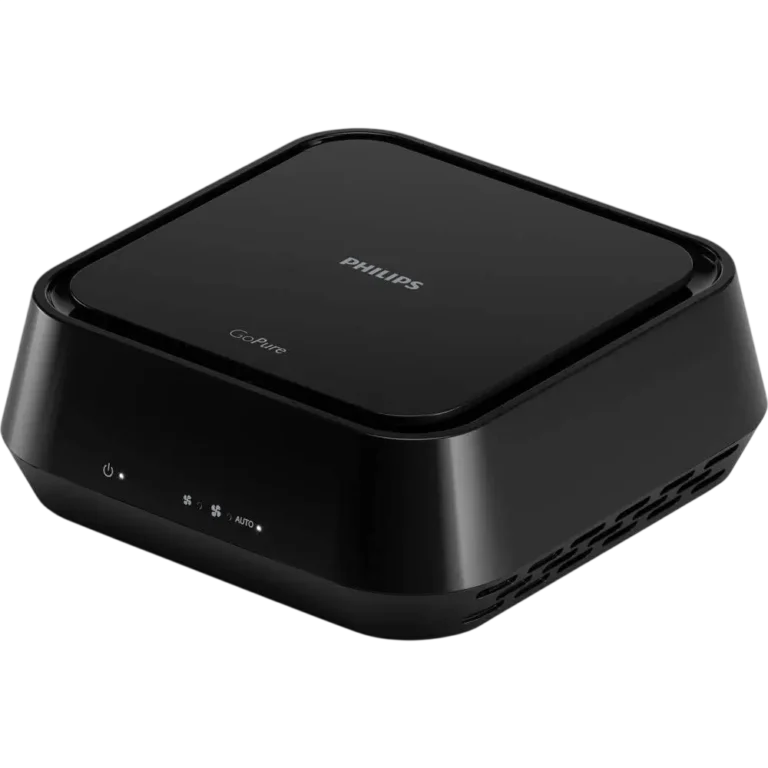
The Philips GoPure GP5212 is a compact car air purifier that runs from your vehicle’s 12V outlet. It uses a multi-layer filtration system built into one replaceable filter, the SelectFilter Plus. The filter removes harmful gases and fine particles such as microorganisms, and it reduces unpleasant odors inside the cabin. The unit has two fan speeds, Silent and Boost, plus an indicator that tells you when the filter needs replacing. You can mount it under a seat with the supplied hook fasteners, or strap it to a headrest or armrest with the included safety belt. The Lumileds warranty covers the product.
Product Specifications
| Specification | Detail |
| Model | GP5212 |
| Power source | 12V car outlet, using the supplied power adaptor |
| Fan modes | Silent and Boost |
| Filter | Philips GoPure SelectFilter Plus |
| Clean air delivery rate (CADR), particles | 16 m³/h |
| CADR, formaldehyde | 6 m³/h |
| CADR, TVOC | 11 m³/h |
| Cleaning energy efficiency grade | High efficiency for particles, formaldehyde and TVOC |
| Noise (sound power level) | 55 dB(A) |
| Birch pollen removal | Up to 90% (Airmid-certified SelectFilter) |
| Mounting positions | Horizontal or vertical (90°) |
Performance figures were tested to GB/T18801-2015 in a 3 m³ chamber (p. 8).
What’s in the Box
- GP5212 car air purifier with SelectFilter Plus (unpack the filter before use)
- Armrest and headrest safety belt
- 12V power adaptor
- Two hook fasteners
Use only the supplied items to install the device. Lumileds declines responsibility for harm or accidents caused by incorrect installation (p. 5).
Parts and Controls
- On/Off/Control button: turns the unit on and off and switches fan speed.
- Silent mode indicator and Boost mode indicator: show the current speed.
- Filter replacement reminder indicator: tells you when the filter is due.
- Air inlet and air outlet: keep both clear.
- Top cover: lifts off to reach the filter.
Installation and Setup
Under the Car Seat (Recommended)
- Peel the liner off the hook fasteners without touching the adhesive side.
- Stick the two strips to the bottom of the device. Clean the contact surface first, since contaminants can weaken adhesion. Isopropyl alcohol is suggested as a general-purpose cleaner.
- Plug the power adaptor into the car’s 12V outlet. Route the cable under the seat to the back, away from the seat rails.
- Connect the cable to the device, then place the device under the seat from the back.
- Press the device down so it attaches firmly to the carpet.
Never slide the device under the seat from the front. Always position it from underneath the back of the seat (p. 6).
On a Headrest or Armrest
- Place the safety belt over the device with the furry surface facing the device.
- Fasten the device to the headrest or armrest.
- Connect the power cable to the device, then plug the adaptor into the 12V outlet.
The safety belt may not fit the armrest of every car model. Never use tape, cord or other improvised fixings. The unit can sit horizontally or vertically (90°).
How to Use the Purifier
The device starts automatically in Silent mode when the vehicle power supply is on. You can also control it manually with the power button:
- Touch the power button to turn the device on. It starts in Silent mode and beeps.
- Touch the button again to switch between Boost and Silent.
- To turn it off, hold the button for 2 seconds until you hear a sound.
For best results, keep the car’s ventilation on low speed and the windows closed. Do not adjust or switch off the device while driving. Park first (p. 7).
Filter Replacement and Reset
When the filter needs replacing, the filter replacement indicator flashes for 30 seconds and then stays lit each time you turn the device on. Replace it right away with a genuine Philips GoPure SelectFilter Plus.
Replace the Filter
- Disconnect the device from power.
- Push the front of the top cover and take it off.
- Remove the old filter.
- Insert a new filter using the groove. It slides in only one way, so do not force it.
Reset After Replacing
The device must be reset after every filter replacement (p. 8).
- Plug the device in and make sure it is turned off.
- With the top cover still open, touch and hold the power button until it beeps.
- Close and lock the top cover. The purifier then runs in normal mode.
- If the reset fails, repeat the steps.
The device shuts down automatically whenever you open the top cover.
Safety Instructions
- Do not clean the device with liquids or spill water, detergents or flammable solvents on it.
- Do not cover the device or let objects block it.
- It is not a toy. Children aged 8 and older and people with reduced physical, sensory or mental capabilities may use it only with supervision or instruction and if they understand the hazards. Children must not clean or maintain it without supervision.
- Handle it with care. It contains high-precision technology, so do not drop or tamper with it.
- Use only the detachable power supply provided. It must be supplied at SELV only.
- Do not manipulate the device while driving.
Cleaning and Maintenance
Disconnect the purifier, then wipe it with a soft cloth only. Replace the filter when the indicator asks for it. Recycle the device through an official waste recycling service rather than household waste. Used filters may go in household waste (p. 4).
Troubleshooting
| Problem | What to do |
| The purifier does not start | Check that the 12V supply is on and the plug is fully inserted. Make sure the top cover is pushed down and locked. Press the power button again. If it still does not start, contact your retailer. |
| The unit runs with the engine off | Some cars keep the 12V outlet powered. The device powers off automatically after two hours of continuous running. Press the power button to restart it. |
| The filter indicator blinks and stays on after a filter change | The power button was not pressed correctly during reset. Repeat the reset steps. If the indicator turns off, the reset worked. |
| The motor stops for a short while | This is normal voltage protection. If the car’s supply fluctuates, the device turns off automatically. Touch the power button to restart. |
| A new car still smells | New cars can release odors continuously. The purifier keeps reducing pollutants. Run it in Boost mode to speed up cleaning. |
Frequently Asked Questions
Where should I install the GoPure GP5212?
Under the car seat is the recommended position. It can also be mounted on a headrest or armrest, horizontally or vertically.
Which mode does it start in?
Silent mode. It starts automatically when the vehicle power is on, and you touch the power button to switch between Boost and Silent.
How do I turn it off?
Hold the power button for 2 seconds until it beeps. A quick touch only changes the speed mode.
How do I know when to change the filter?
After the device is turned on, the filter replacement indicator flashes for 30 seconds and then stays lit. Use a genuine Philips GoPure SelectFilter Plus, then reset the device.
Do I have to reset the purifier after a new filter?
Yes. Hold the power button with the top cover open until you hear a beep. If the indicator blinks and stays on after a filter change, repeat the reset.
Will it drain my car battery?
It powers off after two hours of continuous running. This helps when your car keeps the 12V outlet live with the engine off.
Why did the motor stop by itself?
This is likely voltage protection, which is normal. Touch the power button to restart it.
Can I use it while driving?
It can run while you drive, but do not operate, adjust or switch it off while the car is moving. Stop the car first.