
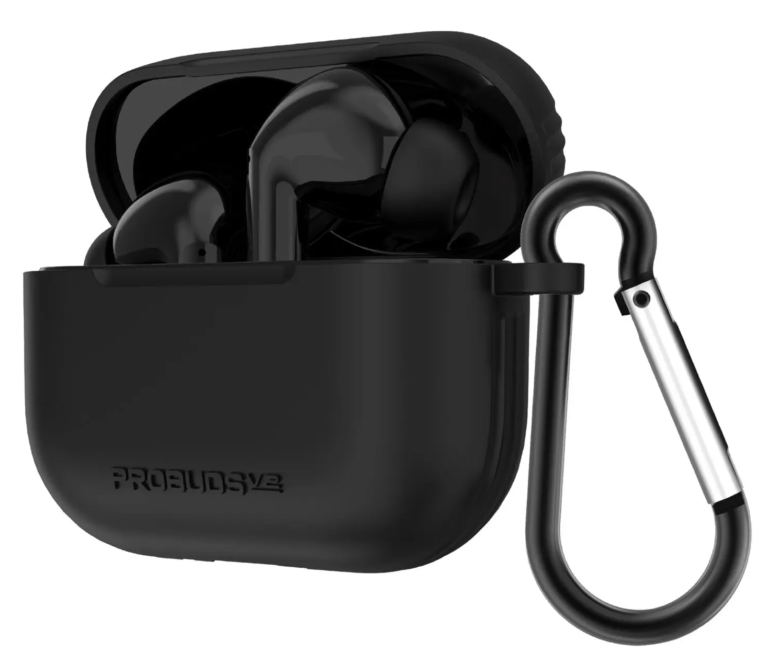
The Tzumi ProBuds V2 are Bluetooth 5.0 wireless earbuds that come with a rechargeable carrying case. Taking both earbuds out of the case turns them on and starts them pairing with each other automatically. To use them with a phone or tablet, turn on its Bluetooth, keep it within 3 feet of the earbuds, and select “Probuds V2” from the device list.
Touch controls on each earbud handle calls, music playback, track changes, and the voice assistant, and the case recharges through a USB Type-C port. Either earbud can also be used on its own.
Earbud Touch Area and Status Indicators
The cover illustration points to a small rectangle on the stem of the earbud, labeled “Touch.” The instructions for calls, music, and the voice assistant all say to touch the right or left earbud, and the earbuds confirm power, pairing, and charging with LED colors and voice prompts.
The manual describes touch areas only; it does not describe any buttons on the earbuds or the case.
| Indicator or prompt | What it means |
|---|---|
| Flashing blue earbud LEDs | The earbuds have been removed from the case and turned on. |
| “Power On” | Confirms a manual power-on after touching an earbud for 5 seconds. |
| “Device Connected” | The Bluetooth connection with your device is complete. |
| “Battery Low” | The earbuds need charging. Place them in their slots in the case. |
How to Turn ProBuds V2 On and Off
Turn on the earbuds using the charging case
- Remove both earbuds from the charging case.
- Check that both earbud LEDs flash blue. The earbuds are on and begin pairing with each other automatically.
Turn on ProBuds V2 without the case
- Make sure the earbuds are outside the charging case and turned off.
- Touch the RIGHT or LEFT earbud for 5 seconds.
- Release when the blue LEDs flicker and you hear “Power On.”
Turn off the earbuds
Place the earbuds back into the charging case. You can also touch the earbuds for a few seconds until you hear “Power OFF.” The manual does not give an exact number of seconds for this second method.
How to Pair ProBuds V2 with an iPhone, Android Phone, or Tablet
The manual describes one pairing procedure for a Bluetooth “smart device” and does not list separate iPhone or Android steps, so the same sequence applies to a phone or tablet.
- Remove both earbuds from the charging case. They begin auto-pairing to each other.
- Keep the earbuds within 3 feet of your phone or tablet. The manual calls out this distance for Bluetooth pairing only.
- Open your device’s Settings menu and turn on Bluetooth.
- In the Bluetooth device list, select “Probuds V2.”
- Listen for “Device Connected.” The earbuds are now ready to use.
How to put ProBuds V2 in pairing mode
ProBuds V2 do not have a separate pairing button or touch-and-hold step. Removing both earbuds from the case starts them pairing with each other. After that, enable Bluetooth on your device and select “Probuds V2” from its list.
If ProBuds V2 do not appear in the Bluetooth list
Check the documented setup conditions first:
- Both earbuds are out of the case and their LEDs are flashing blue.
- The earbuds are within 3 feet of your phone or tablet.
- Bluetooth is turned on in the device’s Settings.
- You are looking for the exact name “Probuds V2.”
The manual does not describe a reset or a way to delete a saved pairing, so there is no further documented step if these checks do not help.
How to Use One ProBuds V2 Earbud
Each earbud can be used independently, so you do not need to wear both.
The manual includes one charging-case note for single-earbud use. If you are using one earbud while the second earbud is fully charged in the case, remove the second earbud before you put the first one back into the case. The manual does not explain the reason for this order.
ProBuds V2 Touch Controls for Calls and Music
Touch the earbud as shown below. The same gestures work on the right or left earbud unless a row names one side.
| Action | Touch control |
|---|---|
| Answer or end a call | Touch the RIGHT or LEFT earbud 2 times. |
| Reject an incoming call | Touch and hold the RIGHT or LEFT earbud for 2 seconds until you hear a prompt sound. |
| Play or pause music | Touch the RIGHT or LEFT earbud 2 times. |
| Skip to the next song | Touch the RIGHT earbud 3 times. |
| Rewind or play the previous song | Touch the LEFT earbud 3 times. |
| Activate the voice assistant or Siri | Touch and hold the RIGHT or LEFT earbud for 2 seconds until you hear a prompt sound. |
The manual lists the same two-second hold for rejecting a call and for the voice assistant without explaining how the earbuds choose between them. Rejecting a call is listed with the call controls, so it applies to an incoming call. The voice assistant function may not work with every device. The manual does not list a touch gesture for changing the volume.
How to Charge ProBuds V2 Earbuds and the Case
Fully charge the earbuds before the first use. The case charges through a standard USB Type-C cable, and the earbuds charge when they sit in their respective slots in the case.
Charge the carrying case
- Plug a standard USB Type-C charging cable into the port on the case.
- Connect the USB end to a power source, such as an AC wall adapter or a computer.
- Watch for the case LED to flash green while it charges.
- When the case is fully charged, the LED stays solid green.
Charge the earbuds
- When you hear “Battery Low,” place each earbud into its respective slot in the charging case.
- Charging starts automatically. The earbud LEDs turn solid red and the LED on the bottom of the case turns white.
- When the earbuds are fully charged, the LEDs on the earbuds and the case turn off.
Charging light quick reference
| Light or sound | Status |
|---|---|
| Case LED flashes green | The case is charging through USB Type-C. |
| Case LED stays solid green | The case is fully charged. |
| Earbud LEDs stay solid red | The earbuds are charging in the case. |
| LED on the bottom of the case is white | The case is charging the earbuds. |
| Earbud and case LEDs turn off | Earbud charging is complete. |
| “Battery Low” voice prompt | The earbuds need charging. |
The manual describes only these light patterns. It does not explain other colors or patterns, such as orange, or a flashing red or white light.
Technical Specifications
These values are printed on the last page of the manual. The charging times are estimates.
| Specification | Manual value |
|---|---|
| Bluetooth technology | Version 5.0 |
| Battery (earbuds) | 40 mAh (×2); 3.7V |
| Battery (charging case) | 500 mAh; 3.7V |
| Input power supply | DC 5V/0.5A |
| Earbuds charging time (estimated) | Approx. 1.2 hr |
| Charging case time (estimated) | Approx. 2 hrs |
| Music playback time | Over 5 hrs |
| Frequency | 20-20KHz |
Features and ratings the manual does not list
Searches for ProBuds V2 often ask about the items below. None is described in the manual, so none should be assumed:
- A water-resistance or dust-resistance (IP) rating
- Active noise cancellation
- A companion app
- A touch gesture for changing the volume
- A way to check the battery percentage; only the “Battery Low” prompt is described
- Standby time, or how many times the case can recharge the earbuds
- A button on the case or the earbuds
- A reset, a factory reset, or a way to delete a saved pairing
Important Safeguards
Follow these precautions from the manual:
- Do not use the unit for anything other than its intended use.
- Keep the unit away from heat sources, direct sunlight, humidity, water, or any other liquid.
- Do not expose the device to extremely high or low temperatures, as this may damage the battery.
- Do not operate the unit if it has been wet or moist, to prevent electric shock, injury to yourself, and damage to the unit.
- Do not use the unit if it has been dropped or damaged in any way.
- Repairs to electrical equipment should only be performed by a qualified electrician. Improper repairs may place the user at serious risk.
- Keep the unit out of reach of children. It is not a toy.
Troubleshooting ProBuds V2 Power, Pairing, and Charging
These checks use only the functions documented above. If the earbuds or case are wet or damaged, stop using them rather than attempting a reset or repair.
The earbuds will not turn on
Remove both earbuds from the case and look for flashing blue LEDs. If an earbud is already outside the case and off, touch it for 5 seconds and listen for “Power On.” If you have heard “Battery Low,” or the earbuds still do not respond, charge them in the case first.
ProBuds V2 are not connecting to a phone
Remove both earbuds from the case so they can pair with each other, keep them within 3 feet of the phone or tablet during setup, turn on Bluetooth in Settings, and look for “Probuds V2” in the device list. “Device Connected” confirms a finished connection. The manual does not give a reset or stored-pairing deletion procedure.
Only one earbud is working
Single-earbud use is a supported mode, so sound from one earbud is not a fault by itself. If you expect both to play, put both earbuds in the case to turn them off, make sure both are charged, then remove both so they pair with each other again. Check that the LEDs on both earbuds flash blue and that you hear “Device Connected.” The manual gives no further repair or synchronization sequence.
The earbuds are not charging as expected
Return each earbud to its respective slot in the case and look for solid red earbud LEDs and a white light on the bottom of the case. To recharge the case, connect its USB Type-C port to a suitable power source and look for a flashing green LED. If the expected lights do not appear, the manual gives no electrical diagnostic or repair procedure.
Frequently Asked Questions
How do I pair ProBuds V2 with my phone?
Take both earbuds out of the charging case so they can pair with each other, then keep them within 3 feet of your phone while you connect. Open Settings, turn on Bluetooth, and choose “Probuds V2” from the list of available devices. You will hear “Device Connected” when pairing succeeds. The same steps apply to an iPhone, an Android phone, or a tablet, because the manual gives one procedure for any Bluetooth smart device.
How do I turn on ProBuds V2 without the charging case?
If an earbud is outside the case and turned off, touch the RIGHT or LEFT earbud for 5 seconds. Release when the blue LEDs flicker and you hear “Power On.” If the earbud does not respond, charge it in the case and try again.
How do I put ProBuds V2 in pairing mode?
ProBuds V2 do not use a separate pairing button or touch-and-hold gesture. Pairing starts when you take both earbuds out of the case, and they connect to each other automatically. Then turn on Bluetooth on your phone or tablet, keep it within 3 feet of the earbuds, and select “Probuds V2” from the list.
Why won’t my ProBuds V2 connect or show up in the Bluetooth list?
Start with the setup conditions. Both earbuds should be out of the case with their LEDs flashing blue, the earbuds should be within 3 feet of your phone or tablet, and Bluetooth should be on. Then look again for the exact name “Probuds V2.” If an earbud is outside the case and shows no light, touch it for 5 seconds to turn it on, or charge it if you hear “Battery Low.” No reset or saved-pairing deletion is documented for this model, so avoid guessed button combinations. If the earbuds are wet or damaged, stop using them.
Where is the touch area on ProBuds V2?
It is on the stem of the earbud. The cover illustration points to a small rectangle there labeled “Touch.” The gestures are described for the right and left earbuds, so use the same marked area on whichever earbud you want to control. No buttons are described on the earbuds or the case.
What are the ProBuds V2 touch controls?
Touch either earbud 2 times to play or pause music, or to answer or end a call. Touch and hold either earbud for 2 seconds until you hear a prompt sound to reject an incoming call or to activate the voice assistant or Siri, which may not work with every device. Touch the RIGHT earbud 3 times for the next song and the LEFT earbud 3 times for the previous song. No touch gesture for volume is listed.
Can I use only one ProBuds V2 earbud?
Yes. Either the left or the right earbud works independently. When you finish, there is one charging-case detail to follow: if the second earbud is fully charged in the case, take it out before you put the first earbud back in.
Why is only one ProBuds V2 earbud working?
Using one earbud is supported, so a single working earbud is not necessarily a fault. If you expect both to play, try this sequence, which combines the documented power, charging, and pairing steps:
- Put both earbuds in the charging case to turn them off.
- Make sure both earbuds are charged. Place them in their slots if you have heard “Battery Low.”
- Remove both earbuds so they pair with each other again, and check that both LEDs flash blue.
- Confirm that your device says “Device Connected.”
The manual does not present this as a fix for one-sided sound and gives no further repair procedure.
How do I know when the ProBuds V2 charging case is fully charged?
While the case charges through USB Type-C, its LED flashes green. When the case is full, the LED stays solid green. Charging the earbuds in the case looks different: the earbud LEDs stay solid red and the LED on the bottom of the case turns white, and both turn off once the earbuds are fully charged.
How long do ProBuds V2 take to charge, and how long do they last?
The earbuds take approximately 1.2 hours to charge and the charging case takes approximately 2 hours. Both figures are estimates. Battery life is listed as music playback time of over 5 hours. No standby time is listed, and neither is the number of times the case can recharge the earbuds.
How do I reset or factory reset ProBuds V2?
No reset or factory reset procedure is documented for ProBuds V2, so avoid guessed button-hold sequences. What is documented is power, charging, and pairing. You can turn the earbuds off by placing them in the case, turn them on by removing them, and connect again by selecting “Probuds V2” in your device’s Bluetooth list. Treat this as a fresh connection attempt, not as a reset.
Are ProBuds V2 waterproof?
No water-resistance or IP rating is listed for ProBuds V2. The safeguards say to keep the unit away from water and any other liquid and not to operate it if it has been wet or moist. Treat the earbuds and case as not protected against rain, sweat, or submersion.