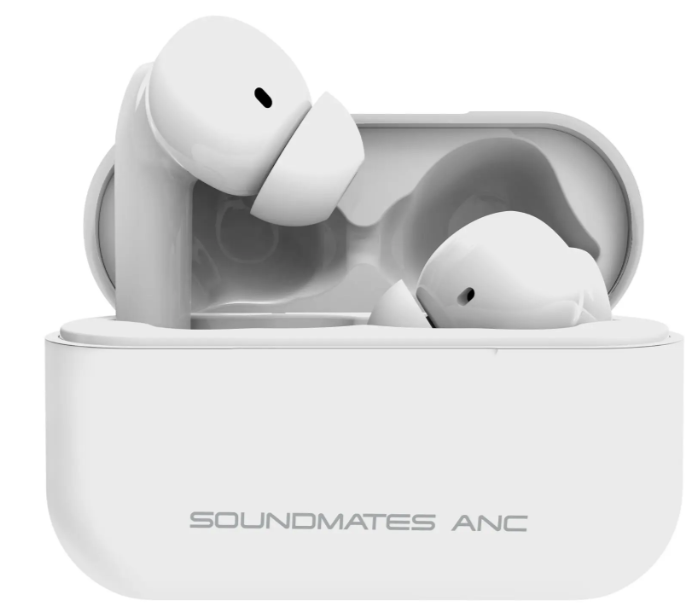
The TZUMI SoundMates Pro ANC are true wireless earbuds designed for immersive audio, active noise cancellation, and everyday convenience. They offer Bluetooth connectivity, touch controls, and a compact charging case that keeps them powered throughout the day.
This manual explains how to set up, pair, charge, and use the earbuds step by step. Even if someone is new to wireless earbuds, this guide makes everything easy to understand.
About SoundMates Pro ANC Earbuds
The TZUMI Pro ANC earbuds combine wireless audio with noise cancellation technology. They help users enjoy music, calls, and media without distractions.
According to the official manual, these earbuds deliver high-quality stereo sound with Active Noise Cancellation (ANC) and include a charging case that supports multiple recharges.
They are ideal for:
- Daily commuting
- Work calls and meetings
- Music and entertainment
- Travel and outdoor use
Key Features and Benefits
The earbuds include several features that improve usability and performance.
Core Features
- Active Noise Cancellation (ANC)
- Bluetooth 5.0 wireless connectivity
- Auto-pairing functionality
- Touch controls for music and calls
- Up to 5 hours of playback time
- Charging case with multiple recharges
These features make the earbuds both practical and easy to use.
Product Components and Package Contents
Understanding the included components helps users get started quickly.
Package Contents
- SoundMates Pro ANC earbuds
- Charging case
- Type-C charging cable
- Multiple ear tip sizes
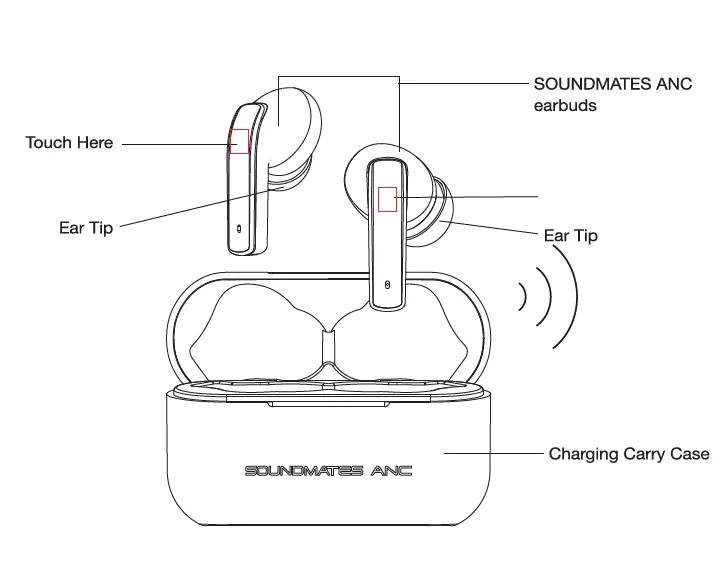
Main Components
- Left and right earbuds
- Touch-sensitive control areas
- Charging case
- LED indicator lights
- Charging port (Type-C)
The official manual diagram clearly shows these components and their layout.
How to Pair the Earbuds
Pairing the TZUMI SoundMates earbuds is simple and takes only a few seconds.
First-Time Pairing Steps
- Remove both earbuds from the charging case
- Open Bluetooth settings on your device
- Select “Soundmates ANC” from the list
- Wait for the connection confirmation
Once paired, the earbuds will connect automatically the next time they are used.
How to Charge the Earbuds and Case
Charging ensures uninterrupted use.
Charging the Earbuds
- Place both earbuds inside the charging case
- Charging starts automatically
- LED indicators show charging status
Charging the Case
- Connect the Type-C cable to the case
- Plug into a power source
- LED light flashes while charging
- Light turns solid when fully charged
The official manual notes that charging completes automatically when the battery is full.
Power Controls
Users can easily turn the earbuds on or off.
Power ON
- Remove earbuds from the case
- Or touch and hold each earbud for about 2 seconds
Power OFF
- Place earbuds back into the case
- Or touch and hold for about 5 seconds
Touch Controls and Functions
The TZUMI SoundMates earbuds use touch gestures instead of physical buttons.
Music Controls
- Play/Pause: Tap earbud twice
- Next Track: Tap three times
- Previous Track: Tap three times (other earbud)
Call Controls
- Answer Call: Tap once
- End Call: Tap twice
- Reject Call: Touch and hold for 2 seconds
These controls allow users to manage playback without using their device.
Active Noise Cancellation (ANC) Mode
The earbuds include ANC to reduce background noise.
How to Enable or Disable ANC
- Touch and hold either earbud for about 2 seconds
- Voice prompt confirms:
- “Noise Cancelling ON”
- “Noise Cancelling OFF”
ANC improves listening experience in noisy environments like public transport or crowded areas.
Resetting and Reconnecting the Earbuds
If pairing issues occur, users can reset the earbuds.
Reset Steps
- Remove both earbuds from the case
- Ensure they are powered off
- Touch and hold both earbuds for about 10 seconds
- Clear previous Bluetooth connections
- Reconnect to the device
This process restores proper pairing.
Audio Performance and Specifications
The earbuds are designed for balanced sound quality.
Technical Specifications
| Feature | Details |
| Bluetooth Version | 5.0 |
| Playback Time | Up to 5 hours |
| Charging Time | ~1.5 hours (earbuds) |
| Case Charging | ~3 hours |
| Frequency Range | 20Hz – 20,000Hz |
These specifications support clear audio and stable wireless connection.
How to Use the Earbuds Effectively
Users can improve performance with simple habits.
Usage Tips
- Use the correct ear tip size for a secure fit
- Keep earbuds charged regularly
- Enable ANC in noisy environments
- Adjust device volume for comfort
These tips help improve sound quality and comfort.
Cleaning and Maintenance
Proper care helps extend the life of the earbuds.
Cleaning Steps
- Turn off the earbuds
- Use a soft, dry cloth to clean surfaces
- Avoid water or chemical cleaners
The manual warns against using harsh substances, as they may damage the product.
Safety Guidelines
Users should follow these precautions:
- Do not expose earbuds to water or extreme temperatures
- Do not disassemble the device
- Avoid dropping the earbuds
- Keep away from children
These guidelines ensure safe usage and prevent damage.
Troubleshooting Common Issues
Problem: Earbuds Not Connecting
Solution:
- Reset the earbuds
- Reconnect through Bluetooth settings
Problem: No Sound
Solution:
- Check device volume
- Ensure earbuds are connected
Problem: Charging Issues
Solution:
- Clean charging contacts
- Ensure case is charged
Most problems are easy to resolve with basic steps.
TZUMI Okko Sonic Party Speaker
Customer Support Information
If users need help with the TZUMI SoundMates earbuds, they can contact:
- Phone: 1-855-GO-TZUMI
- Email: support@tzumi.com
- Website: www.tzumi.com
Support is available for troubleshooting and product assistance.
Frequently Asked Questions
How long do the earbuds last on one charge?
They provide up to 5 hours of playback time.
Do they connect automatically?
Yes, after first pairing, they auto-connect when removed from the case.
How do users turn on ANC?
Press and hold the earbud for about 2 seconds.
Can users take calls with these earbuds?
Yes, they support answering, ending, and rejecting calls.
What should users do if pairing fails?
Reset the earbuds and reconnect through Bluetooth settings.