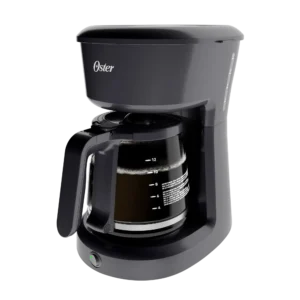
| Field | Details |
| Document Title | Oster 12 Cup Coffeemaker / Cafetera para 12 Tazas |
| Document Type | User Guide / Guía del Usuario |
| Brand Name | Oster |
| Product Name | 12 Cup Coffeemaker |
| Model Number(s) | BVST-JBX Series |
| PDF File Size | 2.11 MB |
| Number of Pages | 12 |
| Languages Covered | English and Spanish |
Oster 12 Cup Coffeemaker BVST-JBX Series
The Oster 12 Cup Coffeemaker BVST-JBX Series is an automatic drip coffee maker designed for preparing up to 12 cups of coffee using ground coffee and fresh water. It features a removable filter basket, a glass decanter, a nonstick warming plate, and a Pause ‘n Serve function that allows a cup of coffee to be poured before the brewing cycle finishes.
Programmable models include a digital clock, Delay Brew scheduling, and a Strong Brew function for preparing coffee with a fuller flavor. The Delay Brew feature allows a brewing time to be scheduled up to 24 hours in advance.
The coffeemaker also includes a two-hour automatic shut-off function. After brewing finishes, the warming plate keeps the coffee hot for up to two hours before switching off automatically.
The appliance is intended for household use and requires proper placement of the filter basket, coffee decanter, and electrical cord. Regular cleaning and descaling help maintain brewing performance and prevent mineral deposits from affecting water flow.
Technical Specifications
| Specification | Details |
| Brand | Oster |
| Model Series | BVST-JBX |
| Product Type | Automatic Drip Coffeemaker |
| Brewing Capacity | 12 Cups |
| Coffee Cup Measurement | 5 US Fluid Ounces per Cup |
| Decanter Type | Glass |
| Coffee Filter | Removable Filter Basket |
| Filter Options | 10–12 Cup Paper Filter or Compatible Permanent Filter |
| Coffee Grind | Medium Grind |
| Recommended Coffee Measurement | 1 Level Tablespoon per Cup |
| Brewing Strength | Regular and Strong Brew |
| Warming Plate | Nonstick |
| Keep-Warm Duration | Up to 2 Hours |
| Automatic Shut-Off | After 2 Hours |
| Pause ‘n Serve | Up to 30 Seconds |
| Programmable Timer | Up to 24 Hours in Advance |
| Clock | Digital, on Programmable Models |
| Water-Level Indicator | Yes |
| Electrical Plug | Polarized |
| Extension Cord Rating | At Least 10 Amps and 120 Volts |
| Intended Use | Household Use Only |
| Warranty | 1-Year Limited Warranty |
The manufacturer’s coffee measurements use a 5-fluid-ounce cup rather than a standard 8-fluid-ounce measuring cup. A full 12-cup batch therefore corresponds to 60 fluid ounces of brewed coffee by the specified cup measure.
The amount of finished coffee may be slightly lower than the amount of water added because some water is absorbed by the coffee grounds and some is lost as steam.
Parts and Components
The Oster BVST-JBX Series coffeemaker includes removable brewing components, a water reservoir, a glass decanter, and an electronic control panel.
Main Coffeemaker Components
| Part Number | Component | Description and Function |
| 1 | Filter Basket Lid | Opens to provide access to the filter basket and water reservoir. |
| 2 | Pause ‘n Serve | Temporarily stops coffee flow when the decanter is removed during brewing. |
| 3 | Warming Plate | Nonstick heated surface that keeps brewed coffee hot. |
| 4 | Glass Decanter | Holds the prepared coffee and includes measurement markings. |
| 5 | Control Panel | Provides access to brewing controls and programmable functions. |
| 6 | Digital LCD with Programmable Clock | Displays the time and scheduled brewing information. |
| 7 | Removable Filter Basket | Holds the coffee filter and ground coffee during brewing. |
| 8 | Shower Head | Distributes water over the coffee grounds. |
| 9 | Water-Level Window | Displays the amount of water in the reservoir. |
Control Panel Buttons and Display
Programmable models include the following controls and indicators.
| Control or Indicator | Function |
| Strong Brew Button | Selects a stronger brewing setting for fuller-flavored coffee. |
| Clock Display | Displays the current time or the programmed brewing time. |
| AUTO/ON/OFF Button | Controls brewing, automatic operation, and shutdown. |
| PROG Button | Selects the clock and Delay Brew programming functions. |
| AM/PM Indicator Light | Indicates the selected time period. |
| TIME Button | Changes the clock or scheduled brewing time. |
| Red Brewing Indicator | Illuminates during active brewing. |
| Blue Strong Brew Indicator | Illuminates when Strong Brew is selected. |
| Flashing AUTO Indicator | Shows that a delayed brewing cycle has been activated and is waiting for its scheduled time. |
Removable Filter Basket
The removable filter basket can be lifted out for filling and cleaning.
It supports an appropriate coffee filter and the desired amount of ground coffee.
A compatible permanent filter may be used instead of disposable paper filters. Permanent filters are not included with every model.
Glass Decanter
The glass decanter collects brewed coffee and provides markings for measuring the water required for different batch sizes.
The decanter must be correctly positioned on the warming plate before brewing begins.
Its lid must also be installed to prevent the filter basket from overflowing.
Nonstick Warming Plate
The warming plate keeps the coffee hot after the brewing process is complete.
Its nonstick surface helps prevent the decanter from sticking to the plate.
The warming function operates for up to two hours before the coffeemaker switches off automatically.
Water-Level Window
The water-level window allows the amount of water inside the reservoir to be checked.
The water reservoir must never be filled past its MAX line.
Important Safety Instructions
The Oster BVST-JBX Series Coffeemaker uses electrical power and heated water during brewing. All safety precautions must be followed to reduce the risk of fire, electric shock, burns, and personal injury.
General Safety Precautions
- All operating instructions must be read before the coffeemaker is used.
- Hot surfaces must not be touched. Handles and knobs must be used when handling the appliance.
- The electrical cord, plug, and coffeemaker must never be immersed in water or other liquids.
- Close adult supervision is required whenever the appliance is used by or near children.
- The coffeemaker must be switched OFF and unplugged when the appliance and clock are not in use.
- The appliance must be unplugged before cleaning.
- All components must cool before they are installed, removed, or cleaned.
- An appliance with a damaged cord, damaged plug, malfunction, or other damage must not be operated.
- Repairs and adjustments must be performed by an authorized service center.
- Accessories other than recommended Oster products must not be used.
- The coffeemaker must not be operated outdoors.
- The power cord must not hang over a tabletop or countertop edge or come into contact with hot surfaces.
- The appliance must not be positioned on or near hot gas burners, electric burners, or heated ovens.
- The coffeemaker must be placed on a hard, flat, and level surface to allow airflow underneath it.
- The appliance is designed for household use only and must not be used for any other purpose.
Hot Water and Steam Safety
Hot water and steam are produced during the brewing cycle.
The filter basket lid must remain closed while coffee is brewing because opening it can cause scalding.
If the filter basket overflows or fails to drain into the decanter, the lid must not be opened immediately. The coffeemaker must be switched off, unplugged, and allowed to cool before the affected components are handled.
Glass Decanter Safety
The glass decanter must be handled carefully to prevent breakage and burns.
- The decanter must not be placed on a stovetop or in any oven, including a microwave oven.
- A hot decanter must not be placed on a wet or cold surface.
- A cracked decanter must not be used.
- A decanter with a loose or weakened handle must not be used.
- Abrasive cleaners and steel wool must not be used on the glass.
- The decanter must be discarded if it has ever been boiled dry.
- The glass must be protected from sharp blows, scratches, and rough handling.
Caution: Cold water must not be poured into a hot decanter. The decanter must be allowed to cool before it is used to measure fresh water.
Electrical Safety and Polarized Plug
The coffeemaker has a polarized electrical plug with one blade wider than the other.
The plug is designed to fit a polarized outlet in only one orientation.
If the plug does not fit:
- Remove it from the electrical outlet.
- Reverse the plug.
- Attempt to insert it again.
- If it still does not fit, contact a qualified electrician.
The electrical plug must never be modified.
Extension Cord Requirements
A short electrical cord is supplied to reduce the risk of entanglement and tripping.
If an extension cord is used, the following requirements apply:
| Requirement | Specification |
| Minimum Current Rating | 10 Amps |
| Minimum Voltage Rating | 120 Volts |
| Placement | Must not hang over a table or countertop edge |
| Safety | Must not be positioned where children can pull it or someone can trip over it |
Adjusting Power Cord Length
The power cord length can be adjusted using the cord-storage slot.
To increase the available cord length:
- Grasp the power cord rather than the electrical plug.
- Gently lift the cord out of the storage slot.
- Pull the cord away from the coffeemaker to the required length.
To shorten the available cord length:
- Grasp the power cord.
- Lift it out of the slot.
- Gently feed the excess cord into the coffeemaker.
- Secure the cord in the slot when finished.
Before First Use
The coffeemaker must be cleaned before its first brewing cycle.
The initial cleaning procedure removes residue from removable parts and rinses the internal brewing system.
Cleaning the Removable Components
- Make sure the coffeemaker is switched OFF and unplugged.
- Remove the glass decanter and its lid.
- Remove the filter basket.
- Remove the permanent filter if one is included.
- Wash the removable components using mild detergent and water.
- Rinse all washed components thoroughly.
Running the Initial Water-Only Brewing Cycle
After washing the removable components:
- Reinstall the filter basket.
- Replace the decanter and its lid.
- Close the filter basket lid.
- Fill the reservoir with fresh water.
- Run a complete brewing cycle using water only, without adding ground coffee or a coffee filter.
- When brewing is complete, switch off the coffeemaker.
- Discard the water collected in the decanter.
- Rinse the decanter, decanter lid, and filter basket.
The coffeemaker is then ready for normal coffee preparation.
Setting the Clock
Programmable BVST-JBX Series models include a digital clock that must be set before scheduled brewing can be used.
How to Set the Current Time
- Insert the power cord into a standard electrical outlet.
- Press the PROG button.
- The word CLOCK will appear on the display.
- Press and hold the TIME button.
- Continue until the current time appears.
- Check the AM/PM indicator on the left side of the display.
The clock is now set.
Adjusting the Clock Faster
The TIME button supports faster adjustment when held down.
| TIME Button Action | Result |
| Press and hold | Advances the displayed time. |
| Hold for approximately 3 seconds | Time advances faster. |
| Hold for approximately 10 seconds | Time advances faster again. |
The AM/PM setting must be checked whenever the clock is adjusted.
Setting the Delay Brew Time
The Delay Brew feature allows a programmable model to prepare coffee automatically at a selected time, up to 24 hours in advance.
The current clock time must be set before a delayed brewing time is entered.
How to Program a Brewing Time
- Complete the clock-setting procedure.
- Press the PROG button twice.
- The word TIMER will appear on the display.
- Press and hold the TIME button.
- Continue until the required brewing time appears.
- Check the AM/PM indicator.
- Press PROG once or wait approximately 10 seconds.
The scheduled brewing time is now stored, but the Delay Brew function has not yet been activated.
How to Check the Programmed Time
- Press the PROG button until TIMER appears.
- Read the displayed scheduled brewing time.
- Wait approximately 10 seconds for the display to return to the normal clock.
The Delay Brew function must be activated separately after programming.
Preparing Coffee for Brewing
Correct coffee measurements, water filling, and filter placement help produce consistent brewing results.
Selecting Ground Coffee
The manufacturer recommends medium-grind coffee for automatic drip brewing.
For measuring coffee, a level tablespoon should be used.
The recommended starting ratio is one level tablespoon of ground coffee for each 5-fluid-ounce cup.
Coffee Measurement Chart
| Desired Coffee Quantity | Ground Coffee |
| 12 Cups | 12 tablespoons |
| 10 Cups | 10 tablespoons |
| 8 Cups | 8 tablespoons |
| 6 Cups | 6 tablespoons |
| 4 Cups | 4 tablespoons |
| 2 Cups | 2 tablespoons |
Measurement Information
- 1 level tablespoon: approximately 5 grams or 15 mL
- 1 coffee cup: 5 US fluid ounces
- More or less coffee may be used according to the preferred taste.
Installing the Coffee Filter
- Lift the filter basket lid.
- Remove the filter basket if necessary.
- Place a suitable 10–12 cup paper cone-style filter or compatible permanent filter into the basket.
- Make sure the filter is centered.
- Press the filter fully into the basket.
When using a paper filter, its sides must fit against the inner walls of the basket.
If a paper filter collapses, it may be dampened before being inserted and filled with coffee.
Adding Ground Coffee
- Measure the required amount of medium-grind coffee.
- Add the coffee to the installed filter.
- Gently shake the basket to level the grounds.
- Confirm that the filter remains centered and fully seated.
Adding Water
- Fill the glass decanter with fresh, cold water to the desired cup marking.
- Use the measurement markings on the decanter to determine the correct amount.
- Pour the water into the coffeemaker’s water reservoir.
- Do not exceed the MAX line.
- Close the filter basket lid.
- Position the empty decanter on the warming plate.
The decanter must be placed fully onto the warming plate before brewing begins.
Warning: If the decanter is not correctly positioned, hot water and coffee grounds may overflow from the filter basket. Overflowing hot liquid can cause injury or property damage.
Water Reservoir Maximum Level
Water must never be added beyond the MAX line.
Overfilling causes excess water to flow through the overflow opening at the back of the reservoir.
How to Brew Coffee Immediately
The following procedure starts a regular brewing cycle without scheduling it for a later time.
Step 1: Prepare the Filter Basket
Install a suitable filter in the removable filter basket.
Add the desired amount of medium-grind coffee.
Step 2: Fill the Reservoir
Use the glass decanter to measure fresh, cold water.
Pour the water into the reservoir without exceeding the MAX line.
Step 3: Position the Decanter
Place the empty decanter on the warming plate.
Make sure the decanter is properly seated and the filter basket is installed correctly.
Step 4: Start Brewing
Press the AUTO/ON/OFF button to begin brewing.
The red indicator light will illuminate, indicating that the coffeemaker is brewing.
Step 5: Allow the Brewing Cycle to Complete
The coffeemaker will pass heated water through the coffee grounds and collect the brewed coffee in the glass decanter.
After the brewing cycle is complete, the appliance automatically changes to warming mode.
Step 6: Keep the Coffee Warm
The warming plate maintains the coffee’s temperature for up to two hours.
After two hours, the coffeemaker automatically switches off.
Step 7: Turn Off the Coffeemaker Manually
To stop the appliance manually, press the AUTO/ON/OFF button until its indicator light goes out.
Step 8: Remove Used Coffee Grounds
After the coffee grounds have cooled:
- Open the filter basket lid carefully.
- Remove the used coffee filter or permanent filter.
- Discard the coffee grounds.
- Clean the filter basket when necessary.
The decanter must be emptied before another pot of coffee is brewed.
The coffeemaker must be turned off when it is no longer being used.
How to Use the Strong Brew Setting
The Strong Brew function changes the brewing process to produce a more full-flavored cup of coffee.
Activating Strong Brew
- Prepare the coffeemaker with the desired amount of water and ground coffee.
- Select the Strong Brew button.
- Check that the blue Strong Brew indicator light illuminates.
- Brew the coffee using the selected setting.
The Strong Brew function adjusts the brewing time to create a fuller flavor.
Returning to Regular Brew
To return to regular brewing strength, press the Strong Brew button again.
The blue indicator light will turn off.
The selected Strong Brew setting remains active until it is changed back to Regular or the appliance is unplugged.
Strong Brew Indicator
| Indicator Status | Brewing Strength |
| Blue Light ON | Strong Brew |
| Blue Light OFF | Regular Brew |
Using the Pause ‘n Serve Feature
The Pause ‘n Serve function allows a cup of coffee to be poured before the complete brewing cycle has finished.
When the decanter is removed, coffee flow into the decanter stops temporarily.
How to Use Pause ‘n Serve
- Start a normal brewing cycle.
- Carefully remove the decanter from the warming plate.
- Pour the desired amount of coffee.
- Return the decanter to the warming plate within 30 seconds.
- Make sure it is correctly positioned beneath the filter basket.
The brewing process will continue after the decanter has been replaced.
Pause ‘n Serve Time Limit
The decanter must not remain away from the warming plate for longer than 30 seconds while coffee is brewing.
Leaving it out longer may cause coffee to overflow from the filter basket.
If Coffee Overflows
If the decanter has been removed for too long and coffee overflows:
- Turn off the coffeemaker.
- Unplug the electrical cord.
- Allow the appliance to cool.
- Wipe up the spilled coffee.
Warning: A hot glass decanter must not be returned to a wet warming plate because the glass may crack.
How to Use Delay Brew to Make Coffee Later
Programmable BVST-JBX Series coffeemakers can start brewing automatically at a selected time.
The Delay Brew function allows coffee to be scheduled up to 24 hours in advance.
Step 1: Set the Current Clock Time
Set the coffeemaker’s clock using the PROG and TIME buttons.
Verify the AM/PM indicator.
Step 2: Prepare the Coffeemaker
- Install a coffee filter.
- Add the desired amount of ground coffee.
- Fill the water reservoir.
- Close the filter basket lid.
- Position the empty glass decanter on the warming plate.
Step 3: Select the Programmed Brewing Time
- Press PROG twice.
- Wait for TIMER to appear on the display.
- Use the TIME button to select the required brewing time.
- Check the AM/PM setting.
- Press PROG once or wait approximately 10 seconds.
The scheduled time has now been entered.
Step 4: Activate Delay Brew
Press the AUTO button twice to activate the delayed brewing function.
The AUTO indicator will flash while the coffeemaker waits for the selected brewing time.
Step 5: Select Brewing Strength
The Strong Brew button may be used to select the preferred brewing strength.
- Blue indicator ON: Strong Brew
- Blue indicator OFF: Regular Brew
Step 6: Automatic Brewing Begins
When the programmed brewing time is reached:
- The flashing AUTO indicator changes to a steady red light.
- The coffeemaker automatically begins the brewing cycle.
- Coffee is collected in the decanter.
Step 7: Automatic Warming and Shut-Off
After brewing finishes, the warming plate keeps the coffee hot for two hours.
The coffeemaker then automatically switches off.
Using Delay Brew Again the Following Day
The coffeemaker does not automatically repeat a scheduled brewing cycle the next day.
To brew coffee at the same scheduled time again:
- Install a fresh filter.
- Add fresh ground coffee.
- Fill the reservoir with water.
- Position the decanter.
- Press AUTO until the indicator flashes to reactivate Delay Brew for the previously selected time.
To use a different scheduled time, the Delay Brew programming procedure must be repeated.
Canceling Delay Brew
To cancel Delay Brew during brewing, press the AUTO button. The red Delay Brew indicator will turn off.
The scheduled time can be selected again when required.
Automatic Shut-Off and Power Interruption
Two-Hour Automatic Shut-Off
After the coffee has finished brewing, the coffeemaker switches to warming mode.
The warming plate keeps the brewed coffee hot for up to two hours.
The appliance then turns off automatically.
Operation After a Brief Power Interruption
If power is interrupted while an operating function is selected, the coffeemaker can act on the last selected operation when power is restored within 10 seconds.
This behavior applies to the operating functions described for the programmable coffeemaker.
Manually Turning Off the Coffeemaker
Press the AUTO/ON/OFF button until the operating light turns off. The electrical cord must be unplugged when the appliance and clock are not in use or before cleaning.
Cleaning and Maintenance Instructions
Regular cleaning removes coffee oils, used grounds, and residue from the coffeemaker. The appliance must always be switched OFF, unplugged, and allowed to cool before cleaning.
Caution: The coffeemaker housing must never be immersed in water or another liquid or placed in a dishwasher.
Daily Cleaning
- Press the AUTO/ON/OFF button until the appliance is OFF.
- Disconnect the electrical plug from the outlet.
- Allow the coffeemaker and its components to cool.
- Remove the filter basket.
- Remove the permanent filter if one is installed.
- Remove the glass decanter and its lid.
- Wash the removable components using hot water and mild liquid soap.
- Rinse thoroughly.
- Allow the components to dry before they are reinstalled.
Harsh abrasive cleaners, steel wool pads, and other abrasive materials must never be used.
Dishwasher-Safe Components
The following components may be cleaned on the top rack of a dishwasher:
| Component | Dishwasher Cleaning |
| Glass Decanter | Top Rack |
| Glass Decanter Lid | Top Rack |
| Removable Filter Basket | Top Rack |
| Permanent Filter, if included | Top Rack |
| Main Coffeemaker Housing | Not Dishwasher Safe |
A thermal carafe, if used with an applicable configuration, must not be placed in a dishwasher.
Cleaning the Glass Decanter
The glass decanter must be handled carefully during cleaning.
Abrasive materials must not be used because scratches can weaken the glass and contribute to breakage.
The decanter should be washed with mild liquid soap and water, followed by thorough rinsing.
How to Descale the Oster BVST-JBX Series Coffeemaker
Minerals such as calcium can accumulate inside the coffeemaker as water passes through the brewing system.
Over time, these deposits can affect brewing performance and cause the machine to brew more slowly.
Regular descaling with white household vinegar helps remove these deposits.
Descaling Solution
The manufacturer specifies the following amount of cleaning solution:
| Cleaning Ingredient | Quantity |
| Undiluted White Household Vinegar | 4 Cups (20 US Fluid Ounces) |
The vinegar must be used without dilution for the descaling procedure.
Step-by-Step Descaling Instructions
- Pour 4 cups, or 20 fluid ounces, of undiluted white household vinegar into the water reservoir.
- Place an empty 10–12 cup basket-style paper filter or compatible permanent filter into the filter basket.
- Close the water reservoir lid.
- Place the empty decanter on the warming plate.
- Make sure the decanter is properly centered.
- Start a brewing cycle and allow approximately 3 cups of the cleaning solution to pass through the coffeemaker.
- Turn the coffeemaker OFF.
- Allow the remaining cleaning solution to stand inside the appliance for 30 minutes.
- Restart the brewing cycle.
- Allow the remaining vinegar solution to pass through the brewing system.
- Discard the cleaning solution collected in the decanter.
- Rinse the decanter thoroughly with clean water.
Rinsing the Coffeemaker After Descaling
The coffeemaker must be flushed with fresh water after the vinegar cleaning cycle.
- Fill the water reservoir with clean, fresh water.
- Place the empty decanter on the warming plate.
- Remove and discard the paper filter used during descaling.
- If a permanent filter was used, remove it and rinse it thoroughly before reinstalling it.
- Start a complete brewing cycle using clean water.
- Allow the cycle to finish.
- Discard the rinse water.
- Repeat the clean-water brewing and rinsing procedure once more.
After the second clean-water rinse cycle, the coffeemaker is ready for normal brewing.
Recommended Descaling Frequency
The frequency of descaling depends on the hardness of the water used.
| Water Type | Recommended Cleaning Frequency |
| Soft Water | Every 80 Brewing Cycles |
| Hard Water | Every 40 Brewing Cycles |
Mineral deposits should be removed regularly to maintain proper brewing performance.
How to Remove Stains from the Glass Decanter
Hard water can leave white mineral stains on the glass decanter.
Coffee may cause these deposits to develop a brown appearance.
Cleaning Solution for Decanter Stains
Use a mixture containing equal parts water and vinegar.
Step-by-Step Decanter Cleaning
- Fill the decanter with the equal-parts water and vinegar solution.
- Allow the solution to remain inside the decanter for approximately 20 minutes.
- Discard the solution.
- Wash the decanter.
- Rinse thoroughly with clean water.
Abrasive cleaners must not be used because scratches may cause the decanter to break.
Troubleshooting Guide
The following troubleshooting procedures address the operating problems identified for the Oster BVST-JBX Series Coffeemaker.
Power Indicator Does Not Illuminate
| Possible Cause | Recommended Action |
| The appliance is unplugged. | Connect the power cord to an electrical outlet. |
| There is a power outage. | Wait until electrical power is restored. |
Coffeemaker Does Not Brew Coffee
| Possible Cause | Recommended Action |
| The coffeemaker is unplugged. | Plug in the appliance. |
| There is a power outage. | Wait for electrical power to return. |
| The water reservoir is empty. | Check the water level and add water. |
| The filter basket is incorrectly installed. | Reinstall the filter basket correctly. |
| The decanter is not fully seated on the warming plate. | Position the decanter correctly. |
Coffeemaker Brews Only Water
If the coffeemaker runs but produces only hot water, the filter basket may not contain any ground coffee.
The correct amount of ground coffee must be added before brewing begins.
Coffeemaker Brews Slowly
Slow brewing may indicate that the coffeemaker needs cleaning. Mineral deposits can accumulate inside the appliance and affect water flow.
The recommended corrective action is to clean and descale the coffeemaker using the specified vinegar procedure.
Filter Basket Overflows
The filter basket may overflow if its components are incorrectly positioned or the coffee flow is interrupted.
| Possible Cause | Recommended Action |
| Filter basket is incorrectly installed. | Insert the filter basket correctly. |
| Decanter is not fully positioned on the warming plate. | Reposition the decanter correctly. |
| Decanter lid is missing. | Place the lid on the decanter. |
| Too much ground coffee has been added. | Remove the filter, discard the grounds, and restart with the appropriate quantity. |
| Decanter has been removed for longer than 30 seconds during brewing. | Switch off and unplug the appliance, allow it to cool, and clean up the spill. |
If excessive coffee grounds caused the overflow, the paper filter must be replaced or the permanent filter rinsed before brewing is restarted.
Warning: A hot decanter must not be returned to a wet warming plate because the glass may crack.
Brewed Coffee Is Not Hot
| Possible Cause | Recommended Action |
| There has been an electrical power outage. | Wait for power to return. |
| The two-hour automatic shut-off has activated. | Brew a fresh pot of coffee for the best result. |
Coffee Has an Unpleasant Taste
| Possible Cause | Recommended Action |
| Coffee grind is unsuitable for automatic drip brewing. | Use coffee ground for automatic drip coffeemakers. |
| Coffee-to-water ratio is incorrect. | Use the recommended coffee measurements. |
| Coffeemaker needs cleaning. | Clean and descale the appliance. |
Coffee Grounds Appear in the Brewed Coffee
| Possible Cause | Recommended Action |
| Filter is not seated correctly inside the basket. | Position the filter properly within the filter basket. |
| Paper filter has collapsed. | Remove the collapsed filter and replace it. |
Before Requesting Service
The following conditions should be checked before contacting an authorized service center:
- The electrical plug is connected.
- Electrical power is available.
- The water reservoir contains water.
- The filter basket is installed correctly.
- The decanter is correctly positioned on the warming plate.
- The decanter lid is installed.
- The correct coffee quantity and grind are being used.
- The coffeemaker has been cleaned and descaled as required.
If the appliance continues to malfunction, it must be inspected or repaired by an authorized service center.
Replacement Parts and Accessories
Replacement Glass Decanter
A replacement decanter may be available from the retailer where the coffeemaker was originally purchased.
If a replacement cannot be located, the manufacturer’s manual provides the following contact numbers for replacement decanter information:
| Region | Replacement Decanter Assistance |
| United States | 1-800-672-6333 |
| Canada | 1-800-667-8623 |
The replacement decanter must be compatible with the Oster BVST-JBX Series Coffeemaker.
A cracked decanter or one with a loose or weakened handle must never be used.
Authorized Repair Service
Repairs and replacements must be performed by Oster or an authorized Oster service center.
The manufacturer’s service section provides the following telephone numbers for locating an authorized service center:
| Region | Authorized Service Assistance |
| United States | 1-800-458-8407 |
| Canada | 1-800-667-8623 |
The model number and purchase date should be available when contacting service personnel.
The model number is located on the bottom of the coffeemaker.
Warranty Information
The Oster BVST-JBX Series Coffeemaker is covered by a 1-year limited warranty under the terms provided by Sunbeam Products, Inc., doing business as Jarden Consumer Solutions.
Warranty Coverage
The manufacturer warrants that the product will be free from defects in materials and workmanship for one year from the original retail purchase date.
During the warranty period, Jarden Consumer Solutions may:
- Repair a defective product or component.
- Replace a defective product or component with a new or remanufactured replacement.
- Provide a similar product of equal or greater value if the original product is unavailable.
The decision to repair or replace the product rests with the manufacturer.
Warranty Eligibility
The warranty applies to the original retail purchaser.
It begins on the original purchase date and is not transferable.
The original sales receipt must be retained because proof of purchase is required when requesting warranty service.
Warranty Exclusions
The limited warranty does not cover normal wear of components or damage resulting from:
- Negligent operation
- Product misuse
- Incorrect electrical voltage or current
- Operation contrary to the manufacturer’s instructions
- Unauthorized disassembly
- Unauthorized electrical or mechanical repairs
- Alterations performed by anyone other than Jarden Consumer Solutions or an authorized service center
- Events such as fires, floods, hurricanes, or tornadoes
Attempting to repair or adjust the appliance’s electrical or mechanical functions may void the warranty.
Warranty Limitations
The manufacturer’s warranty includes limitations concerning incidental and consequential damages, implied warranties, and other liabilities.
Some limitations may not apply in certain states, provinces, or jurisdictions.
The warranty provides specific legal rights, and additional rights may vary according to applicable local laws.
Customer Support Information
For product questions, replacement parts, warranty service, or repair assistance, the manufacturer provides the following contacts.
| Contact Type | Details |
| Brand | Oster |
| Manufacturer | Sunbeam Products, Inc., doing business as Jarden Consumer Solutions |
| United States General Consumer Service | 1-800-334-0759 |
| United States Authorized Service Assistance | 1-800-458-8407 |
| United States Replacement Decanter Assistance | 1-800-672-6333 |
| Canada Consumer Service | 1-800-667-8623 |
| Official Website | www.oster.com |
United States Support
Sunbeam Products, Inc., doing business as Jarden Consumer Solutions
Boca Raton, Florida 33431
Canada Support
Sunbeam Corporation (Canada) Limited, doing business as Jarden Consumer Solutions
20 B Hereford Street
Brampton, Ontario L6Y 0M1
How to Request Warranty Service
For warranty questions or service requests, customers should contact:
- United States: 1-800-334-0759
- Canada: 1-800-667-8623
The manufacturer will provide information about a convenient authorized service center.
Information Required When Contacting Support
The following information should be available before contacting customer service:
- Coffeemaker model number
- Original purchase date
- Customer’s full name
- Address
- Telephone number
- Description of the problem
The model number can be found on the bottom of the coffeemaker.
Important: The appliance must not be mailed directly to the manufacturer’s corporate addresses or returned to the original place of purchase for warranty service.
Frequently Asked Questions
1. How do I use the Oster BVST-JBX Series 12-Cup Coffeemaker?
The filter basket must be installed with a suitable coffee filter and the desired amount of medium-grind coffee. Fresh, cold water is added to the reservoir without exceeding the MAX line, and the glass decanter is positioned on the warming plate. Pressing the AUTO/ON/OFF button starts brewing.
After brewing, the warming plate keeps the coffee hot for up to two hours before automatically switching off.
2. How much coffee should be used in the Oster 12-Cup Coffeemaker?
The recommended measurement is one level tablespoon of ground coffee for each 5-fluid-ounce cup. For a full 12-cup batch, 12 tablespoons of ground coffee are recommended. The quantity may be adjusted according to personal taste.
3. How do I set the clock on the Oster BVST-JBX Coffeemaker?
On programmable models, the power cord must first be connected to an electrical outlet. Pressing PROG displays CLOCK. The TIME button is then held until the correct time appears. The AM/PM indicator must be checked to confirm the selected time.
4. How do I program Delay Brew on the Oster BVST-JBX Series?
The current clock time must be set first. After preparing the filter basket, coffee, water, and decanter, the PROG button is pressed twice until TIMER appears. The TIME button is used to select the desired brewing time.
Pressing PROG once or waiting 10 seconds stores the time. The AUTO button must then be pressed twice to activate Delay Brew. Its indicator flashes until brewing begins automatically.
5. What does the Strong Brew button do?
The Strong Brew function adjusts the brewing time to produce a fuller-flavored coffee. Pressing Strong Brew turns on the blue indicator light. Pressing the button again returns the appliance to Regular brewing strength.
The selected Strong Brew setting remains active until changed or the appliance is unplugged.
6. How long does the Oster BVST-JBX Coffeemaker keep coffee warm?
The warming plate keeps brewed coffee hot for up to two hours after the brewing cycle is complete. The coffeemaker then automatically switches off.
7. How do I clean and descale the Oster 12-Cup Coffeemaker?
The manufacturer recommends using 4 cups, or 20 fluid ounces, of undiluted white household vinegar in the water reservoir. Approximately 3 cups of cleaning solution are brewed through the appliance before it is turned off for a 30-minute soaking period.
The remaining solution is then brewed through, discarded, and followed by two complete fresh-water brewing cycles. The recommended descaling interval is every 80 cycles for soft water or every 40 cycles for hard water.
8. Why is the Oster BVST-JBX Coffeemaker overflowing or brewing slowly?
Overflow may result from an incorrectly installed filter basket, an improperly positioned decanter, a missing decanter lid, excessive coffee grounds, or leaving the decanter off the warming plate for more than 30 seconds during brewing. Slow brewing may indicate mineral buildup and the need for cleaning.
The appropriate filter placement, coffee measurements, decanter position, and descaling procedure should be checked before requesting service.