| Field | Details |
| Document Title | Power Converter – Converts 12V DC Battery Power to AC Household Power |
| Document Type | Owner’s Manual |
| Brand Name | Schumacher Electric |
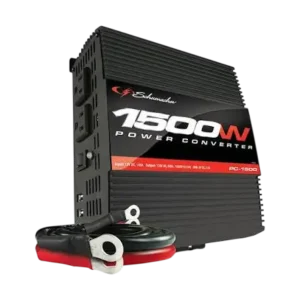
| Product Name | 1500 Watt Power Converter |
| Model Number(s) | PC-1000, PC-1500 |
| PDF File Size | 303 KB |
| Number of Pages | 23 |
| Languages | English, Spanish |
Schumacher 1500 Watt Power Converter PC-1500
The Schumacher PC-1500 Power Converter is a 1500-watt DC-to-AC power inverter designed to convert electricity from a 12V DC battery or power supply into 120V AC household power. It provides two standard AC outlets and two USB ports for operating compatible electrical equipment and electronic devices.
The PC-1500 delivers up to 1500 watts of continuous AC output and supports a momentary surge of 3000 watts for 0.1 second. It uses modified sine wave technology, making it suitable for equipment designed to operate with this type of AC waveform.
The converter includes two high-speed cooling fans, an ON/OFF rocker switch, LED operating indicators, grounding connections, and automatic protection against low battery voltage, excessive input voltage, overloads, and overheating.
The PC-1500 connects directly to a compatible 12V DC power source using heavy-duty positive and negative battery cables. It may also be connected to a properly assembled 12V battery bank to provide additional battery capacity.
Product Features
The Schumacher PC-1500 includes the following features:
- Converts 12V DC battery power into 120V AC electricity.
- Provides up to 1500W continuous AC output.
- Supports a 3000W momentary surge for 0.1 second.
- Modified sine wave AC output.
- Two standard 120V AC power outlets.
- Two USB charging ports rated at 5V DC, 2A.
- ON/OFF rocker switch.
- Green LED power indicator.
- Red LED overload and fault indicator.
- Audible low-voltage and protection alarms.
- Two high-speed cooling fans.
- Automatic thermal shutdown protection.
- Automatic high-voltage protection.
- Low-battery voltage alarm and shutdown.
- Output overload protection.
- Positive and negative battery cable terminals.
- Chassis grounding terminal.
- Included 16 AWG copper grounding wire.
- Heavy-duty 5 AWG battery cables.
- Built-in internal fuses.
- Horizontal mounting capability.
- Support for compatible 12V battery banks.
Technical Specifications
Schumacher PC-1500 Specifications
| Specification | Details |
| Brand | Schumacher Electric |
| Model Number | PC-1500 |
| Product Type | DC-to-AC Power Converter |
| Nominal Input Voltage | 12.8–13.2V DC |
| Operating Input Voltage | 10.5–15.5V DC |
| Nominal Output Voltage | 120V AC ±5% |
| Output Frequency | 60Hz ±2Hz |
| Continuous Output Power | Up to 1500W |
| Surge Output Power | 3000W for 0.1 Second |
| Output Waveform | Modified Sine Wave |
| Maximum Efficiency | 90% |
| Maximum No-Load Current | 0.60A DC at Nominal Input Voltage |
| Input Overvoltage Shutdown | 16 ±0.5V DC |
| Input Undervoltage Alarm | 10.5 ±0.5V DC |
| Input Low-Voltage Shutdown | 10 ±0.5V DC |
| Output Overload Shutdown Level | 1675 ±175W |
| Internal Fuses | Six 30A Fuses |
| AC Power Outlets | Two NEMA 5-15 USA |
| USB Ports | Two |
| USB Output | 5V DC, 2A |
| Cooling Fans | Two High-Speed Fans |
| Positive Battery Cable | 5 AWG, 3.28 Feet |
| Negative Battery Cable | 5 AWG, 3.28 Feet |
| Grounding Wire | 16 AWG, 3 Feet |
| Recommended Operating Air Temperature | 50–80°F |
| Warranty | 1-Year Limited Warranty |
The 1500W rating is the maximum continuous operating output. The 3000W surge rating applies only to the specified 0.1-second interval and must not be treated as continuous power.
Parts and Components
The PC-1500 includes controls, power outlets, ventilation components, and battery connections.
Main Components and Functions
| Component | Function |
| ON/OFF Rocker Switch | Turns the converter on or off |
| Green LED Indicator | Indicates that the converter is switched on and receiving power |
| Red LED Indicator | Signals an overload or interruption in power |
| Two 120V AC Outlets | Supply AC electricity to compatible equipment |
| Two USB Ports | Provide 5V DC power to compatible USB devices |
| Two Cooling Fans | Help remove heat generated during operation |
| Positive Battery Terminal (Red) | Connection point for the positive battery cable |
| Negative Battery Terminal (Black) | Connection point for the negative battery cable |
| Chassis Ground Terminal | Connects the converter to an appropriate grounding point |
| Positive Battery Cable | Connects the converter to the positive terminal of the 12V power source |
| Negative Battery Cable | Connects the converter to the negative connection of the power source |
| Grounding Wire | Provides the required grounding connection |
High-Speed Cooling Fans
The PC-1500 contains two cooling fans.
The cooling fans increase their speed as the connected electrical load increases.
The fans do not run when the converter is switched off.
Control Panel and LED Indicator Guide
ON/OFF Rocker Switch
The ON/OFF rocker switch controls the converter’s operation.
| Switch Position | Function |
| ON (I) | Activates the converter |
| OFF (O) | Turns the converter off |
When the switch is moved to ON and the converter is receiving suitable battery power, the green LED illuminates.
Green LED Power Indicator
The green LED illuminates when the converter is connected to a 12V DC power source and switched on.
It indicates normal power input and converter operation.
Red LED Warning Indicator
The red LED illuminates when the converter detects an operating problem.
Possible causes include:
- Low battery voltage.
- Excessive input voltage.
- Electrical overload.
- Overheating.
The converter can also sound an audible alarm and shut down automatically.
Audible Alarm
The audible alarm provides a warning when the converter detects certain abnormal operating conditions.
For example, a low-voltage alarm sounds when battery input voltage falls to approximately 10.5V.
If voltage continues falling below the shutdown threshold, the converter automatically turns off.
Important Safety Instructions
WARNING: Risk of electric shock, fire, burns, and serious personal injury.
The Schumacher PC-1500 must be operated according to the manufacturer’s safety instructions.
General Electrical Safety
- Read all operating instructions before using the converter.
- Keep the converter out of children’s reach.
- Do not expose the converter to rain or snow.
- Do not operate the converter in wet conditions.
- Do not use unapproved attachments.
- Do not disassemble the converter.
- Repairs must be performed by qualified service personnel.
- Disconnect electrical power before cleaning or maintenance.
- Do not modify the AC outlets.
- Do not modify or extend the supplied 12V power cables.
- Make sure all electrical connections are tight.
- Do not operate equipment that requires more power than the converter can provide.
AC Output Warning
The converter produces 120V AC electricity and can cause electric shock or electrocution, similar to an ordinary household wall outlet.
Use the AC outlets with the same precautions required for household electrical power.
Battery Power Source Restrictions
The PC-1500 must only be connected to a suitable 12V DC battery or power supply.
Do not connect the converter to:
- A 6V battery.
- A 16V battery.
- An AC electrical power source.
- A positive-ground electrical system.
Connecting the converter to an unsuitable power source can cause permanent damage.
Marine Application Restriction
The PC-1500 must not be used in marine applications.
Medical Equipment Warning
The converter must not be used to power sensitive equipment such as medical devices.
Pacemaker Precaution
People with pacemakers should consult their physician before using the converter.
Electromagnetic fields near a heart pacemaker may cause interference or affect its operation.
Wet Conditions Warning
Do not operate the converter when any of the following are wet:
- The converter.
- The connected electrical device.
- The person operating the equipment.
- Surfaces contacting the power source.
Water and other conductive liquids can cause serious electrical injury.
Ventilation Requirements
The PC-1500 produces heat during operation.
Keep several inches of open space around the top and sides of the converter.
Do not block cooling slots or airflow through the unit.
Heat and Flammable Materials
Do not place the converter:
- On or near heating vents.
- Near radiators.
- Near flammable materials.
- In direct sunlight.
- Inside battery compartments.
- Inside engine compartments where fumes may accumulate.
The recommended operating air temperature is 50–80°F.
Ground-Fault Protection
The PC-1500 does not contain an internal Ground Fault Circuit Interrupter (GFCI).
For GFCI protection, the manufacturer specifies a Coleman Cable 02822 GFCI outlet or equivalent.
Personal Safety When Working Near Batteries
When working near lead-acid batteries:
- Wear complete eye protection and protective clothing.
- Keep another person nearby for assistance.
- Remove rings, bracelets, watches, necklaces, and other metal jewelry.
- Never smoke near the battery or engine.
- Keep sparks and open flames away from the battery.
Lead-acid batteries can produce enough short-circuit current to heat or weld metal jewelry, causing severe burns.
Before First Use
The PC-1500 must be installed and connected to a suitable 12V power source before operation.
Initial Preparation
- Inspect the converter for damage.
- Check that the power cables, terminals, and grounding components are in good condition.
- Place the converter on a flat, dry surface.
- Make sure the area is well ventilated.
- Keep the converter away from flammable materials and combustible fumes.
- Confirm that the power source is compatible with the converter’s 12V input requirements.
- Check the connected equipment’s power requirements.
- Keep the converter and power source switched OFF while connecting the cables.
Checking the Connected Equipment
Before operating an appliance, review its electrical power rating.
The continuous power demand must remain within the converter’s 1500W maximum continuous output rating.
Devices containing electric motors may require substantially more power when starting than during normal operation.
Understanding Continuous Power and Starting Surge
Many electrical appliances use more electricity when starting than they use during regular operation.
The owner’s manual identifies two operating stages.
Starting Load
The starting load is the brief increase in power required when a device or motor first turns on.
Continuous Load
The continuous load is the electrical power required while the device operates normally.
How to Calculate Wattage
Electrical equipment commonly lists its operating current in amperes.
For 120V AC equipment, the manual provides the following calculation:
Wattage = Amps × 120V
For example, equipment rated at 5A uses approximately 600W at 120V.
How to Estimate Starting Load
The owner’s manual provides the following general calculation:
Starting Load = 2 × Wattage
For example, equipment rated at 600W may have an estimated starting load of 1200W.
This is a general estimate rather than a guaranteed starting-power requirement.
Power Requirements
| Power Rating | PC-1500 Capacity |
| Continuous Output | Up to 1500W |
| Momentary Surge Output | 3000W |
| Surge Duration | 0.1 Second |
An appliance must be compatible with the converter’s available output power and waveform.
Test the intended equipment before relying on it for regular use.
Modified Sine Wave Power Output
The Schumacher PC-1500 uses a modified sine wave output.
A modified sine wave differs from the pure sine wave electricity normally supplied by household utility outlets.
Modified Sine Wave vs. Pure Sine Wave
| Feature | Modified Sine Wave | Pure Sine Wave |
| Waveform | Stepped AC waveform | Smooth AC waveform |
| PC-1500 Output | Yes | No |
| Typical Household Utility Power | No | Yes |
| Device Compatibility | Must be checked for the connected equipment | Depends on equipment requirements |
Devices Requiring Compatibility Checks
The manufacturer recommends additional caution with the following equipment:
- Switch-mode power supplies.
- Linear power supplies.
- Class 2 transformers.
- Line filter capacitors.
- Shaded-pole motors.
- Fan motors.
- Microwave ovens.
- Fluorescent and high-intensity lamps with ballasts.
- Transformerless battery chargers.
Operating these devices with a modified sine wave converter may cause them to run warmer than normal or overheat.
Check the equipment manufacturer’s instructions before connecting these devices.
Using the Converter With Battery Chargers
When using the PC-1500 to operate a battery charger:
- Connect the battery charger only after checking compatibility.
- Monitor the battery charger’s temperature for approximately 10 minutes.
- Disconnect the charger immediately if it becomes abnormally warm.
Mounting the PC-1500 to a Flat Surface
The PC-1500 can be mounted horizontally to a flat surface.
The mounting location must be:
- Dry.
- Well ventilated.
- Secure.
- Away from flammable materials.
- Away from combustible fumes.
Mounting Instructions
- Turn off and disconnect the converter.
- Position the back of the converter and its mounting bracket against a flat, secure surface.
- Attach the converter using corrosion-resistant screws.
Keep the ventilation slots clear after installation.
How to Ground the Schumacher PC-1500
WARNING: The converter and its power source must be properly grounded before they are switched on.
The PC-1500 includes a 16 AWG copper grounding wire.
Grounding Wire Specifications
| Specification | Details |
| Wire Type | Copper |
| Wire Gauge | 16 AWG |
| Wire Length | 3 Feet |
| Grounding Connection | Chassis Ground Terminal |
Grounding Instructions
- Turn off and disconnect the converter.
- Locate the chassis ground terminal on the rear of the converter.
- Remove the outer hex nut.
- Loosen the second hex nut.
- Attach the grounding wire’s ring connector to the ground terminal.
- Tighten the loosened hex nut securely.
- Replace the outer hex nut and tighten it.
- Connect the opposite end of the grounding wire to a properly grounded location.
Vehicle Grounding
When installed in a vehicle, connect the grounding wire to:
- The vehicle chassis.
- An unpainted section of the frame.
- The engine block.
Fixed-Location Grounding
For fixed installations, connect the grounding wire to a ground rod or another appropriately rated grounding point.
Do not switch on the converter or power source until grounding is complete.
How to Connect the PC-1500 Battery Cables
The PC-1500 uses separate positive and negative cable terminals.
These terminals are located on the left side of the converter.
Battery Cable Specifications
| Cable | Specification |
| Positive Cable | 5 AWG, 3.28 Feet |
| Negative Cable | 5 AWG, 3.28 Feet |
| Positive Terminal | Red |
| Negative Terminal | Black |
Attaching the Cables to the Converter
- Make sure the converter and power source are OFF.
- Locate the positive and negative cable terminals on the left side.
- Remove the hex nut, split lock washer, and flat washer from each terminal.
- Place the positive red cable ring connector onto the positive red converter terminal.
- Place the negative black cable ring connector onto the negative black converter terminal.
- Place a flat washer over each ring connector.
- Place the split lock washer over the flat washer.
- Install the hex nut.
- Tighten the nuts securely.
Correct Terminal Hardware Order
The cable terminal connection uses the following arrangement:
| Position | Component |
| Bottom | Converter Terminal |
| Above Terminal | Cable Ring Connector |
| Above Ring Connector | Flat Washer |
| Above Flat Washer | Split Lock Washer |
| Top | Hex Nut |
The connections must be tight enough that the cables cannot come loose.
Connecting the PC-1500 to a 12V Battery
The converter must be connected to a compatible 12V DC battery or power supply.
Connection Precautions
Before making battery connections:
- Keep hands away from battery terminals.
- Keep hair and loose clothing clear of the connections.
- Remove metal jewelry.
- Wear protective clothing and eye protection.
- Make sure the converter is OFF.
- Confirm the grounding connection is installed.
Battery Connection Instructions
For a negative-grounded vehicle:
- Connect the positive red cable ring terminal to the battery’s positive terminal marked POS, P, or +.
- Connect the negative black cable ring terminal to a heavy-gauge metal section of the vehicle chassis or engine block away from the battery.
- Make sure all connections are secure.
Do not connect the negative cable to:
- The carburetor.
- Fuel lines.
- Thin sheet-metal body parts.
Disconnecting the Battery Cables
When disconnecting the converter:
- Turn the converter OFF.
- Disconnect the negative connection first.
- Disconnect the positive connection afterward.
IMPORTANT: Incorrect battery connections can blow the converter’s fuses and cause permanent damage.
Connecting the PC-1500 to a Battery Bank
The PC-1500 can operate from a correctly assembled 12V battery bank.
The battery bank must be connected in parallel.
DANGER: Incorrect battery-bank wiring can produce voltage high enough to cause electrocution.
Battery Bank Safety
Before assembling a battery bank:
- Wear splash-resistant ANSI-approved safety goggles.
- Wear electrically insulated gloves.
- Work in a clean, well-ventilated area.
- Keep the batteries away from flames, sparks, and ignition sources.
- Connect batteries in parallel only.
- Do not connect 12V batteries in series.
- Connect only similar batteries together.
Do not combine:
- Old and new batteries.
- Flooded batteries and gel batteries.
- Batteries with different capacities.
Battery Bank Extension Cable Requirements
| Cable Length | Minimum Cable Size for PC-1500 |
| 6 Feet or Less | 4 AWG |
| More Than 6 Feet, Up to 10 Feet | 2 AWG |
Connecting Batteries in Parallel
- Connect the positive terminals of the batteries together.
- Connect the negative terminals together.
- Attach the positive and negative output cables to opposite ends of the battery bank.
- Keep the output cables from touching each other.
- Measure the voltage at the output cables before connecting the converter.
- If the measured voltage is greater than 13V, the manual instructs checking whether part of the bank has been incorrectly connected in series.
- Correct any improper wiring before connecting the converter.
- Make sure the converter ON/OFF switch is set to OFF.
- Connect the output cables from the battery bank to the converter.
Battery Bank Capacity Example
The manual illustrates two 12V, 200Ah lead-acid batteries connected in parallel.
| Battery Bank Configuration | Total Capacity |
| Battery 1 | 12V, 200Ah |
| Battery 2 | 12V, 200Ah |
| Combined Battery Bank | 12V, 400Ah |
The manual provides the following calculation:
Battery Bank Capacity = Capacity of One Battery × Number of Batteries
The 200Ah batteries are shown for illustration purposes.
How to Operate the Schumacher PC-1500
Before operating the PC-1500, the converter must be correctly grounded and connected to a compatible 12V power source.
AC Power Operating Instructions
- Connect the converter using the correct cable and grounding procedures.
- Move the ON/OFF rocker switch to ON (I).
- Check that the green LED illuminates, confirming the converter is receiving power.
- Move the rocker switch to OFF (O).
- Make sure the device to be powered is switched OFF.
- Insert the device’s AC power plug into one of the converter’s AC outlets.
- Move the converter switch to ON (I).
- Turn on the connected device.
- When finished, turn the connected device OFF and disconnect it by reversing the operating procedure.
Normal Shutdown Behavior
When the converter is switched OFF, the green LED may flash briefly.
The internal speaker may also produce a short beep.
This is normal operation.
Operating Multiple AC Devices
If more than one device is connected:
- Start one device at a time.
- Avoid starting several devices simultaneously.
- Check the starting and continuous power requirements of each device.
- Keep the total connected load within the converter’s rated capacity.
Starting multiple appliances simultaneously may create an electrical surge and overload the converter.
Using the PC-1500 USB Ports
The PC-1500 includes two USB ports supplying 5V DC power for compatible USB devices.
USB Specifications
| Specification | Details |
| USB Ports | 2 |
| USB Output Voltage | 5V DC |
| USB Output Current Rating | 2A |
USB Operating Instructions
- Connect the converter to a suitable 12V power source.
- Plug the USB device into one of the USB ports.
- Turn on the connected device if required.
- When finished, turn off and disconnect the USB device.
Important: The converter draws power from the battery even when its rocker switch is OFF.
Disconnect the converter from the power source when it is not being used to prevent battery discharge.
Using the PC-1500 With a Television
The PC-1500 includes shielding and filtering to reduce electrical interference.
However, some televisions may experience signal interference when powered by the converter, especially when receiving weak signals.
Reducing Television Interference
If interference appears:
- Change the position of the converter, antenna cables, and television power cord.
- Use an extension cord between the converter and the television to separate the power and antenna cables from the 12V battery source.
- Try coiling the television power cord and the converter’s battery input cables.
- Attach one or more ferrite data-line filters to the television power cord.
- Check the converter’s grounding connection using a minimum 16 AWG wire with the shortest practical length.
Buzzing Sounds From Audio Equipment
Some inexpensive audio systems may produce buzzing sounds when powered by the converter.
The manual attributes this problem to inadequate filtering in the audio equipment’s power supply.
A sound system with a higher-quality power supply or better filtering may be required.
Battery Power Source and Runtime Considerations
The PC-1500 receives electricity from a connected 12V battery or battery bank.
Its operating time depends on:
- Battery age.
- Battery condition.
- Available battery capacity.
- Electrical power demand of connected equipment.
Using a Vehicle Battery
A fully charged automotive battery can supply power to the converter while the vehicle engine is running.
The manufacturer instructs keeping the vehicle engine running while operating the converter from the vehicle battery.
Preventing Excessive Battery Discharge
Whenever possible, recharge batteries before they become more than 50% discharged.
Recharging before deep discharge helps extend battery service life.
Low-Voltage Protection
The PC-1500 has a low-voltage shutdown threshold of approximately 10V DC.
Under moderate or heavy electrical loads, this protection helps reduce excessive battery discharge.
When operating light loads, recharge the battery before the converter reaches its automatic low-voltage shutdown point.
Power Consumption When Not in Use
The converter consumes some battery power even when no device is connected.
Turn the converter OFF and disconnect it from the battery when it is not being used.
PC-1500 Automatic Protection Systems
The PC-1500 includes automatic protection features for abnormal input voltage, excessive output load, and overheating.
Protection System Overview
| Protection Type | Trigger Condition | Converter Response |
| Low Battery Warning | Input Falls to Approximately 10.5V | Audible Alarm |
| Low-Voltage Shutdown | Input Falls Below Approximately 10V | Red LED, Alarm, Automatic Shutdown |
| High-Voltage Shutdown | Input Exceeds Approximately 16V | Automatic Shutdown |
| Output Overload | Excessive Connected Power Demand | Red LED, Alarm, Automatic Shutdown |
| Thermal Shutdown | Internal Temperature Exceeds 80°C (176°F) | Automatic Shutdown |
| Cooling Recovery | Converter Cools After Thermal Shutdown | Automatic Restart |
| High-Voltage Recovery | Voltage Falls Below 14V | Automatic Restart |
Low Battery Voltage Protection
When the battery input voltage drops to approximately 10.5V, the converter sounds a low-voltage alarm.
If the voltage continues to fall below approximately 10V DC, the converter shuts down.
Recharge or replace the battery.
High-Voltage Protection
If input voltage exceeds approximately 16V, the high-voltage protection system shuts down the converter.
The protection system automatically restarts when the input voltage falls below 14V.
Output Overload Protection
The PC-1500 automatically shuts down when the connected electrical equipment creates an excessive load.
The technical overload shutdown level is 1675 ±175W.
This protection threshold does not increase the converter’s 1500W continuous operating rating.
Thermal Protection
The converter contains a thermal protection system.
If the internal thermal resistor exceeds 80°C (176°F), the converter shuts down.
It automatically restarts after cooling.
To prevent repeated overheating:
- Keep cooling vents clear.
- Maintain proper ventilation.
- Reduce the connected electrical load.
- Avoid excessive ambient temperatures.
PC-1500 LED Warning Lights and Alarms
LED Indicator Meanings
| LED Status | Meaning | Action |
| Green LED On | Normal converter operation | Continue operating within rated limits |
| Red LED On | Operating fault or power interruption | Check voltage, load, and temperature |
| Red LED With Low-Voltage Alarm | Input voltage has become too low | Recharge or replace the battery |
| Red LED With Shutdown | Converter protection has activated | Identify and correct the operating problem |
Continuous Audible Alarm
A continuous audible alarm may indicate:
- Battery input voltage below approximately 10.5V.
- Poor or weak battery connections.
The battery should be checked, and the connections should be clean and secure.
How to Reset the Schumacher PC-1500
After an automatic protection shutdown, the converter can be reset using the rocker switch.
Reset Instructions
- Move the converter switch to OFF (O).
- Identify the reason for shutdown.
- Correct the low-voltage, overload, high-voltage, or overheating condition.
- Move the converter switch to ON (I).
- Check whether the green LED illuminates.
If the converter immediately enters shutdown protection again, correct the fault before attempting further operation.
If the PC-1500 Internal Fuse Blows
The PC-1500 contains six internal 30A fuses.
These fuses are not expected to require replacement during normal operation.
A blown fuse is usually caused by:
- Reversed battery polarity.
- A short circuit in the converter or connected equipment.
Important: If an internal fuse blows, the converter must be taken to a qualified technician for repair.
Do not attempt to disassemble the converter or replace the internal fuses without qualified servicing.
Cleaning and Maintenance Instructions
The PC-1500 requires basic inspection and exterior cleaning.
Before Each Use
Check that:
- All converter components are present.
- The housing is in good condition.
- Battery cables are undamaged.
- Grounding connections are secure.
- The cooling vents are clear.
- The converter is not damaged.
Cleaning the Converter
- Turn the converter OFF.
- Disconnect it from the power source and connected equipment.
- Use a clean, dry cloth to wipe the exterior housing.
- Remove dirt and dust from external surfaces.
Maintenance Safety
The converter contains no user-serviceable internal parts.
Do not open or disassemble the housing.
All repairs and servicing must be performed by qualified service personnel.
Storage Instructions
The Schumacher PC-1500 should be stored indoors in a cool, dry location.
Proper Storage Procedure
- Turn the converter OFF.
- Disconnect the converter from the battery.
- Disconnect all connected AC and USB devices.
- Check the converter for damage.
- Wipe the exterior with a clean, dry cloth.
- Store the unit in a cool, dry location away from children.
Electrical Component Disposal
Internal electrical components should be recycled or disposed of properly.
Troubleshooting Guide
The PC-1500 includes a red LED warning indicator, audible alarm, and automatic shutdown protection to help identify operating problems.
Schumacher PC-1500 Troubleshooting Table
| Problem | Possible Cause | Recommended Solution |
| Low or No AC Output Voltage | Poor battery terminal connection | Disconnect and reconnect the 12V power connections |
| Low or No AC Output Voltage | Incorrect voltmeter used for testing | Use a true RMS-reading meter |
| Red LED Is Illuminated | Battery voltage is below 10V | Recharge or replace the battery |
| Red LED Is Illuminated | Connected equipment draws excessive power | Use equipment with lower power requirements or a higher-capacity converter |
| Red LED Is Illuminated | Converter has overheated | Allow the unit to cool, improve ventilation, and reduce electrical load |
| Alarm Sounds Continuously | Input voltage is below 10.5V | Recharge or replace the battery |
| Alarm Sounds Continuously | Weak or poor battery connection | Check and clean the battery connection points |
| Connected Device Does Not Work Correctly | Converter may lack sufficient capacity | Switch the converter OFF and ON to reset it |
Schumacher PC-1500 Has No AC Output
If the converter produces little or no output voltage, check the battery connections.
Poor Battery Connection
Disconnect the converter.
Inspect the 12V battery terminals and cable connections.
Reconnect the cables securely.
Incorrect Voltage Measurement
Because the converter uses a modified sine wave, an unsuitable voltmeter may produce inaccurate output voltage readings.
Use a true RMS-reading meter.
Schumacher PC-1500 Red Light Is On
A red LED indicates an abnormal operating condition.
Low Battery Voltage
If battery voltage falls below approximately 10V, the converter shuts down.
Recharge or replace the battery.
Excessive Electrical Load
If connected equipment draws more power than the converter can provide, overload protection activates.
Disconnect the equipment.
Use a device with a lower power requirement or a converter with a higher capacity.
Converter Overheating
Allow the converter to cool.
Check that the ventilation slots are not blocked.
Reduce the connected electrical load to stay within the 1500W continuous power rating.
Schumacher PC-1500 Alarm Keeps Beeping
A continuous alarm may indicate low input voltage or weak battery connections.
Battery Voltage Is Below 10.5V
Recharge or replace the battery.
Weak or Loose Connections
Check for poor connections between the converter and battery.
Clean the connection points and reconnect the cables securely.
Schumacher PC-1500 Shuts Off Automatically
The converter can shut down automatically because of:
- Low battery voltage.
- Excessive input voltage.
- Electrical overload.
- Excessive internal temperature.
Corrective Action
- Move the converter switch to OFF.
- Check the battery voltage.
- Check the connected equipment’s power consumption.
- Inspect the ventilation area.
- Allow the converter to cool if overheated.
- Correct the problem and switch the converter ON again.
Connected Appliance Will Not Start
Some electrical devices require a higher starting load than their normal operating wattage.
If a device does not start properly:
- Switch the converter OFF.
- Switch it ON again.
- Check whether the connected appliance starts.
If the device continues to malfunction, the converter may not have sufficient capacity to power that equipment.
Replacement Parts and Accessories
Schumacher identifies two replacement battery cables for the PC-1500.
Replacement Parts
| Replacement Part | Specification | Part Number |
| Negative Battery Cable (Black) | 5 AWG | 3899003409 |
| Positive Battery Cable (Red) | 5 AWG | 3899003410 |
Replacement cables must match the PC-1500 requirements.
For repair or replacement assistance, contact Schumacher Electric Corporation.
Limited Warranty
Schumacher Electric Corporation provides a one-year limited warranty for the PC-1500 Power Converter.
Warranty Information
| Warranty Detail | Information |
| Manufacturer | Schumacher Electric Corporation |
| Product | PC-1500 Power Converter |
| Warranty Type | Limited Warranty |
| Warranty Duration | 1 Year |
| Warranty Start Date | Original Retail Purchase Date |
| Eligible Purchaser | Original Retail Purchaser |
| Transferability | Not Transferable |
| Covered Defects | Defects in Materials or Workmanship Under Normal Use and Care |
| Warranty Remedy | Repair or Replacement at Manufacturer’s Discretion |
| Warranty Validity in Mexico | Not Valid |
Warranty Repair or Replacement
If the converter develops a covered defect during the warranty period, Schumacher Electric Corporation may repair the product or replace it with a new or reconditioned unit.
The manufacturer determines whether repair or replacement is appropriate.
The purchaser must send the product to the manufacturer or an authorized representative with:
- Proof of purchase.
- Prepaid shipping charges.
- The product requiring warranty service.
Warranty Exclusions
The limited warranty may be void if the converter:
- Is misused.
- Is handled carelessly.
- Is repaired or modified by anyone other than the manufacturer.
- Is resold through an unauthorized retailer.
The manufacturer does not provide warranty coverage for accessories that are not manufactured and approved by Schumacher Electric Corporation for use with the product.
The warranty also includes limitations concerning other warranties and incidental or consequential damages. Applicable legal rights may vary by state.
Warranty Registration
Warranty registration is available online at:
The warranty card should be submitted within 30 days of purchase.
Keep the original purchase receipt because it is required for warranty claims.
Customer Support Information
Schumacher Electric Corporation provides customer assistance for operating problems, troubleshooting, warranty service, repairs, and returns.
Customer Support Details
| Service | Contact Information |
| Manufacturer | Schumacher Electric Corporation |
| Customer Service Phone | 1-800-621-5485 |
| Customer Support Email | services@schumacherelectric.com |
| Website | www.batterychargers.com |
| Support Days | Monday–Friday |
| Support Hours | 7:00 AM–5:00 PM CST |
| Manufacturer Address | 801 Business Center Drive, Mount Prospect, IL 60056-2179, USA |
Repair and Return Instructions
- Review the troubleshooting instructions.
- Identify the operating problem.
- Contact Schumacher customer service at 1-800-621-5485.
- Request repair or return assistance.
- Obtain a Return Merchandise Authorization (RMA) number.
- Follow the manufacturer’s shipping and return instructions.
Important: Do not ship the converter until Schumacher Electric Corporation Customer Service has issued an RMA number.
Frequently Asked Questions
1. How many watts can the Schumacher PC-1500 power converter handle?
The Schumacher PC-1500 provides up to 1500 watts of continuous AC output and supports a momentary surge of 3000 watts for 0.1 second. Connected appliances must remain within the converter’s rated operating limits. The total continuous power demand must not exceed 1500W.
2. Can the Schumacher PC-1500 run on a 12V battery?
Yes. The PC-1500 is designed to operate from a compatible 12V DC battery or power supply. Its nominal input voltage is 12.8–13.2V DC, and its specified operating input range is 10.5–15.5V DC. It must not be connected to 6V, 16V, AC, or positive-ground electrical systems.
3. Does the Schumacher PC-1500 produce pure sine wave power?
No. The Schumacher PC-1500 produces a modified sine wave AC output. Some electrical equipment may run warmer than normal or operate incorrectly with this waveform. The equipment manufacturer’s instructions should be checked for modified sine wave compatibility before connection.
4. What does the red LED mean on the Schumacher PC-1500?
A red LED indicates an overload or interruption in converter operation. Possible causes include low battery voltage, excessive input voltage, an electrical load above the converter’s capacity, or overheating. The converter may also sound an audible alarm and shut down automatically.
5. Why does the Schumacher PC-1500 keep beeping?
A continuous audible alarm may indicate that battery input voltage has dropped below approximately 10.5V or that the battery connections are weak. Check the battery voltage and inspect the cable connections. Recharge or replace the battery if necessary.
6. How do I reset the Schumacher PC-1500 after an overload?
Move the converter rocker switch to OFF (O). Identify and correct the cause of the shutdown, such as excessive electrical load, low battery voltage, or overheating. When the problem has been corrected, move the switch to ON (I) to restart the converter.
7. How many USB ports does the Schumacher PC-1500 have?
The PC-1500 includes two USB ports rated at 5V DC, 2A. These ports provide power to compatible USB devices. Disconnect the converter from its battery source when it is not in use to prevent battery discharge.
8. What replacement battery cables are used with the Schumacher PC-1500?
The PC-1500 uses 5 AWG battery cables. The black negative replacement cable is part number 3899003409, and the red positive replacement cable is part number 3899003410. The manufacturer lists both cables as replacement parts for the PC-1500.