
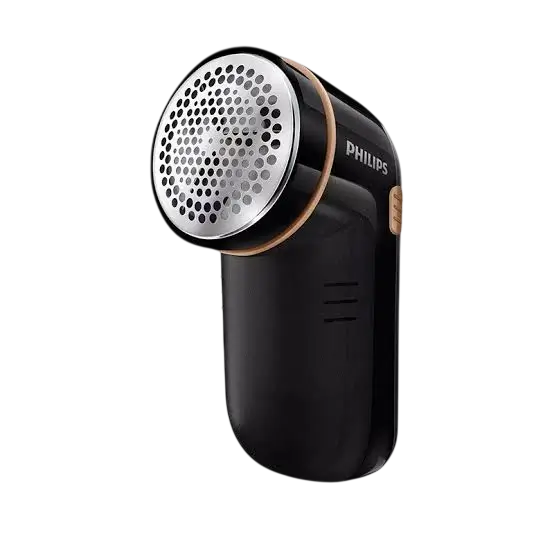
Philips Lint Remover GC026
The Philips GC026 is a battery-powered appliance that removes lint and pills from garments. It runs on 2 AA alkaline batteries and is switched on and off with a slider on its side. You move it gently across the lint on a garment that is smoothed out on a flat surface, and a protective cover at the bottom of the appliance is removed or attached depending on whether the lint is short or long. The appliance is cleaned by removing the front cover to empty the lint, unscrewing the lid, lifting out the blades and brushing away lint residue with the brush provided.
Before You Start
Register Your Product and Keep the Leaflets
Philips asks owners to register the product at www.philips.com/welcome to benefit fully from its support. Before using the appliance, read this user manual, the important information leaflet and the quick start guide carefully, and save them for future reference.
Garment Precautions
- Smooth out the garment on a flat surface before you begin.
- Do not press the appliance onto the garment too hard.
- Do not use the appliance on embroideries, zips, buttons or loose threads.
Parts You Handle During Use and Cleaning
The instructions refer to the following parts. Each one is used in the steps further down this page.
| Part | Where it is used |
| Battery cover | Removed to insert or take out the 2 AA alkaline batteries |
| Protective cover (bottom of the appliance) | Removed for short lint, attached for long lint |
| Slider (side of the appliance) | Up turns the appliance on; down switches it off |
| Front cover | Slid down and removed to empty the lint into a bin |
| Lid | Unscrewed anti-clockwise to remove, screwed on clockwise to attach |
| Blades | Lifted out for cleaning and attached again afterward |
| Brush (provided) | Cleans the blades and the inner lid |
Inserting the Batteries
The appliance uses 2 AA alkaline batteries.
- Remove the battery cover.
- Insert 2 AA alkaline batteries, following the positive (+) and negative (-) terminal markings.
Setting the Protective Cover for Your Garment
The protective cover at the bottom of the appliance depends on the length of the lint on the garment.
| Lint on the garment | What to do with the protective cover |
| Short lints | Remove the protective cover at the bottom of the appliance |
| Long lints | Attach the protective cover at the bottom of the appliance |
Using the Lint Remover
Turning the Appliance On
At the side of the appliance, slide the slider upwards to turn the appliance on.
Removing Lint from the Garment
Place the appliance on the garment and gently move it across the area with lint. Keep the garment smoothed out on a flat surface, avoid pressing the appliance down too hard, and stay clear of embroideries, zips, buttons and loose threads.
Turning the Appliance Off
Once you are done, slide the slider downwards to switch off the appliance. Then remove the alkaline batteries.
Emptying the Lint and Cleaning the Blades
Before cleaning, make sure the appliance is switched off and the alkaline batteries are removed, as described above. Cleaning follows steps 6 to 11 of the “Using the appliance” chapter.
Emptying the Collected Lint
- Remove the front cover by sliding it down.
- Pour the lint into a bin.
Removing and Brushing the Blades
- Turn the lid anti-clockwise to unscrew it, then remove the lid.
- Make sure you do not hold onto or touch the blades. Gently pull up and remove the blades.
- Using the brush provided, brush and clean the blades and the inner lid to remove any lint remains.
Reattaching the Blades and Lid
- Make sure you do not hold onto or touch the blades. Attach the blades onto the appliance.
- Attach the lid and screw it clockwise onto the appliance.
Troubleshooting
The following problem is the one listed for this appliance. If it does not solve your issue, visit www.philips.com/support for a list of frequently asked questions or contact the Consumer Care Center in your country.
| Problem | Possible cause | Solution |
| The appliance does not remove pills. | Pills have accumulated inside the appliance. | Clean the appliance by following steps 5 to 11 in the “Using the appliance” chapter. |
Recycling and Disposal
Do not throw away the product with normal household waste at the end of its life. Hand it in at an official collection point for recycling, which helps preserve the environment. Follow your country’s rules for the separate collection of electrical and electronic products. Correct disposal helps prevent negative consequences for the environment and human health.
Registration, Support and Warranty Information
Register the product at www.philips.com/welcome. For frequently asked questions, visit www.philips.com/support, or contact the Consumer Care Center in your country. The product is manufactured by and sold under the responsibility of Versuni Holding B.V., which is the warrantor in relation to this product. PHILIPS and the Philips Shield Emblem are registered trademarks of Koninklijke Philips N.V. and are used under license.
Frequently Asked Questions
What batteries does the Philips GC026 use, and how do I install them?
The GC026 runs on 2 AA alkaline batteries. Remove the battery cover, then insert the two batteries so that each one lines up with the positive (+) and negative (-) terminal markings in the compartment, and put the cover back on.
How do I turn the Philips GC026 on and off?
The slider is on the side of the appliance. Slide it upwards to turn the appliance on, and slide it downwards when you are finished to switch it off. After switching it off, take out the alkaline batteries.
Should I remove or attach the protective cover on the bottom of the GC026?
It depends on the lint on your garment. For garments with short lints, remove the protective cover at the bottom of the appliance. For garments with long lints, attach the protective cover at the bottom of the appliance. Do this before you switch the appliance on.
How do I use the GC026 on a sweater or other garment?
Smooth the garment out on a flat surface first. Switch the appliance on with the slider, place it on the garment and gently move it across the area with lint. Do not press down too hard on the fabric.
Which parts of a garment should I keep the GC026 away from?
Do not use the appliance on embroideries, zips, buttons or loose threads. Work only on the smooth fabric areas where the lint has gathered.
How do I empty the lint from the Philips GC026?
Switch the appliance off and remove the batteries first. Then slide the front cover down to remove it and pour the lint into a bin.
How do I clean the blades on the Philips GC026?
With the appliance off and the batteries removed, empty the lint by sliding the front cover down. Turn the lid anti-clockwise to unscrew and remove it, then gently pull the blades straight up and out, taking care not to hold or touch them. Use the brush provided to clean the blades and the inner lid until the lint residue is gone.
How do I put the blades and lid back after cleaning?
Attach the blades onto the appliance, again without holding onto or touching them. Then fit the lid and screw it on clockwise.
Why is my Philips GC026 not removing pills?
The listed cause is that pills have accumulated inside the appliance. Clean it by switching it off, removing the batteries, emptying the lint, unscrewing the lid, lifting out the blades, brushing the blades and inner lid with the brush provided, and then reattaching the blades and screwing the lid back on clockwise. If that does not solve the problem, visit www.philips.com/support or contact the Consumer Care Center in your country.
Should I take the batteries out after using the GC026?
Yes. When you are done, slide the slider downwards to switch the appliance off, then remove the alkaline batteries.
How do I dispose of the Philips GC026 when it stops working?
Do not put it in normal household waste. Take it to an official collection point for recycling, and follow your country’s rules for the separate collection of electrical and electronic products.
Where can I register the GC026 or get support?
Register the product at www.philips.com/welcome. For frequently asked questions, go to www.philips.com/support, or contact the Consumer Care Center in your country.