
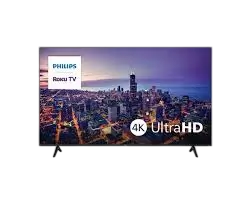
Philips 6000 Series 4K Roku TV 75PUL6645
The Philips 6000 Series 75PUL6645 is a 75-inch class 4K Ultra HD LED Roku TV from the Entertainment Series. It runs Roku OS, so streaming apps, live TV, search and settings all start from the Roku home screen, and the TV receives automatic software updates. The 3840x2160p panel supports HDR10, HLG and a 120 Perfect Motion Rate (PMR) for fast-moving scenes. Connections include four HDMI inputs, Wireless LAN (802.11ac), Ethernet, an antenna/cable input and a USB 2.0 input for the USB media browser. The TV works with Apple AirPlay, the free Roku mobile app, and voice control through Siri, Alexa or Google Assistant. A guided setup walks you through first-time installation.
Key Features
Picture Quality and Roku Smart Picture
The panel resolution is 3840x2160p (4K UHD) with a DLED backlight. HDR10 and HLG support are paired with HDR contrast and color, and the 120 PMR rating targets sharper motion in sports, movies and other fast-paced scenes.
Roku Smart Picture automatically chooses the picture mode that suits what you are watching: movie, sports, vivid or standard.
Roku Home Screen, Search and Free Live TV
The Roku home screen is designed to get you to your content quickly and includes personalized recommendations. Search works by title, actor or director and shows where to stream a title, prioritizing free content or the lowest price. Roku search does not work with all channels.
The TV offers access to 500+ free live TV channels, including live news, weather and sports coverage. Channels can change, vary by region, and some require payment. Content resolution depends on TV compatibility and may vary by channel.
Apple AirPlay, Roku Mobile App and Voice Control
AirPlay lets you stream videos, photos, music and more from an Apple device to the TV. You can also cast from any device running the Roku app. This Philips Roku TV is compatible with AirPlay 2 and HomeKit, and it requires iOS 12.3 or later or macOS 10.14.5 or later for those Apple features.
The free Roku mobile app is available for iOS and Android. Besides acting as an extra remote, it offers private listening, search with your voice or keyboard, and a way to save shows for later.
Voice control works with Siri, Alexa or Google Assistant, and the TV is compatible with HomeKit.
Connections and Ports
Rear Connection Panel
The connection panel illustration labels the following connectors. The data sheet notes that the AV IN, headphone and digital out connectors are shown in no particular order.
| Connector | Label on illustration | Related specification |
| Ethernet | LAN | Ethernet listed under Other connections |
| HDMI 1 | HDMI 1 (eARC) | 4 HDMI connections in total |
| HDMI 2 | HDMI 2 | 4 HDMI connections in total |
| HDMI 3 | HDMI 3 | 4 HDMI connections in total |
| HDMI 4 | HDMI 4 | 4 HDMI connections in total |
| Antenna or cable | ANTENNA/CABLE IN | Aerial input: 75 ohm F-type |
| USB | USB 2.0 5V⎓500mA | USB 2.0 x 1 (USB media browser) |
| Composite video and stereo audio in | AV IN: VIDEO, L-AUDIO-R | CVBS+Audio L/R in |
| Headphones | HEADPHONE | Headphone out |
| Optical audio | DIGITAL OUT (OPTICAL) | Digital audio out (optical) |
Wireless and Multimedia Connectivity
The TV connects to your wireless network through Wireless LAN (802.11ac). For wired networking, use the Ethernet (LAN) port. Content can also be played from a USB drive using the USB media browser, and devices connect through HDMI.
Specifications
Picture and Display
| Specification | Value |
| Diagonal screen size | 75 inch (190.5 cm) |
| Aspect ratio | 16:9 |
| Panel resolution | 3840x2160p |
| Display screen type | LED UltraHD Display |
| Backlight | DLED |
| Picture enhancement | HDR10, HLG, 120 PMR |
| Response time (typical) | 9 ms |
| Viewing angle | 178º (H) / 178º (V) |
Sound, Tuner and Smart Features
| Specification | Value |
| Sound system | Dolby Audio |
| Built-in speakers | 2 |
| Aerial input | 75 ohm F-type |
| TV system | ATSC, NTSC |
| Video playback | ATSC, NTSC |
| TV operating system | Roku OS |
| Network features | Wireless Screencasting |
| Child protection | Parental Control |
| Remote control | TV |
| Ease of installation | Guided setup |
| Multimedia | USB media browser |
Power and Operating Temperature
Mains power, power consumption and standby power consumption are listed as “tbc” in the data sheet, so no electrical figures are published there.
The listed ambient temperature range is 5 °C to 40 °C.
Dimensions and Weight
| Measurement | Metric | Imperial |
| Set width (without stand) | 1669 mm | 65.7 inch |
| Set height (without stand) | 959 mm | 37.8 inch |
| Set depth (without stand) | 74 mm | 2.9 inch |
| Set width (with stand) | 1669 mm | 65.7 inch |
| Set height (with stand) | 1042 mm | 41 inch |
| Set depth (with stand) | 344 mm | 13.5 inch |
| Stand width | 1352 mm | 53.23 inch |
| Product weight (without stand) | 25.3 kg | 55.78 lb |
| Product weight (with stand) | 25.5 kg | 56.22 lb |
| Weight including packaging | 36.10 kg | 79.59 lb |
| Box height | 45.08 inch | |
| Box width | 73.82 inch | |
| Box depth | 7.99 inch |
Stand, Wall Mounting and Included Accessories
The TV has an open square stand design. The included accessories are listed as batteries for the remote control, the remote control, 2 stand feet and screws.
The specifications list the TV as wall mount compatible at 400 x 300 mm. The data sheet does not name a wall bracket, specify screw size or give mounting instructions, so follow the instructions supplied with your bracket and the TV’s full user documentation.
Product Notes and Limits
Third-party features and services may be subject to change or removal without notice. Payment is required for some channels and content, and channels can change and vary by region. Specifications are subject to change without notice.
Roku, Roku TV, the Roku logo and the purple d-pad design are trademarks of Roku, Inc. HDMI is a trademark or registered trademark of HDMI Licensing Administrator, Inc. Dolby and Dolby Audio are registered trademarks of Dolby Laboratories Licensing Corporation. Apple, Apple Home, AirPlay, HomeKit and Siri are trademarks of Apple Inc. Google and Google Home are trademarks of Google LLC.
Frequently Asked Questions
How many HDMI ports does the Philips 75PUL6645 have, and which one supports eARC?
The TV has four HDMI connections. On the rear connection panel, HDMI 1 is the one labeled eARC, so that is the port to use if you want to connect an eARC-capable audio device. HDMI 2, HDMI 3 and HDMI 4 are labeled without eARC.
What resolution and HDR formats does the 75PUL6645 support?
The panel resolution is 3840x2160p, which Philips markets as 4K Ultra HD. For picture enhancement, the specifications list HDR10, HLG and 120 PMR (Perfect Motion Rate). Actual content resolution depends on TV compatibility and can vary by channel.
Does the 75PUL6645 connect to Wi-Fi, and does it have an Ethernet port?
Yes to both. The TV supports Wireless LAN (802.11ac) for a wireless connection, and the rear panel includes a LAN port for a wired Ethernet connection. Choose whichever suits your setup when connecting the TV to your network.
Does this Philips Roku TV work with Apple AirPlay and HomeKit?
Yes. The TV is compatible with AirPlay 2 and HomeKit, and you can stream videos, photos, music and more from an Apple device to the screen. These Apple features require iOS 12.3 or later or macOS 10.14.5 or later. You can also cast from any device running the Roku app.
Which voice assistants can control the 75PUL6645?
Philips lists voice control through Siri, Alexa or Google Assistant. The TV is also described as compatible with HomeKit, and the product graphic shows compatibility with Apple Home and Google Home. Third-party features and services can change or be removed without notice.
What does Roku Smart Picture do?
Roku Smart Picture automatically selects the picture mode that fits what you are watching, choosing between movie, sports, vivid and standard. The goal is to make content look its best without you changing picture settings by hand.
Can I use my phone as a remote for this TV?
Yes. The free Roku mobile app, available for iOS and Android, works as an extra remote. It also supports private listening, searching with your voice or keyboard, and saving shows for later.
Can the 75PUL6645 play files from a USB drive?
The TV includes a USB 2.0 input, and its multimedia features list a USB media browser, so you can watch content from a USB drive. The rear panel labels the USB connector 5V 500mA. The data sheet does not list supported file formats or drive types, so check those in the TV’s full user documentation.
What is included with the 75PUL6645?
The listed accessories are the remote control, batteries for the remote control, two stand feet and screws. The TV also has a guided setup to help with first-time installation.
How big and heavy is the 75PUL6645 with and without the stand?
Without the stand, the TV measures 1669 mm wide, 959 mm high and 74 mm deep (65.7 x 37.8 x 2.9 inches) and weighs 25.3 kg (55.78 lb). With the stand attached, the height is 1042 mm (41 inches), the depth is 344 mm (13.5 inches) and the weight is 25.5 kg (56.22 lb). The stand is 1352 mm (53.23 inches) wide, so confirm your furniture is wide enough before placing the TV on it.
Can I wall mount the Philips 75PUL6645?
The specifications list the TV as wall mount compatible at 400 x 300 mm. That is the only mounting information provided, so use a bracket that matches that size and follow the bracket maker’s instructions. For mounting hardware details, refer to the TV’s full user documentation.
What other connections does the TV have besides HDMI?
Besides the four HDMI inputs, the TV has an antenna/cable input (75 ohm F-type), a composite video input with left and right audio (AV IN), a headphone output, an optical digital audio output, an Ethernet port and a USB 2.0 input. The tuner system is listed as ATSC and NTSC.