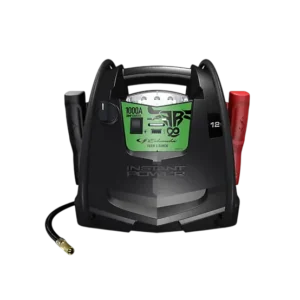
| Field | Details |
| Document Title | Jump Starter and DC Power Source |
| Document Type | Owner’s Manual |
| Brand Name | Schumacher Electric |
| Product Name | Jump Starter and DC Power Source |
| Model Number(s) | FR01578 |
| PDF File Size | 163 KB |
| Number of Pages | 15 |
| Languages | English, Spanish |
Schumacher Jump Starter FR01578
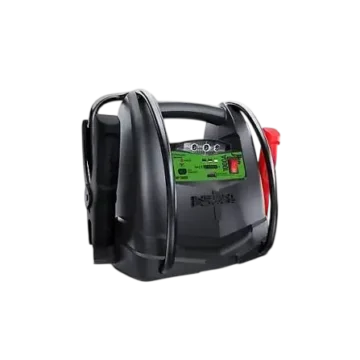
The Schumacher FR01578 Jump Starter and DC Power Source is a portable power pack designed for jump-starting vehicles equipped with 12V lead-acid battery systems, powering compatible 12V accessories, inflating tires, and providing work lighting.
The unit contains a sealed, non-spillable lead-acid battery and features a built-in air compressor rated for 150 PSI, a 12V DC power outlet, a 5V USB charging port, and a work light. Battery status indicators show the internal battery’s charge level, while the built-in charging system automatically switches to Maintain mode when charging is complete.
The Schumacher FR01578 owner’s manual provides instructions for charging the internal battery, connecting the jump-starting clamps, operating the USB and DC outlets, using the air compressor, maintaining the battery, troubleshooting operating problems, and obtaining replacement parts.
Product Features
The Schumacher FR01578 includes the following features:
- Jump-starting support for vehicles with 12V DC lead-acid battery systems.
- Sealed, non-spillable internal lead-acid battery.
- Rotary ON/OFF switch for USB and jump-starting functions.
- Built-in work light with a separate ON/OFF switch.
- LED battery status indicators.
- Battery Status button.
- USB charging port rated at 5V DC and up to 2A.
- 12V DC accessory power outlet rated for devices drawing no more than 20A.
- Built-in air compressor rated for a maximum of 150 PSI.
- Air compressor pressure gauge.
- Separate air compressor ON/OFF switch.
- Air compressor hose with storage cleats.
- Inflation adapters and storage bag.
- Positive and negative battery clamps.
- Internal battery charging through a 120V AC connection.
- Optional charging through a vehicle’s 12V accessory outlet.
- Automatic battery maintenance after AC charging.
- Portable electrical power for compatible accessories.
Technical Specifications
| Specification | Details |
| Brand | Schumacher Electric |
| Model | FR01578 |
| Product Type | Jump Starter and DC Power Source |
| Internal Battery | Sealed, Non-Spillable Lead-Acid |
| Supported Vehicle Battery System | 12V DC |
| Jump-Starting Battery Compatibility | Lead-Acid |
| Internal Battery Charging Input | 120V AC |
| Charging Extension Cord | 18 AWG or Larger |
| Maximum Internal Battery Charging Time | Up to 72 Hours |
| Alternative Charging Method | 12V Vehicle Accessory Outlet |
| Maximum Vehicle-Based Charging Duration | 30 Minutes |
| USB Output | 5V DC, Up to 2A |
| DC Accessory Outlet | 12V DC |
| Maximum DC Accessory Current | 20A |
| Built-in Air Compressor | Yes |
| Compressor Maximum Pressure | 150 PSI |
| Air Compressor Pressure Gauge | Yes |
| Battery Status Indicators | Red, Yellow/Orange, Green |
| Built-in Work Light | Yes |
| Automatic Battery Maintain Mode | Yes |
| Recommended Storage Temperature | 70°F |
| Jump Starter Warranty | 1-Year Limited Warranty |
| Internal Battery Warranty | 90 Days |
Parts and Components
The Schumacher FR01578 includes 14 main components and controls identified in the manufacturer’s parts diagram.
Main Parts and Their Functions
| No. | Component | Function |
| 1 | Worklight ON/OFF Switch | Turns the built-in work light on or off |
| 2 | Rotary Switch for USB and Jump Starter | Controls the USB and jump-starting functions |
| 3 | Built-in Work Light | Illuminates the work area |
| 4 | Battery Status Indicators | Show the internal battery charge level |
| 5 | Battery Status Button | Activates the battery charge indicators |
| 6 | USB Port | Supplies 5V DC power to compatible USB devices |
| 7 | 12V DC Power Outlet | Supplies power to compatible 12V accessories |
| 8 | Battery Clamps | Connect the jump starter to a vehicle battery |
| 9 | Air Compressor Gauge | Displays inflation pressure |
| 10 | Air Compressor ON/OFF Switch | Starts and stops the air compressor |
| 11 | Internal Battery Charger Port | Connects the internal charging system to AC power |
| 12 | Air Compressor Hose Wrap Cleats | Hold the compressor hose during storage |
| 13 | Air Compressor Hose | Connects the compressor to an inflation valve |
| 14 | Air Compressor Adapters and Storage Bag | Provide connections for compatible inflatable items |
Control Panel and Switch Functions
The FR01578 uses separate controls for battery monitoring, jump-starting, USB output, work lighting, and air compression.
Rotary Switch for USB and Jump Starter
The rotary switch controls the USB and jump-starting functions.
For jump-starting, the switch must remain OFF until the battery clamps have been properly connected.
When using the USB port, the switch must be turned ON.
Important: Keep the rotary switch OFF whenever the jump-starting function is not being used, and store the clamps on their designated holders.
Battery Status Button
The Battery Status button activates the LED indicators used to check the internal battery charge level.
Pressing the button displays the current charge range through the red, yellow/orange, or green LED.
Worklight ON/OFF Switch
The work light has a separate sliding ON/OFF switch located on the front of the unit.
This switch controls the built-in work light.
Air Compressor ON/OFF Switch
The air compressor is controlled using its dedicated ON/OFF switch.
The compressor gauge shows the pressure while the compressor is operating.
The compressor must be switched OFF manually when the required inflation pressure has been reached.
Battery Status LED Indicator Guide
The Schumacher FR01578 uses three LED colors to indicate the internal battery’s charge level.
Battery Status Indicator Meanings
| LED Color | Battery Charge Level | Meaning |
| Red | Less than 20% | Internal battery is very low and requires immediate charging |
| Yellow/Orange | 20–80% | Internal battery is partially charged |
| Green | More than 80% | Internal battery has a high charge level |
Red Battery Status LED
A red battery status indication means the internal battery contains less than 20% of its full charge.
Recharge the unit immediately.
Yellow/Orange Battery Status LED
A yellow/orange indication means the internal battery charge level is between 20% and 80%.
Green Battery Status LED
A green indication means the internal battery contains more than 80% of its full charge.
LED Indicators During Internal Battery Charging
The charger also uses LED indicators to show charging and maintenance status.
| Charging Condition | LED Behavior |
| Internal Battery Charging | Red LED Illuminates |
| Charging Complete | Red Charging LED Turns Off |
| Maintain Mode Active | Green LED Illuminates While AC Power Remains Connected |
Important Safety Instructions
WARNING: Risk of explosive gases, electric shock, fire, and serious personal injury.
Lead-acid batteries generate explosive gases during normal operation. The jump starter must be used according to the safety instructions provided by Schumacher and the vehicle battery manufacturer.
General Safety Precautions
- Keep the jump starter away from children.
- Do not disassemble the unit.
- Have repairs performed by qualified service personnel.
- Never operate the jump starter if it is damaged.
- Do not expose the jump starter to rain or snow.
- Do not recharge the internal battery using a damaged extension cord.
- Provide adequate ventilation while charging.
- Do not place the jump starter on flammable materials such as carpeting, upholstery, paper, or cardboard.
- Position the jump starter as far from the vehicle battery as the cables allow.
- Never place the jump starter directly above the battery being jump-started.
- Never allow the battery clamps to touch each other or the same metal surface.
- Use only attachments recommended or sold by the manufacturer.
Vehicle Battery Safety
The jump starter is designed for vehicles, boats, and garden tractors equipped with a 12V DC battery system.
The jump-starting function is intended for lead-acid batteries only.
The FR01578 must not be used to jump-start household dry-cell batteries.
The unit is not designed to replace the vehicle’s installed battery.
IMPORTANT: Never use the jump-starting function on a vehicle without a battery installed. Doing so can damage the vehicle’s electrical system.
Frozen Battery Warning
Never attempt to jump-start a frozen battery.
Charging Safety
- Do not use the jump-starting function while the internal battery is charging.
- Do not use a damaged extension cord.
- Keep the unit properly ventilated during charging.
- Keep the unit away from flammable materials.
- Do not allow the unit to become wet.
Personal Safety Precautions
When working near lead-acid batteries:
- Wear complete eye protection.
- Wear protective clothing.
- Have another person nearby who can provide assistance.
- Keep clean water, soap, and baking soda available.
- Remove rings, bracelets, necklaces, watches, and other metal jewelry.
- Never smoke near a battery or engine.
- Keep sparks and open flames away from the battery.
A lead-acid battery can produce enough short-circuit current to heat or weld metal jewelry, causing severe burns.
Battery Acid Safety
Battery acid can cause severe burns and eye injuries.
If battery acid contacts the skin or clothing, wash the affected area immediately with soap and water and obtain medical assistance.
If battery acid enters the eyes, flush immediately with water for at least 10 minutes and obtain medical attention.
Battery acid spills must be thoroughly neutralized with baking soda before cleanup.
Before First Use
The FR01578 internal battery must be charged before the jump starter is used.
Initial Preparation Instructions
- Place the unit on a stable, nonflammable surface.
- Inspect the housing, cables, and battery clamps for damage.
- Make sure the jump starter rotary switch is OFF.
- Place the battery clamps on their storage holders.
- Check the internal battery charge level using the Battery Status button.
- Charge the internal battery through the AC charging connection.
- Allow the battery to become fully charged.
- Disconnect the AC charging connection before using the jump-starting function.
IMPORTANT: Charge the internal battery immediately after purchase, after every use, and every 30 days while the jump starter is not being used.
Regular charging helps prolong the internal battery’s service life.
How to Check the Internal Battery Charge Level
The Battery Status button allows the internal battery charge level to be checked without connecting the jump starter to a vehicle.
Checking Battery Status
- Locate the Battery Status button on the front of the unit.
- Press the button.
- Check the illuminated LED indicator.
- Read the battery charge level according to the LED color.
A red indication requires immediate charging. A yellow/orange indication means the battery is partially charged, while a green indication means the charge level is above 80%.
How to Charge the Internal Battery Using AC Power
The FR01578 contains an internal battery charger that operates through a 120V AC electrical connection.
An extension cord is required for this charging method.
Charging Requirements
| Item | Requirement |
| AC Power Source | 120V AC Wall Outlet |
| Extension Cord | 18 AWG or Larger |
| Charging Connector | Rear AC Charging Connection |
| Maximum Charging Time | Up to 72 Hours |
| Charging Indicator | Red LED |
| Maintain Mode Indicator | Green LED |
AC Charging Instructions
- Locate the AC charging connector on the back of the jump starter.
- Flip the connector downward.
- Connect an 18 AWG or larger extension cord to the charging connector.
- Plug the extension cord into a 120V AC wall outlet.
- The red LED illuminates while the internal battery is charging.
- Allow the battery to charge completely.
- When the red LED turns off, the jump starter is ready for use.
- After the battery is fully charged, the internal charger automatically enters Maintain mode.
A complete charge may take up to 72 hours.
Automatic Maintain Mode
When the internal battery reaches full charge, the charging system automatically switches to Maintain mode.
During Maintain mode:
- The charger maintains the battery at full charge.
- The green LED illuminates.
- The green LED remains illuminated while the AC charging cord is connected.
Important Charging Reminder
Recharge the internal battery as soon as possible after each use.
How to Charge the Internal Battery While Driving
The FR01578 can also charge its internal battery through a vehicle’s 12V accessory outlet.
This method requires an optional male-to-male charging cable.
Required Charging Accessory
| Accessory | Part Number |
| Male-to-Male 12V Accessory Charging Cable | 94500109 |
The charging cable is not included with the unit.
Vehicle Charging Warning
WARNING: Never charge the internal battery through a vehicle’s 12V accessory outlet for more than 30 minutes. Never leave the battery unattended during this charging method.
Excessive charging may cause the battery to explode, resulting in personal injury or property damage.
Charging Instructions While Driving
- Make sure the vehicle engine is running.
- Insert one end of the male-to-male charging cable into the jump starter’s 12V DC power outlet.
- Connect the other end to the vehicle’s 12V accessory outlet or cigarette lighter socket.
- Monitor the internal battery charge level using the Battery Status button.
- Disconnect the charging cable when the internal battery is fully charged or before the 30-minute limit is reached.
- Remove the charging cable from the jump starter first.
- Disconnect the other end from the vehicle accessory outlet.
Vehicle Charging Limitations
- The red charging LED does not operate during this charging method.
- Automatic Maintain mode is bypassed.
- The internal battery can become overcharged.
- The charging cable must be completely disconnected whenever the vehicle engine is not running.
How to Jump Start a Vehicle
The Schumacher FR01578 is designed to help start compatible vehicles equipped with a 12V DC lead-acid battery system.
Before Jump-Starting
- Confirm that the vehicle uses a 12V DC battery system.
- Make sure a battery is installed in the vehicle.
- Turn the vehicle ignition OFF.
- Make sure the jump starter rotary switch is OFF.
- Position the DC cables away from fan blades, belts, pulleys, and other moving engine components.
- Identify whether the vehicle has a negative-ground or positive-ground electrical system.
Connecting to a Negative-Ground Vehicle
Most vehicles use a negative-ground electrical system.
- Connect the red positive clamp to the positive (+) battery terminal.
- Connect the black negative clamp to the vehicle chassis or engine block away from the battery.
- Make sure the clamps are securely connected.
Connecting to a Positive-Ground Vehicle
For a vehicle with a positive-ground electrical system:
- Connect the black negative clamp to the negative (–) battery terminal.
- Connect the red positive clamp to the vehicle chassis or engine block away from the battery.
- Confirm that both clamps are securely connected.
Starting the Engine
- After connecting the clamps correctly, turn the jump starter switch to ON.
- Attempt to start the engine.
- Crank the engine for no more than 8 seconds.
- If the engine does not start, wait 2 minutes before trying again.
- When the engine starts, turn the jump starter switch to OFF.
- Disconnect the jump starter from the vehicle battery.
- Recharge the internal battery after use.
If the vehicle does not start after the recommended attempts, disconnect the jump starter and investigate other problems that may need correction.
Jump-Starting Time Limits
| Operation | Time Limit |
| Maximum Engine Cranking Duration | 8 Seconds |
| Waiting Period Before Another Attempt | 2 Minutes |
Do not repeatedly crank the engine without following the specified waiting period.
How to Use the USB Charging Port
The FR01578 includes a USB port for powering compatible USB devices.
USB Port Specifications
| Specification | Details |
| Number of USB Ports | 1 |
| Output Voltage | 5V DC |
| Maximum Output Current | 2A |
| Power Control | Rotary ON/OFF Switch |
USB Charging Instructions
- Make sure the battery clamps are securely attached to their storage holders.
- Turn the jump starter rotary switch to ON.
- Connect the USB device to the USB port.
- Allow the connected device to operate or charge.
- When finished, turn the rotary switch to OFF.
- Recharge the jump starter.
How to Use the Built-in Work Light
The FR01578 includes a work light controlled by a sliding ON/OFF switch on the front of the unit.
Work Light Operating Instructions
- Place the jump starter on a flat, stable surface near the intended work area.
- Make sure the battery clamps are securely attached to their storage holders.
- Locate the worklight ON/OFF switch on the front of the unit.
- Move the switch to ON to activate the work light.
- Move the switch to OFF when the light is no longer required.
Important: The work light must remain OFF while the internal battery is charging or the jump starter is being stored.
How to Power a 12V DC Device
The FR01578 can supply power to compatible 12V DC accessories equipped with a 12V accessory plug.
The outlet can be used to operate compatible devices during power outages, camping trips, and other situations requiring portable DC power.
12V DC Outlet Specifications
| Specification | Details |
| Output Voltage | 12V DC |
| Maximum Device Current | 20A |
| Connection Type | 12V Accessory Plug |
12V DC Operating Instructions
- Make sure the connected 12V device is turned OFF.
- Open the protective cover of the jump starter’s 12V DC outlet.
- Insert the device’s 12V accessory plug into the outlet.
- Turn on the connected device if required.
- When finished, turn off the device.
- Disconnect the accessory plug from the outlet.
- Recharge the internal battery immediately after use.
12V DC Power Limitations
CAUTION: Do not use the FR01578 to operate appliances that draw more than 20A DC.
Do not operate a connected 12V device while the jump starter’s internal battery is charging.
Extended operation of connected devices may significantly discharge the internal battery.
Estimated 12V DC Device Run Times
The owner’s manual provides estimated operating times for several 12V electrical accessories.
12V DC Run-Time Chart
| Appliance Type | Estimated Power Consumption | Approximate Run Time |
| Cell Phone or Fluorescent Light | 4W | 34 Hours |
| Radio, Fan, or Depth Finder | 9W | 14 Hours |
| Camcorder | 15W | 7 Hours |
| Electrical Tool | 24W | 5 Hours |
| Electric Cooler | 48W | 2 Hours |
| Car Vacuum or Air Compressor | 80W | 1.8 Hours |
These estimates are based on a fully charged internal battery.
Actual operating times may vary.
How to Use the Air Compressor
The Schumacher FR01578 includes a built-in air compressor rated for a maximum pressure of 150 PSI.
The compressor uses a pressure gauge, an ON/OFF switch, a flexible air hose, and inflation adapters.
Air Compressor Safety Instructions
WARNING: Read the inflation instructions for the item being inflated before operating the compressor.
- Never exceed the inflation pressure recommended by the item manufacturer.
- Do not overinflate tires or other inflatable items.
- Do not leave the air compressor unattended while operating.
- Use the compressor pressure gauge to monitor inflation.
- Allow the unit to cool after using the compressor.
Air Compressor Operating Instructions
- Make sure the battery clamps are securely attached to their storage holders.
- Remove the air compressor hose from the storage cleats.
- Connect the hose adapter to the valve stem by threading it onto the valve.
- Use one of the additional inflation adapters if necessary.
- Press the air compressor ON/OFF switch to turn the compressor ON.
- Monitor the inflation pressure using the gauge next to the switch.
- Continue inflating until the required pressure or fullness is reached.
- Press the compressor ON/OFF switch to turn the compressor OFF.
- Remove the hose connector from the valve stem.
- Allow the jump starter to cool.
- Recharge the internal battery before storing the unit.
Air Compressor Pressure Rating
| Specification | Rating |
| Maximum Air Compressor Pressure | 150 PSI |
| Pressure Monitoring | Built-in Pressure Gauge |
| Compressor Control | Manual ON/OFF Switch |
The compressor must be switched OFF when the required pressure has been reached.
Estimated Inflation Times
| Item | Estimated Inflation Time |
| Vehicle Tires, 13–16 Inches | 6–24 Minutes |
| Bicycle Tires | 1–3 Minutes |
| Sports Balls | Approximately 30 Seconds |
The inflation times are approximate.
Use the built-in compressor gauge to confirm the required pressure. Never overinflate an item.
Storing the Air Compressor Hose
The FR01578 includes hose wrap cleats for storing the air compressor hose.
When the compressor is not in use, wrap the hose around the cleats to keep it properly stored.
Maintenance and Cleaning Instructions
The FR01578 requires regular cleaning and internal battery charging to maintain its operating condition.
Cleaning the Battery Clamps
After using the jump starter:
- Turn the jump starter OFF.
- Disconnect it from the vehicle battery and any charging source.
- Use a dry cloth to clean corrosion, dirt, and oil from the battery clamps.
- Return the clamps to their designated storage holders.
Cleaning the Power Pack Housing
Use a dry cloth to remove dirt, oil, and other residue from the housing.
Cleaning the Cables
Clean the charging and battery cables using a dry cloth.
Inspect the cables for damage before the next use.
Inspecting the Jump Starter
Make sure that all components are properly installed and in good operating condition.
If servicing or repair is required, the work must be performed by qualified service personnel.
Storage and Transportation Instructions
Proper storage helps protect the internal lead-acid battery and prevent accidental electrical arcing.
Proper Storage Procedure
- Turn the jump starter rotary switch to OFF.
- Disconnect the unit from the vehicle battery and charging source.
- Store the battery clamps on their designated holders.
- Keep the clamps separated from metal surfaces.
- Wrap the compressor hose around its storage cleats.
- Store the unit indoors in a cool, dry location.
- Recharge the internal battery every 30 days.
Battery Clamp Storage Precautions
Do not store the battery clamps:
- Attached to the carrying handle.
- Clipped together.
- Attached to metal objects.
- Clipped to electrical cables.
WARNING: The battery clamps are live when the jump starter switch is ON.
If the clamps touch each other while energized, electrical arcing or sparks may occur.
Always turn the rotary switch OFF when the jump-starting function is not in use.
Transporting the Jump Starter
When moving the FR01578 around a workshop or transporting it to another location, protect the cables, battery clamps, and housing from damage.
Damaged cables or components can create a risk of injury or property damage.
Storage Temperature
The ideal storage temperature is approximately 70°F.
The internal battery gradually loses charge during storage, especially in warm environments.
Leaving the battery discharged for an extended period may cause permanent battery damage.
Monthly Battery Maintenance
To maintain battery performance:
- Recharge immediately after purchase.
- Recharge after every use.
- Recharge every 30 days during storage.
- Keep the internal battery fully charged.
Troubleshooting Guide
The Schumacher FR01578 troubleshooting instructions cover jump-starting failures, 12V accessory power problems, internal battery charging issues, and air compressor shutdowns.
Schumacher FR01578 Troubleshooting Table
| Problem | Possible Cause | Recommended Solution |
| Jump starter will not start the vehicle | Battery clamps are not making proper contact | Check the battery and chassis connections; clean the contact points |
| Jump starter will not start the vehicle | Clamp connections are reversed | Disconnect the unit and correct the clamp connections |
| Jump starter will not start the vehicle | Internal battery is not charged | Press the Battery Status button and check the LED indicators |
| Jump starter will not start the vehicle | Vehicle battery is defective | Have the vehicle battery checked |
| Jump starter will not start the vehicle | Jump starter switch is OFF | Turn the jump starter switch ON after making correct connections |
| 12V DC device will not operate | Connected device is OFF | Turn on the connected device |
| 12V DC device will not operate | Internal battery is discharged | Check the battery status using the Battery Status button |
| 12V DC device will not operate | Device draws more than 20A, has a short circuit, or the internal fuse has blown | Disconnect the device; have the internal 20A fuse replaced by qualified service personnel if necessary |
| Internal battery will not hold a charge | Battery is defective or unable to accept charging current | Have the internal battery checked |
| Air compressor shuts off | Compressor has overheated | Allow the compressor to cool for a few minutes before trying again |
FR01578 Will Not Jump Start a Vehicle
If the FR01578 does not start the vehicle, several conditions may need to be checked.
Poor Battery Clamp Connections
Battery clamps that are not making proper electrical contact can prevent jump-starting.
Check the battery terminal and chassis connections.
Make sure the connection points are clean and the clamps are securely attached.
Reversed Battery Clamp Connections
If the battery clamps are connected incorrectly, disconnect the jump starter and correct the connections.
Low Internal Battery Charge
Press the Battery Status button to check the internal battery.
Recharge the unit if the charge level is low.
Defective Vehicle Battery
If the jump starter is charged and the connections are correct, the vehicle battery may be defective.
Have the vehicle battery checked.
Jump Starter Switch Is OFF
The rotary switch must be turned ON to activate the jump-starting function.
The switch should only be turned ON after the battery clamps have been correctly connected.
FR01578 Will Not Power a 12V Device
If a connected 12V accessory does not operate, check the device and the portable power unit.
Device Is Not Turned On
Make sure the connected 12V device is switched ON.
Internal Battery Is Discharged
Press the Battery Status button to check the charge level.
Recharge the internal battery if necessary.
Device Draws Too Much Current
The DC outlet must not be used with appliances drawing more than 20A.
If the connected device draws excessive current, has a short circuit, or the internal fuse has blown, disconnect the device.
The internal 20A fuse must be replaced by a qualified service professional if replacement is required.
FR01578 Internal Battery Will Not Hold a Charge
If the internal battery does not retain its charge, the battery may be defective or unable to accept charging current.
Have the internal battery checked.
FR01578 Air Compressor Keeps Shutting Off
The air compressor may stop operating because it has overheated.
Troubleshooting Steps
- Turn the compressor OFF.
- Allow the compressor to cool for a few minutes.
- Try operating the compressor again after cooling.
Replacement Parts and Accessories
Schumacher identifies the following replacement part and optional charging accessory for the FR01578.
Replacement Parts
| Replacement Part | Part Number |
| Air Compressor Accessory Kit – 3 Hose Adapters | 2299001425Z |
Optional Accessories
| Accessory | Part Number |
| Male-to-Male 12V Accessory Charging Cable | 94500109 |
The male-to-male accessory charging cable is not included with the unit.
Replacement parts information is available through:
Internal Battery Disposal
The Schumacher FR01578 contains a sealed, non-spillable lead-acid battery.
The battery must be disposed of properly.
WARNING: The battery presents a possible explosion hazard. Contact with battery acid may cause severe burns and blindness.
Keep the battery and portable power unit away from children.
Limited Warranty
Schumacher Electric Corporation provides separate limited warranty coverage for the FR01578 jump starter and its internal battery.
Warranty Coverage
| Warranty Detail | Information |
| Manufacturer | Schumacher Electric Corporation |
| Jump Starter Warranty | 1 Year |
| Internal Battery Warranty | 90 Days |
| Warranty Start Date | Date of Retail Purchase |
| Eligible Purchaser | Original Retail Purchaser |
| Transferability | Not Transferable |
| Covered Defects | Defective Materials or Workmanship Under Normal Use and Care |
Warranty Repair or Replacement
If the jump starter develops a defect covered by the warranty, Schumacher may repair the product or replace it with a new or reconditioned unit.
The manufacturer determines whether repair or replacement is appropriate.
The purchaser must provide proof of purchase and pay shipping charges in advance when sending the product for warranty service.
Warranty Exclusions
The limited warranty may be void if the product:
- Is misused.
- Is handled carelessly.
- Is repaired by someone other than the manufacturer.
- Is modified without manufacturer authorization.
- Is resold through an unauthorized retailer.
Accessories not manufactured and approved by Schumacher Electric Corporation are excluded from warranty coverage.
The warranty contains limitations concerning other warranties and incidental or consequential damages. Applicable legal rights may vary by state.
Warranty Registration
Product warranty registration is available at:
Keep the original retail purchase receipt for warranty claims.
Customer Support and Repair Information
Schumacher Electric Corporation provides support for repair and return requests.
Customer Support Details
| Service | Information |
| Manufacturer | Schumacher Electric Corporation |
| Repairs and Returns | 365rma.com |
| Replacement Parts | batterychargers.com |
| Warranty Registration | batterychargers.com |
| Manufacturer Address | 801 Business Center Drive, Mount Prospect, IL 60056-2179 |
Repair and Return Procedure
- Review the troubleshooting instructions.
- Identify the operating problem.
- Visit 365rma.com for repair or return requests.
- Follow the manufacturer’s repair or return process.
Replacement parts information is available at batterychargers.com.
Frequently Asked Questions
1. How do I charge the Schumacher FR01578 jump starter?
The Schumacher FR01578 is charged through its rear AC charging connector using an 18 AWG or larger extension cord connected to a 120V AC outlet. The red LED illuminates during charging and turns off when the jump starter is ready for use. Complete charging may take up to 72 hours. The green LED illuminates when the charger enters Maintain mode.
2. How often should the Schumacher FR01578 be charged?
The FR01578 should be charged immediately after purchase, after every use, and every 30 days when it is not being used. Monthly charging helps prevent the internal lead-acid battery from becoming deeply discharged and suffering permanent damage.
3. What do the battery status lights mean on the Schumacher FR01578?
The battery status lights indicate the internal battery charge level. Red means less than 20%, yellow/orange means 20–80%, and green means more than 80%. A red battery status indication means the unit should be recharged immediately.
4. How do I jump start a car with the Schumacher FR01578?
With the rotary switch OFF, connect the battery clamps according to the vehicle’s grounding system. Turn the rotary switch ON and crank the engine for no more than 8 seconds. If the engine does not start, wait 2 minutes before another attempt. After starting, turn the jump starter OFF, disconnect the clamps, and recharge the unit.
5. What is the maximum PSI of the Schumacher FR01578 air compressor?
The FR01578 air compressor is rated for a maximum of 150 PSI. The compressor has a built-in pressure gauge and a manual ON/OFF switch. Inflation must be stopped when the required pressure is reached, without exceeding the inflatable item’s recommended pressure.
6. Can the Schumacher FR01578 charge a phone?
Yes. The Schumacher FR01578 includes a USB port rated at 5V DC and up to 2A. With the battery clamps secured on their holders, turn the unit ON and connect the USB device. Turn the rotary switch OFF and recharge the jump starter after use.
7. Why will the Schumacher FR01578 not jump start my car?
Possible causes include poor battery clamp connections, reversed clamps, a discharged internal battery, a defective vehicle battery, or the jump starter switch being OFF. Check the connections, use the Battery Status button to check the charge level, and have the vehicle battery checked if necessary.
8. Why does the Schumacher FR01578 air compressor stop working?
The air compressor may shut off when it overheats. Turn the compressor OFF, allow it to cool for a few minutes, and then try operating it again.